
 Bunlings: sprint apps for Jira





Picture refinement, 40 minutes in. The team is on work item 9 of 42, and someone has just asked “is this one a 3 or a 5?” for the ninth time. Nobody is sure any more what a 3 is.
Most of those 42 work items were never going to cause an argument. A handful will. The trick is to find that handful quickly and spend your talking time there.
How do you size a big backlog quickly?
Sort, don’t vote. Everyone moves cards into size columns at the same time, and only the cards people disagree on get a conversation.
Voting on one work item at a time is the right tool for a few that matter. On a long backlog it gives the obvious ones the same airtime as the tricky ones. Sorting gives each card the attention it needs and not a minute more.
What does a 30-minute sizing session look like?
Five short blocks: agree the scale, pick anchors, sort, talk, save. The times below are a starting point, so stretch or squeeze them to suit your team.
Before the session, give each card a clear title and one sentence of detail, and check which field your board keeps estimates in.
| Minutes | What happens | Why it helps |
|---|---|---|
| 0 to 3 | Name the sizes you use (for example 1, 2, 3, 5, 8, 13) and who keeps time | Everyone sorts against the same scale |
| 3 to 8 | Pick two or three anchors the team agrees on, such as “a 2 we all know” and “a 5 we all know” | Each new card has something real to compare with |
| 8 to 22 | Everyone sorts cards into size columns at once | Obvious ones settle without a speech |
| 22 to 28 | Talk through the disagreements, one card at a time | Talk goes where the doubt is |
| 28 to 30 | Save what is settled and name an owner for each open question | You leave with numbers in Jira |
Two house rules help. Silence is fine: a move nobody objects to needs no explanation. And a card two people place far apart is not a problem. It is exactly what the session is there to find.
Fair warning: if half your work items have one-word titles, no plan fits them into 30 minutes. Fix the titles first.
How is sorting different from voting one by one?
Voting asks one question 42 times. By the twentieth time, the answer is whatever ends the meeting. Sorting asks it once, about the whole backlog.
| Voting one by one | Sorting into sizes together | |
|---|---|---|
| Good for | A few work items that matter | A long backlog |
| Focus | One work item at a time | The whole backlog at once |
| Talking | About every work item | Only about the disagreements |
| Compared with | The number in your head | The other cards in the column |
| Watch out for | Tired voters by work item 15 | Rushing a card that needed a talk |
| You end with | One agreed number per work item | Sizes for the settled cards, a short list for the rest |
They work well together. Sort the backlog first, then vote on the few that need it. For the voting half, see scrum poker in Jira.
Can you do this in Jira without an app?
Yes. You need a whiteboard and some patience for typing.
-
Find the work items. This JQL lists open work items that have no estimate yet:
project = KEY AND "Story Points" is EMPTY AND statusCategory != DoneSwap KEY for your space key. Some spaces call the field Story point estimate, so check what your board uses and swap that name in. If you can’t find either, read why the Story Points field goes missing.
-
Copy them to a board. Draw a column per size on a whiteboard or a wall of sticky notes, and write each work item’s key and title on a card.
-
Sort together. Everyone moves cards at once. Disagreements go to a separate pile.
-
Type the sizes back in. In the backlog, click each work item’s estimate and type the number, or bulk change a group that got the same size.
It works. The cost is the copying at both ends: every work item goes out to the whiteboard, and every size comes back by hand. In between, the sizes live in two places. Story point estimation in Jira Cloud covers the other built-in options.
What changes when the sorting happens inside Jira?
The copying goes away. The work items are already on the screen, and the sizes go straight to the field.
Bunlings is a Jira Cloud app for scrum poker and retrospectives. Its Sort into sizes together screen lays out your work items as cards, with one column per size and a pile called Needs a talk.
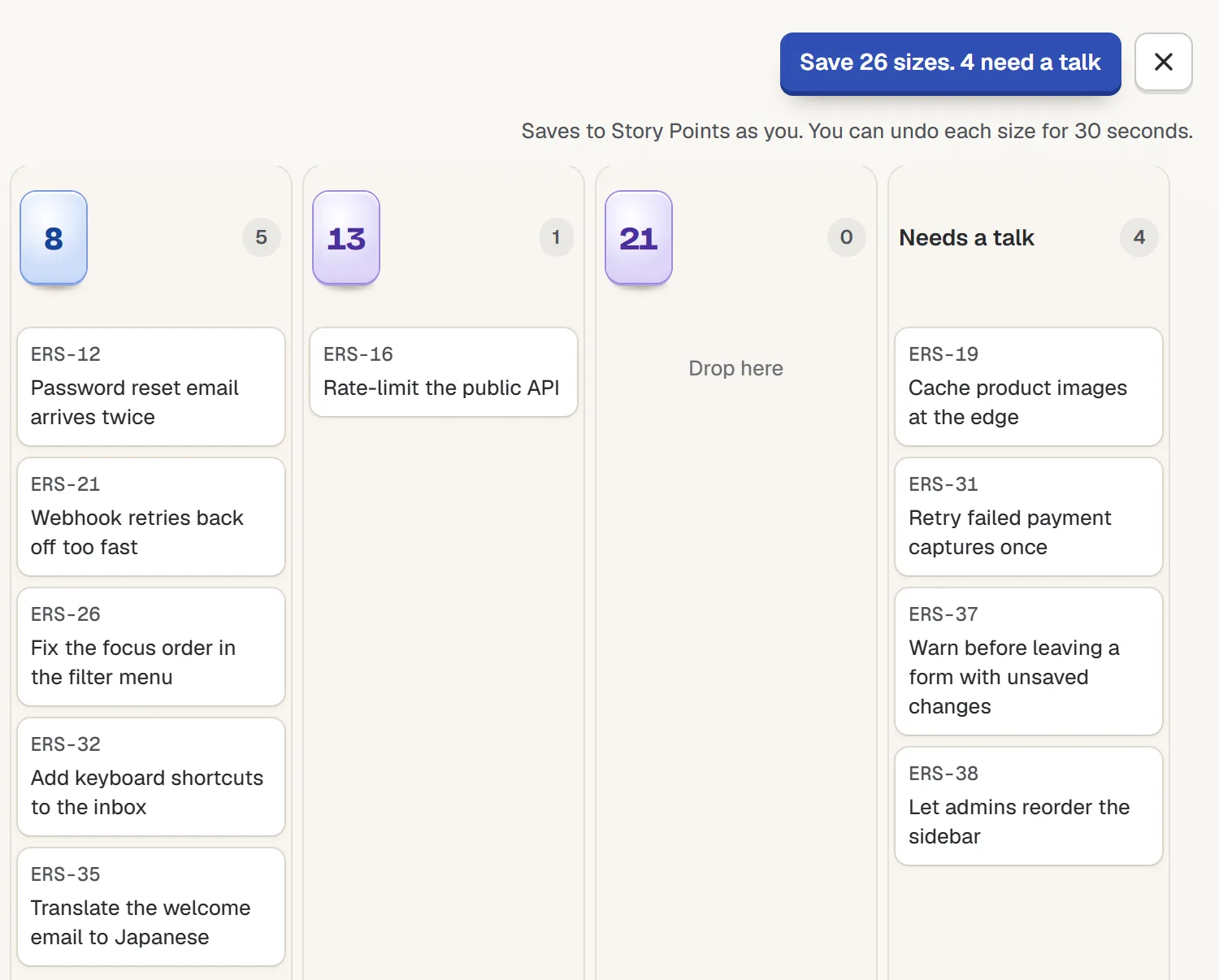
Sort into sizes together, part of the screen. Sample data, not a real team.
Drag a card into a size, or use the arrow keys and type the number. Everyone in the room sees it move.
The button counts as you go. In the picture it says “Save 26 sizes. 4 need a talk”: 26 are settled and 4 are in the pile. Press it and the sizes save to your board’s estimate field (Story Points here), as you. The line under the button tells you how long you have to undo each size.
There is nothing to set up. Open the menu on a sprint, board or backlog, pick Sort into sizes together, and your work items are already on the cards.
How do you pick good anchors?
Pick them from finished work, not from memory. Choose a small one and a big one the team remembers, then check how long they actually took.
In the Bunlings room, point at the 5, for example, and you see how long your 5s actually took on this board, from your own finished work.
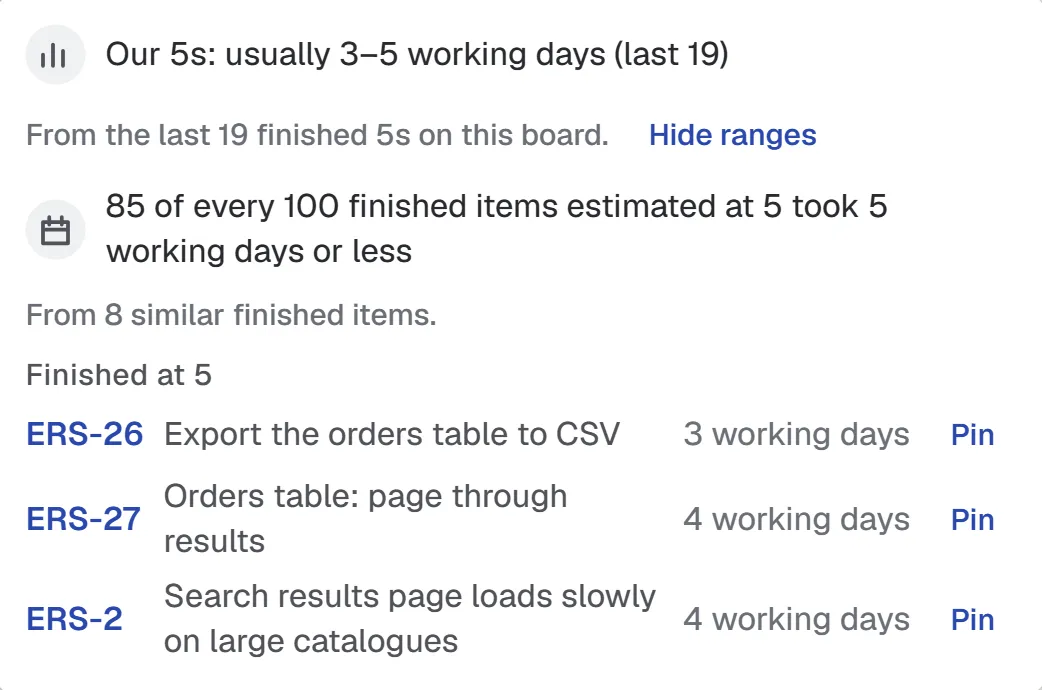
Pointing at the 5 card. The numbers are sample data; yours will come from your board.
That makes anchors easy to say out loud: “here, a 5 is three to five working days.” It opens when you point at a card with the mouse or tab to it with the keyboard. It does not open on phones. It tells you what finished work took, not what the next work item will take.
What goes in the Needs a talk pile?
Anything people disagree on, and anything nobody can size yet. Usually it is one of two kinds:
- The foggy one. Nobody can say what done looks like. The talk is about the work item, not the number.
- The far-apart one. One person put it under 13, another under 3. One of them has probably read the code. Ask each side what they know, and if it turns out to be big, split it.
A wide gap between sizes is useful news, not a fight. Votes far apart walks through what to do with it.
When should you still vote one by one?
When a work item is risky, expensive or new to everyone. Sorting is a quick pass, and a quick pass should not decide something hard. Put those cards in the pile and give each one a proper round with hidden votes, so the first number spoken does not become everyone’s number.
And if the team can’t all be online at once, try estimating without a meeting for the small ones.
Try it on your next backlog
Bunlings runs inside Jira Cloud, with no outside servers and no new login. It is free for up to 10 users, then from $2.00 per user a month. Not for Data Center or Server.