
 Bunlings: sprint apps for Jira





Jira keeps the score, but it does not run the round. It stores the number and adds it up. Agreeing on that number, and looking back on the sprint, happens on a call or in Confluence. Here is what that looks like with Jira and Confluence alone, what Bunlings adds inside Jira, and when native is the better call.
How this comparison was made. Native behaviour comes from Atlassian’s documentation, checked on 3 November 2026. Bunlings behaviour comes from the current app. It compares what each option does. It makes no promises about faster meetings or better estimates.
What does a team actually need from estimation and retros?
Honest numbers and honest retro cards, before anyone is swayed, and both ending up in Jira.
Picture a team of six. Refinement, 10:02: someone says “8?” out loud, and suddenly the whole team thinks it is an 8. Five work items still need a size, and two weeks later the same team holds its sprint retro.
The team wants:
- Everyone’s own number, before anyone hears anyone else’s.
- The agreed number in Jira, in the field the board actually uses.
- Honest retro cards, written before people read each other’s.
- Retro actions that turn into work items, and come back if nobody did them.
- Nothing new to log in to, and as little setup as possible.
The first and third are about how people behave in a room. The others are about where the work ends up.
Does Jira have scrum poker built in?
No. Jira Cloud stores an estimate on each work item and adds it up in reports, but it has no voting room and no way to hide votes until everyone has picked.
Jira’s own Votes on a work item count interest. They are not estimates.
How do you estimate in Jira without an app?
You use the board’s estimate field and agree the number some other way, usually out loud on a call.
Here is what Jira gives you:
- An estimate field. Company-managed spaces use Story points. Team-managed spaces use Story point estimate. They are two different fields, which is why the field can seem to go missing. The fix is in Story Points field missing in Jira.
- A switch. In a team-managed space, Estimation is off at the start. Turn it on in Space settings > Features > Estimation and choose Story points or Time. On a company-managed board, the Estimation method in the board settings picks it.
- Reports. Velocity and sprint reports add up what you estimated and what you finished.
A typical round without an app: share the work item on screen, everyone holds up fingers on camera on “three”, two people are still on mute, someone counts, and one person types the number into the field.
It works, and it costs nothing. The weak spot is the first number. Whoever speaks or shows first sets the anchor, and quieter people drift toward it. Teams that estimate in comments instead have the same problem in writing: everyone can read the earlier votes.
How do you run a sprint retro without an app?
With Confluence, if your team has it. Atlassian’s retro templates live there, not in Jira.
- A retro page or whiteboard. When you complete a sprint, Jira can create a retrospective for it as a Confluence page or whiteboard, linked to the sprint. Your Jira space needs a linked Confluence space first.
- Whiteboard tools. Confluence whiteboards come with ready-made retro templates (such as the simple retrospective, the 4 Ls and the sailboat), stamps for voting, a timer, and a way to turn sticky notes into Jira work items.
That covers a lot. What Atlassian’s guide doesn’t describe is keeping cards hidden until everyone has written, a link between the retro and how the sprint was estimated, or last retro’s open actions showing up again at the next one. Teams handle those by habit: a “write silently for five minutes” rule, and someone who remembers to check the old page.
What does Bunlings add?
A voting room and a sprint retro, both inside Jira, both already attached to your board.
Estimation. Open the menu on a sprint, board or backlog, and the work items are already in the room. Nobody creates a game or invites anyone to a new tool.
- Votes stay hidden until the reveal. Then the cards flip together, so nobody anchors anybody, not even the lead who always says 8.
- Agree saves the number to your board’s own estimate field, such as Story points, written as you. You get 10 seconds to undo.
- Can’t edit that work item? Ask a teammate who can to save it.
- Every card shows how long that estimate actually took your team, from your team’s own finished work on this board.
- No meeting slot? Pick who votes and by when. People vote when it suits them, and when you set a reveal time, Jira reminds them the day before.
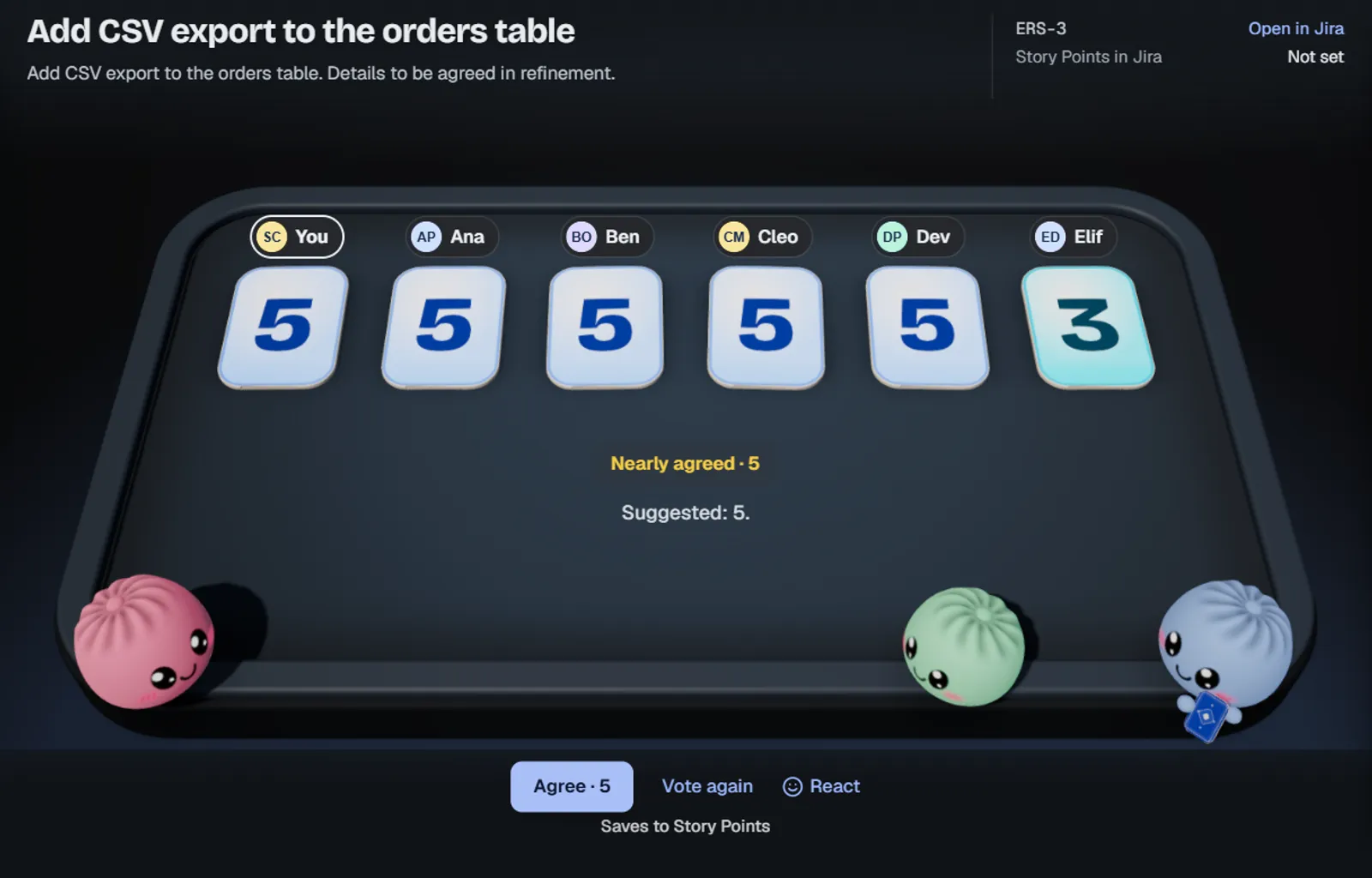
The cards flip together, and Agree saves the 5 to the board’s estimate field, here Story Points. Sample team.
Retros. Open the sprint retro from the sprint menu. It opens with facts from the sprint’s estimates, such as what got done or where votes were far apart.
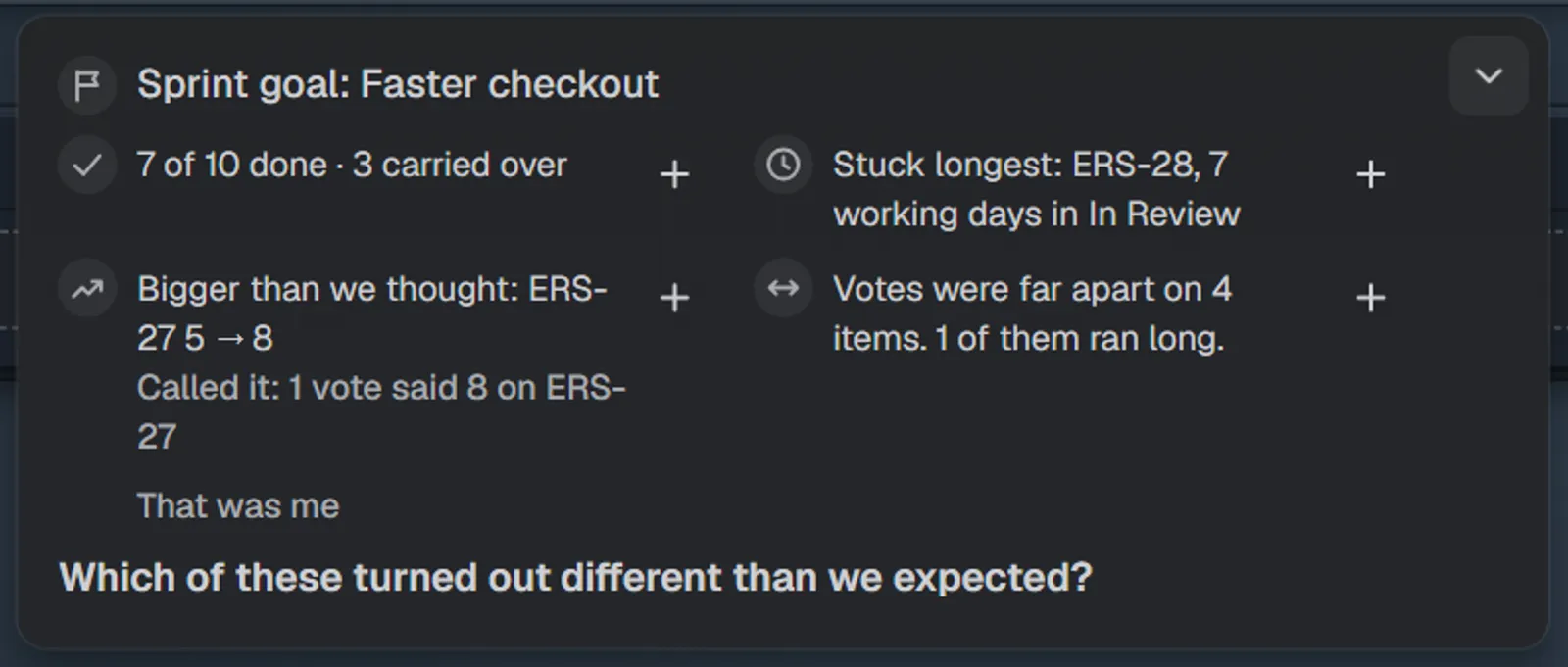
The retro already knows how the sprint was estimated. Sample team.
- Retro cards stay hidden until someone presses Show all.
- Actions become Jira work items in two clicks, and open ones come back next time.
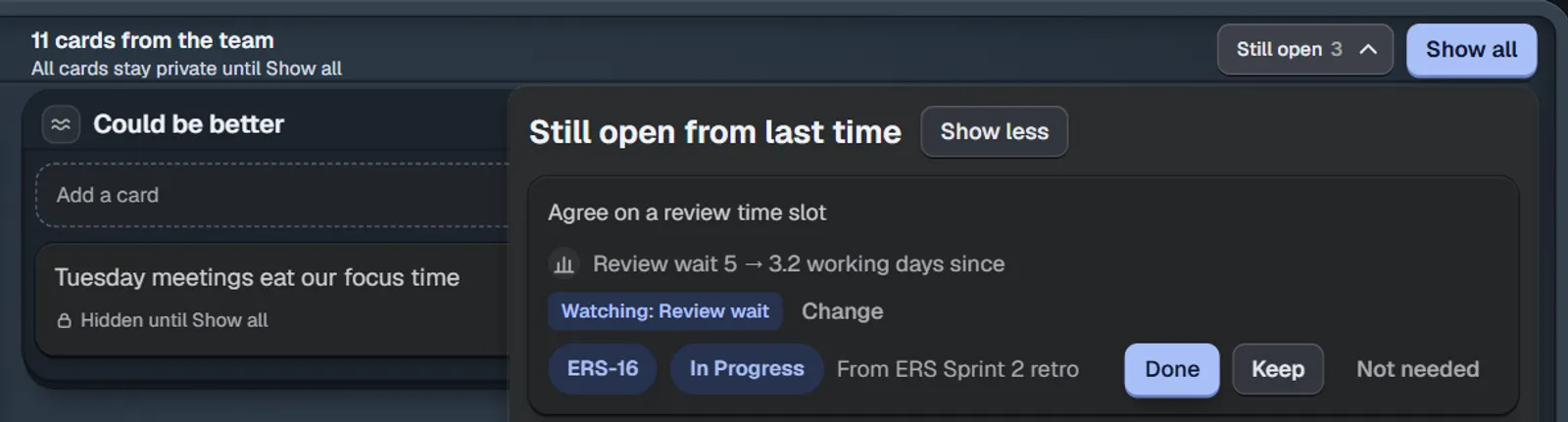
Cards stay hidden until Show all, and last retro’s open actions come back. Sample team.
There are 50 retro formats and 30 work-safe icebreakers, for the sprint where Start, Stop, Continue has run out of things to say. When you are done, copy the recap for your manager or for Confluence.
And the fun part: little dumpling characters called Bunlings sit at the table. They peek, count along and dance when you agree, and they are never sad or angry about a vote. Anyone who prefers a quiet screen turns on Calm for me.
How do native Jira and Bunlings compare?
| For this scenario | Native Jira and Confluence | Bunlings |
|---|---|---|
| Where you estimate | A call, plus the work item’s estimate field | A room on your board, opened from the sprint, board or backlog menu |
| Hidden votes | No | Yes, the cards flip together |
| Saving the number | Someone types it in | Agree saves to the board’s estimate field, as you, with 10 seconds to undo |
| Estimating without a meeting | Comments, where earlier votes are visible | Pick who and by when; with a reveal time, Jira reminds them the day before |
| Past work while you vote | Reports, in another screen | Point at a card to see how long that estimate actually took on this board |
| Where the retro happens | A Confluence page or whiteboard | Inside Jira, from the sprint menu |
| Hidden retro cards | No hidden mode in Atlassian’s guide | Hidden until Show all |
| Retro formats | A few whiteboard templates, or build your own | 50 formats |
| Actions to work items | From whiteboard sticky notes | Two clicks, and open ones come back next time |
| Login | Your Atlassian account | Your Atlassian account, no new login |
| Extra cost | None, if you already have Confluence | Free for up to 10 users, then per user |
When is native Jira the better choice?
Stay native when:
- Your team is happy with how it estimates. If nobody anchors and the number gets typed in, you don’t need a room. Keep the fingers.
- You already run good retros on Confluence whiteboards and like a free-form canvas. Bunlings is not a whiteboard.
- Nobody on the team wants a voting step. If the lead sizes work alone and the team is fine with that, a room adds a step you do not need.
- App budget decides. Native costs nothing extra, and Bunlings is free only on Jira sites with up to 10 users.
When is Bunlings worth it?
Try Bunlings when:
- The first number keeps winning. Votes stay hidden until the flip.
- Estimates never make it into Jira. Agree saves them there and then.
- Your retro and your estimates never meet. The retro opens with the sprint’s facts, which is hard to do by hand.
- Retro actions vanish. They become work items and come back next time.
- People are spread out, or crowded into one room. Estimate without a meeting, or put the table on the big screen and vote by phone from a QR code.
Who is Bunlings not for?
Skip it if you need:
- Jira Data Center or Server. Bunlings runs on Jira Cloud only.
- Voters without a Jira sign-in. Everyone signs in to your Jira, also on a phone.
- Votes or reminders in Slack or Teams. Reminders are Jira notifications.
- A free-form whiteboard for retros.
- Scores per person or comparisons between teams.
- Work items that aren’t on a board.
What does Bunlings cost, and where does the data go?
Free for up to 10 users. Above that, Atlassian bills monthly by the users on your Jira site: $2.00 per user at 50 users. One plan, everything included.
Bunlings runs on Atlassian’s Forge platform and makes no calls to outside servers. It writes to Jira only after someone clicks, as the person who clicked, so Jira’s History shows their name. It sees what Jira lets each person see. The whole app runs in ten languages, with dark mode.
Try Bunlings in your Jira
Your next sprint, estimated together. Install Bunlings from the Atlassian Marketplace and open the menu on your sprint: the room is already there.
- Bunlings on the Atlassian Marketplace
- Watch the demo (about a minute and a half)
- See everything Bunlings does
For the native setup in more depth, read story point estimation in Jira Cloud and sprint retrospectives in Jira.