
 Bunlings: sprint apps for Jira





Ben is in his first week on the team, and his first refinement is this afternoon: the meeting where the team sizes the work coming up next. Someone hands him a deck with a 13 and a question mark on it. Nobody has told him what either one means.
The video above is the round Sam played with him: one real work item (a task in Jira), five steps, about three minutes. Here is the same round written out, so you can skim it before your first session or keep it open during one.
What do the cards in scrum poker mean?
A card is a size. A 5 is a bigger job than a 3 and a smaller one than an 8. It says nothing about hours, so “does a 5 mean five hours?” gets a no. You are comparing work with work.
A typical deck goes 0, ½, 1, 2, 3, 5, 8, 13, 21 and ?.
- Why it jumps from 8 to 13. Big work is fuzzy. Nobody can tell a 13 from a 14, so the deck stops pretending. The bigger the number, the wider the gap to the next card.
- 0 and ½ are for tiny things. A wording change, a setting someone flips in two minutes.
- ? means “I can’t size this yet”. It is a perfectly good card to play. It tells the room a question needs an answer before anyone can vote.
If the team is new to points altogether, story points explained covers where they come from and how they turn into a plan.
How do you play scrum poker, step by step?
- Pick a yardstick. Choose a finished work item everyone already knows. In the video it’s the login fix, which was a 3. From then on, every card simply means bigger or smaller than the login fix. That’s the whole trick.
- Read and ask. Someone reads the next work item out loud, then the team asks questions. Does it need a new screen? No, just one button. Nobody says a number yet.
- Pick in secret. Everyone picks a card, and nobody sees anyone else’s. Only the people doing the work vote. The person running the session can sit this one out.
- Flip together. Once everyone is in, all the cards turn over at the same moment.
- Explain, then vote again. The lowest and the highest voter say why they picked their card. Keep it curious. Nobody is on trial. Answer any open question behind a ?, then everyone votes once more.
Two rounds, max. If the room is close after the second vote, take the number. If it isn’t, split the work item or park it until someone has the missing answer.
What goes wrong at step 2
Ben was keen. Before anyone voted he said, “Easy, that’s an 8!” The cards flipped: 8, 8, 8, 8, 8.
Nobody lied. They had all heard an 8 before they had finished thinking. The first number said out loud wins, so that round doesn’t count. It’s the reason the cards stay hidden until the flip, and how the first number heard skews estimates shows the other ways it sneaks in.
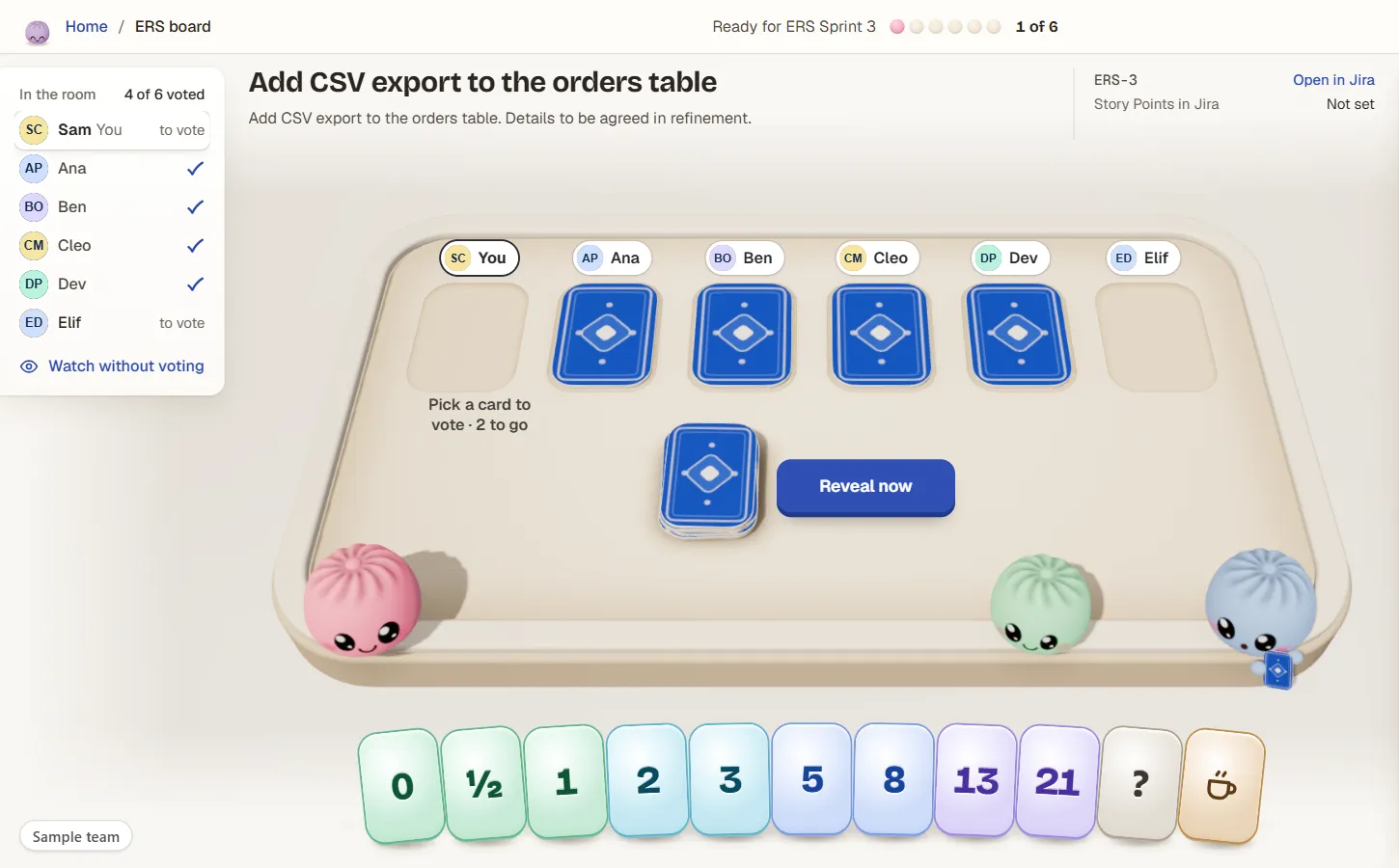
Step 3: four cards are down, two people are still picking. The list on the left shows who has voted, never what. Sample team, not real data.
What should you do when the votes land far apart?
Talk. In the video, the second round flips to a 3 from Ben and a 13 from Dev, with a 5, an 8 and Elif’s ? in between.
Ben said 3 because the export already exists, so it’s just a button. Dev said 13 because the old data has to move first. Ben didn’t know that. Neither of them was wrong. They were sizing two different pictures of the same work item, and the gap is what brought the second picture out.
So the lowest and the highest explain, the team answers Elif’s question, and everyone votes again. The second round came back as four 8s and a 5. Close is good. The team took the 8.
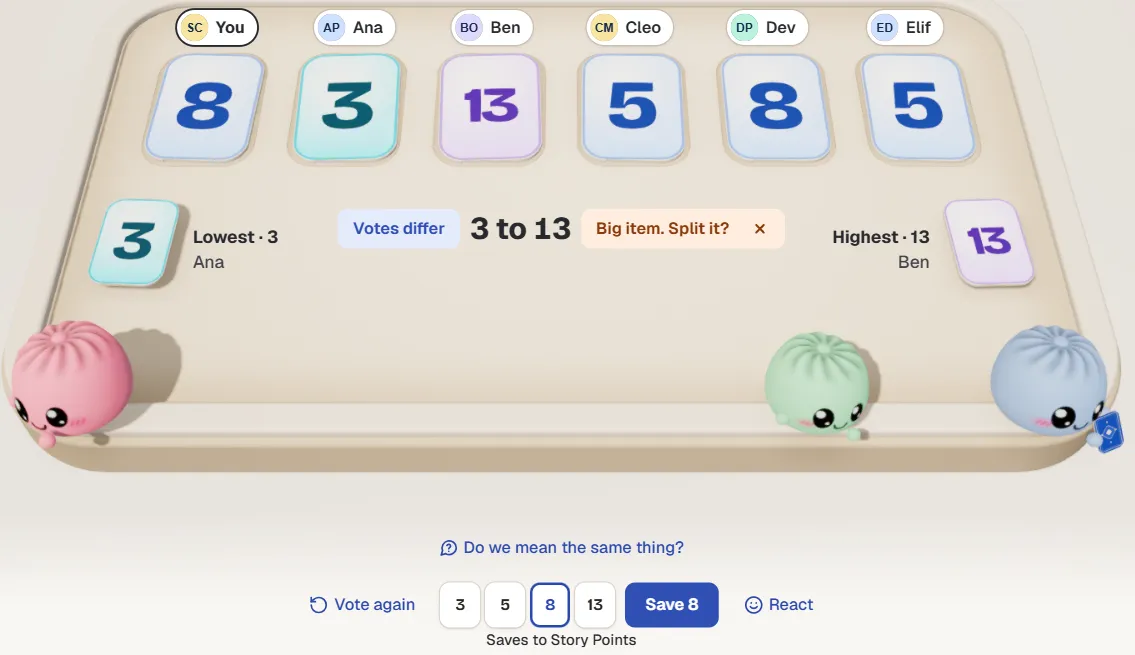
Another round with a spread from 3 to 13: the lowest and highest cards are named, so you know who talks first. Sample team.
There’s more on reading a gap, and on telling a harmless one from a real one, in what to do when votes are far apart.
Why not just average the votes?
Because averages skip the talk. A 3 and a 13 make an 8 on a calculator, but nobody in the room voted 8 and nobody believes it. Worse, Dev’s point about the old data never gets said, so it turns up halfway through the sprint instead.
Sam’s last team averaged for a year. The numbers meant nothing. The conversation is the useful part of the meeting. The number is just what’s left at the end.
What do you do when someone plays a 21?
Treat it as a signal: the work item is too big to size well. Split it into smaller pieces, then vote on the pieces.
The same goes for a work item that’s still split after the second round. Two votes without agreement usually means two pieces of work hiding under one title.
The five steps on one line
Pick a yardstick. Read and ask. Pick in secret. Flip together. Explain, then vote again. That’s it, and you can run one today.
Play it right inside Jira
The round in the video was played in Bunlings, a Jira Cloud app for scrum poker and retrospectives. The room opens from your sprint, board or backlog with your work items already in it. Cards stay face down until everyone has voted, then flip together. When everyone agrees, one click on Agree writes the number into the work item in Jira (into Story Points, for example), with 10 seconds to undo.
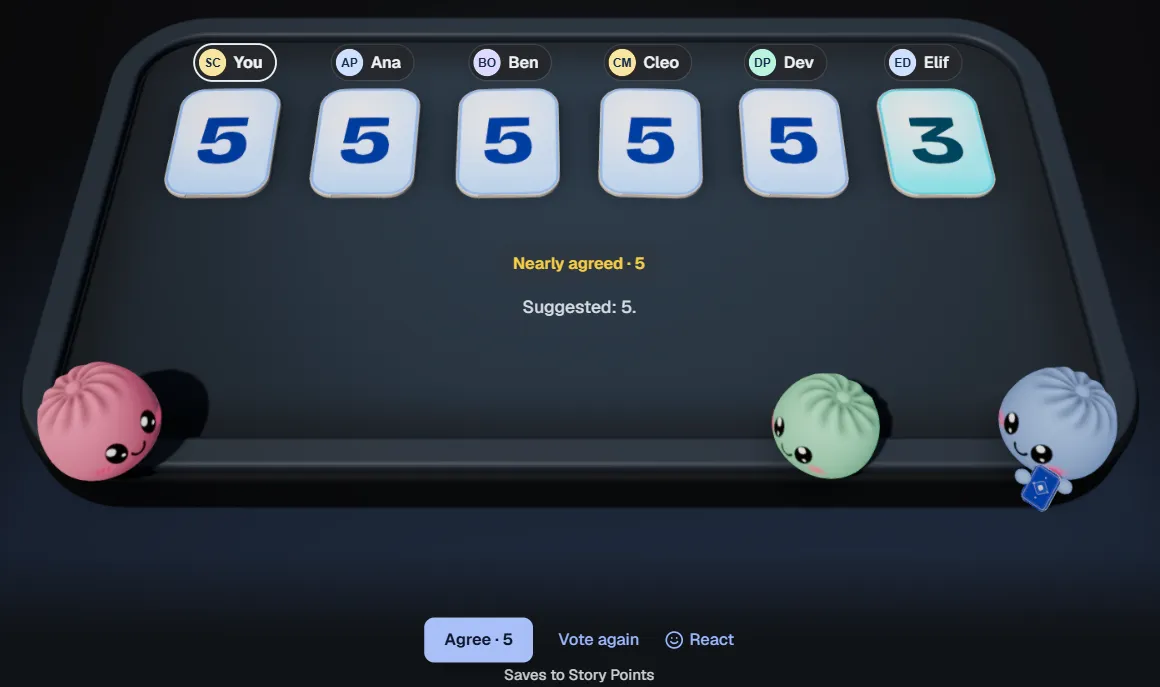
After the flip: five 5s and a 3, and Agree · 5 is ready. The line under the buttons names the field it will write to. Sample team.
The dumplings around the table are the Bunlings. They peek, count along and dance when you agree. Bunlings runs inside Jira with no outside servers and no new login, and it’s free for up to 10 users.
- See Bunlings, scrum poker and retros inside Jira
- Scrum poker in Jira: the full round, from the sprint menu to the estimate field
- How to estimate without a meeting, for teams that can’t meet at the same time