
 Bunlings: sprint apps for Jira





A 5 is not five days. It is not five hours either.
It is a size, and the size only means something next to the other sizes on your board.
Your board already knows what a 5 means here. It is in your finished work items.
What are story points in Jira?
Story points are a relative measure of how big a piece of work is. They combine effort, complexity and uncertainty into one number, so a 3 is roughly “a bit more than a 2 and a bit less than a 5”.
They do not convert to hours. A 5 on one team can be a 2 on another, and that is fine, because the points only have to be consistent inside one team.
In Jira the number lives in an estimate field on the work item. Company-managed spaces usually use a field called Story Points. Team-managed spaces usually use Story point estimate. If the field seems to be missing, it is usually the wrong field, not a missing one.
Why do teams use Fibonacci numbers?
Because the gaps grow, and the gaps should grow. The usual scrum deck runs 0, 1, 2, 3, 5, 8, 13, 21. The bigger a piece of work is, the less you can say about it, so the deck stops offering you false precision.
Nobody can honestly tell a 12 from a 13. The deck saves you that conversation: pick the 13.
It also forces a choice. When you cannot decide between a 5 and an 8, there is no 6 or 7 to hide in. The disagreement is real, and it is worth a minute of talking.
What are T-shirt sizes, and when do they fit?
T-shirt sizes (S, M, L and so on) are a rough label for early sorting. They work when you have a large pile of work and nobody wants to argue about numbers yet.
They are good for the first pass over a big backlog. The work you actually pick up gets points later.
One practical catch in Jira: the Story Points field holds a number. A size like M has to turn into a number before it can be saved there.
Fibonacci vs T-shirt sizes: which one should we pick?
Pick Fibonacci for sprint-level work, T-shirt sizes for a first rough pass. Neither is more correct. They answer different questions.
| Fibonacci | T-shirt sizes | Powers of 2 | |
|---|---|---|---|
| Looks like | 0, 1, 2, 3, 5, 8, 13, 21 | S, M, L and so on | 1, 2, 4, 8, 16 and so on |
| Good for | Refining work for the next sprints | Sorting a big backlog quickly | Teams who like each step to double |
| Saves to Jira as | A number | Needs a number first | A number |
| Watch out for | Treating points as days | Arguing how many days an M is | Gaps that jump fast |
If you already use one deck and your team gets on with it, keep it. Changing the deck rarely fixes an estimation problem. Changing the conversation does.
What does a 5 really mean?
A 5 means “about as big as the other things your team called 5”. That is a statement about your history, so the honest way to check it is to look at that history.
Try this once. Open your board and find the last ten or so finished work items that were estimated at 5. How long did each one take from start to done?
Some may have taken two days. One may have taken three weeks. The spread is the real answer to “what is a 5 here”, and it is rarely written down anywhere.
This is also where estimates drift. Nobody checks, so a 5 slowly turns into whatever the loudest person in refinement says it is. We wrote about the look-back habit in why estimates are off.
How do you check how long your 5s actually took?
Compare each number to the finished work that carried it. You can do it by hand in Jira with a search and a spreadsheet:
- Search for finished 5s. Company-managed:
"Story Points" = 5 AND statusCategory = Done ORDER BY updated DESC. Team-managed:"Story point estimate" = 5 AND statusCategory = Done ORDER BY updated DESC. - For each, open History and note when it first moved to an in-progress status and when it reached Done.
- Look at the range, not the average. “Usually 3 to 5 days, sometimes 12” is more useful than “4.2 days”.
- Repeat for your 3s and 8s. The point is whether they sit in a sensible order.
In Bunlings you skip the spreadsheet: point at any card to see how long work with that number actually took on this board, from your own finished work.
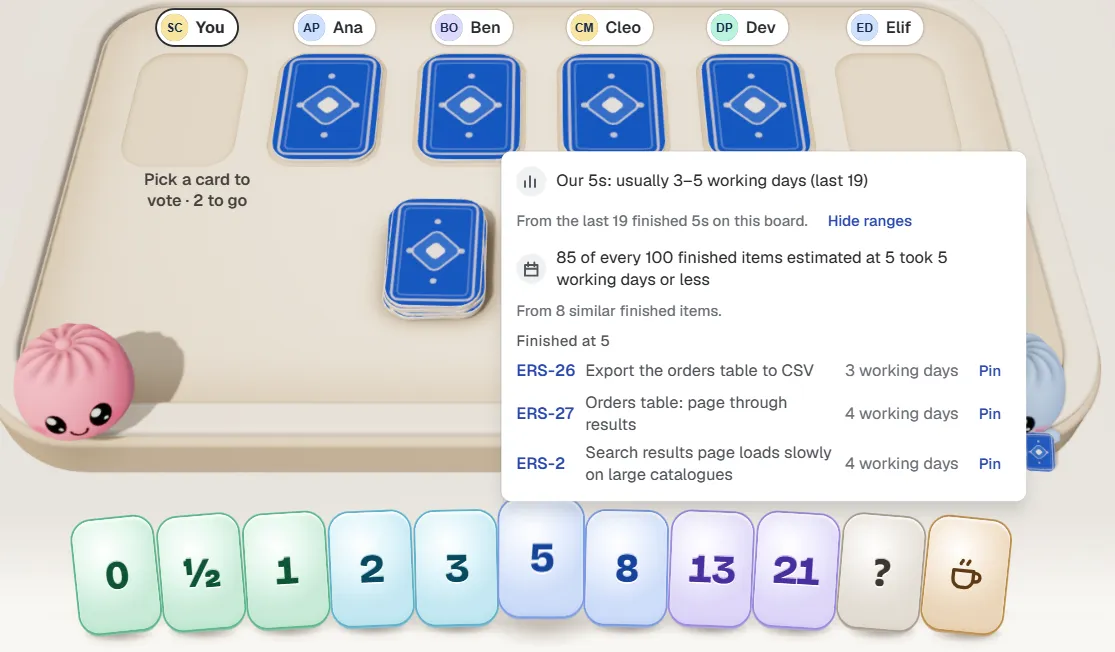
Pointing at the 5 card in the Bunlings estimation room. Sample team and sample data: the numbers come from a demo board, so yours will differ. The panel shows past finished work. It does not predict the next one.
“Is this a 5?” becomes “our 5s usually take a few days, does this look like one?”
How should a team vote on points without anchoring each other?
Keep votes hidden until everyone has picked, then show them together. If the loudest person says “8” first, half the room suddenly agrees with 8. Nobody decided it was an 8. It just became one.
Here is the routine we would start with:
- Read the work item out loud and take questions.
- Everyone picks a card without showing it.
- Flip all the cards at once.
- If they are close, take the middle or the higher one. If they are far apart, the people at the ends explain, then you vote again.
The far-apart votes are the useful part. A 3 next to a 13 means two people picture different work, and that is cheaper to find out in refinement than mid-sprint. There is more on this in what to do when votes are far apart and on anchoring.
In Bunlings the cards flip together at Reveal now, and Agree saves the number to your board’s estimate field, as you, with 10 seconds to undo.
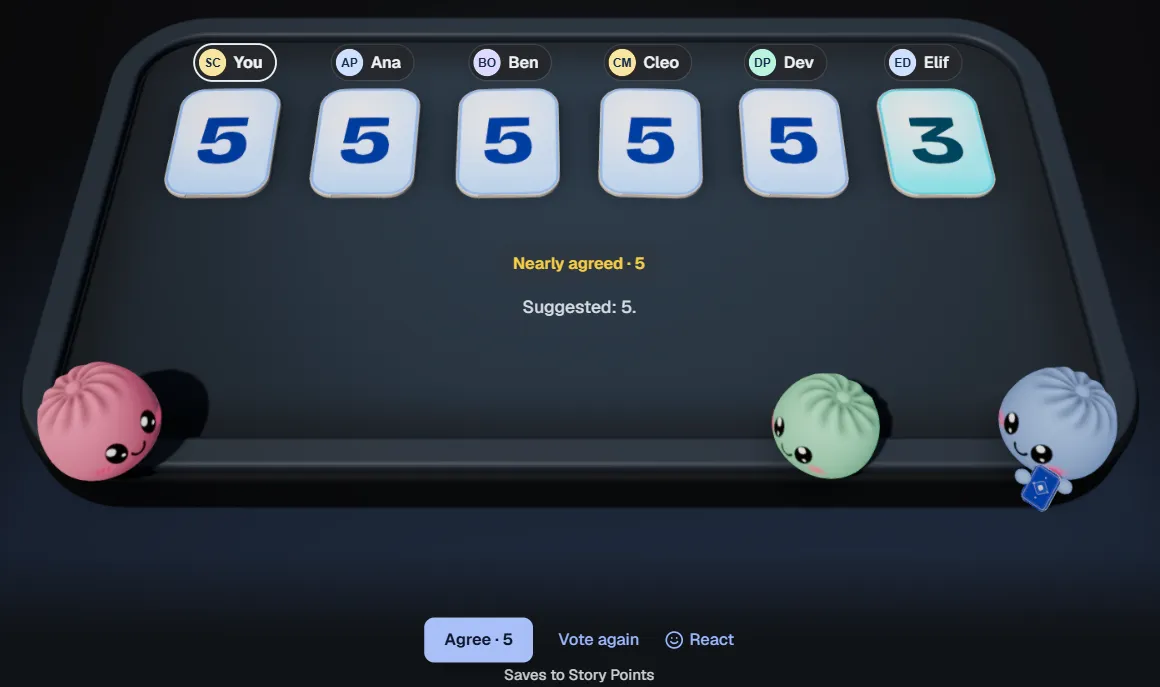
Five 5s and a 3, so Agree 5 is offered first. It saves to Story Points, and Jira’s History shows who saved it. Sample team.
Do you need story points at all?
Not every team does. Some teams size everything the same and count work items instead. Others on Kanban boards forecast from how many items finish per week. If that sounds like you, read Kanban forecasting without story points.
Story points earn their place when you plan in sprints, work items vary a lot in size, and the team wants a short, shared way to say “this one is bigger than it looks”.
The short version
- Story points are relative size, not time.
- Fibonacci for sprint-level work, T-shirt sizes for a rough first pass.
- Keep votes hidden, flip them together, and talk when they are far apart.
- A 5 means whatever your finished 5s took on your board. Go and look.
See it in Jira
Bunlings is scrum poker and retros inside Jira, and the room’s deck can be Fibonacci or T-shirt sizes. Open the menu on a sprint and your work items are already in the room, with nothing to set up and no new login. It is free for up to 10 users.