Free up to 10 users30-day free trialOne plan, everything includedBuilt on Atlassian ForgeNo calls outside Atlassian
What's left
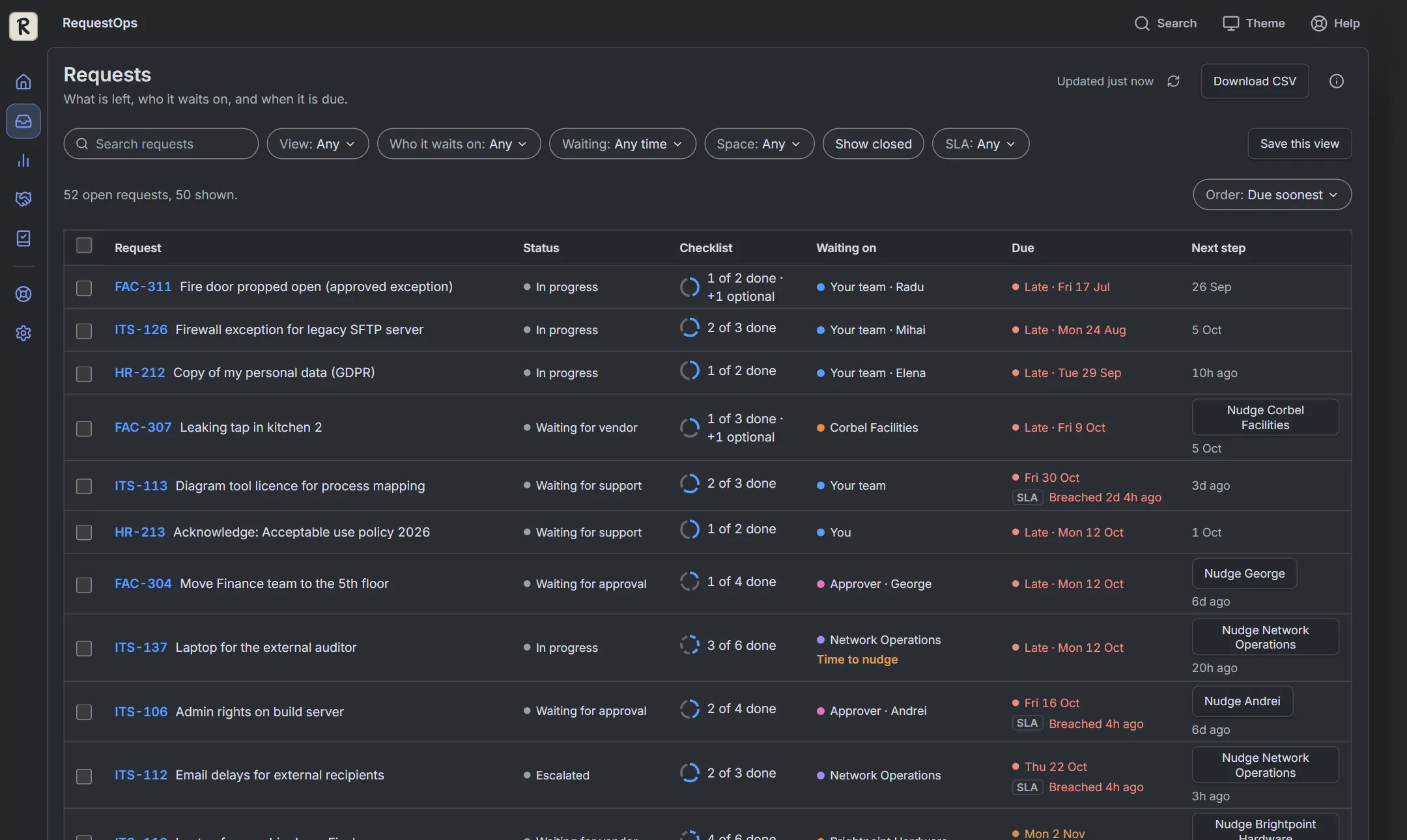
See what's left and who it's waiting on
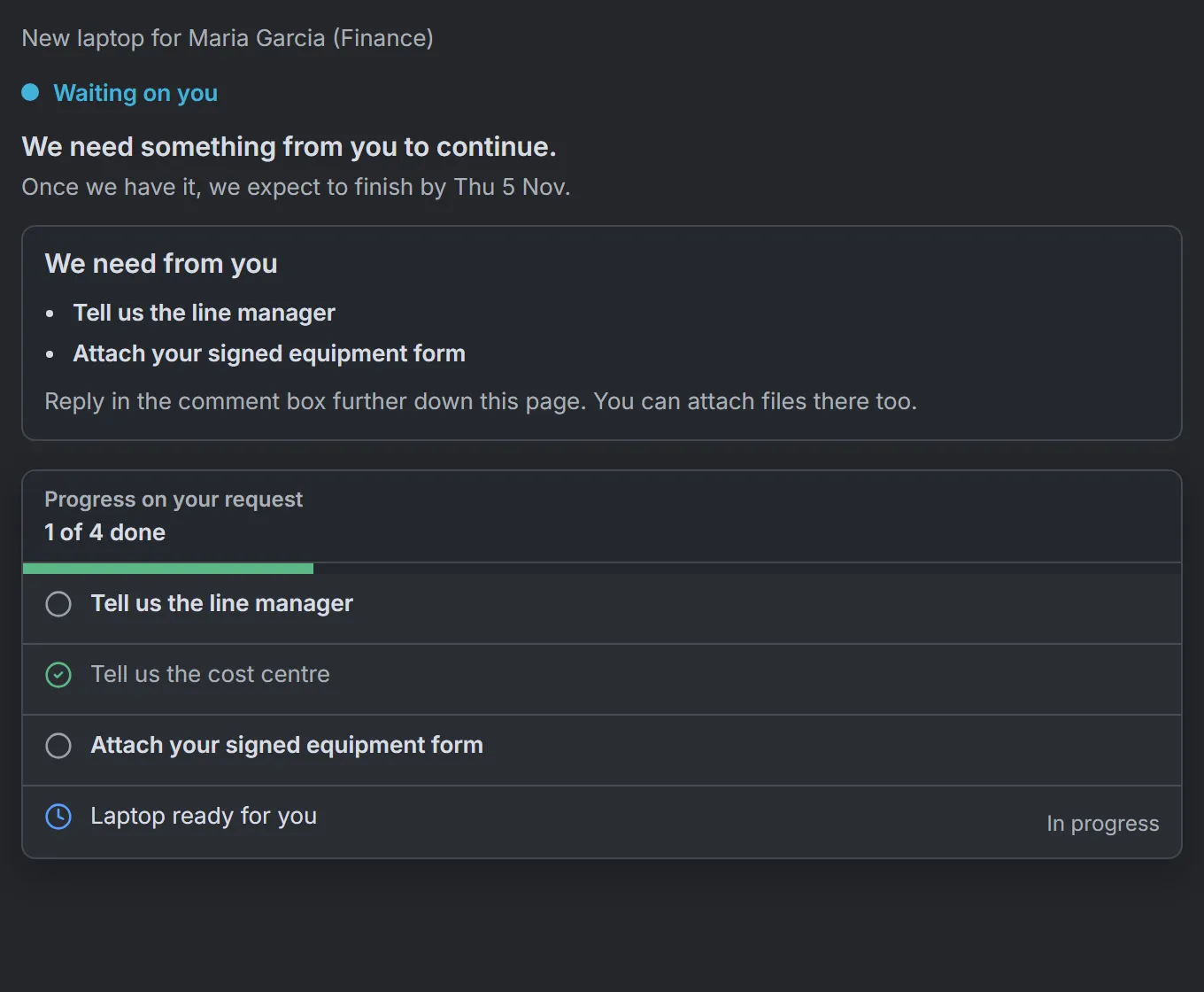
Every request shows its checklist and its current holder, and since when: the customer, an approver, another team, a vendor or your team. It shows in the issue panel, on queues and in the Requests list.
Items tick themselves from Jira facts: fields, approvals, linked work, replies and attachments
Items reopen if the facts change
Approvers can approve or decline right in the request
Ask and Nudge
Ask or Nudge in one click, with Undo
Ask the customer for exactly what is missing, or Nudge a person or team about their part. You see the message first. Every send waits about 10 seconds so you can undo it.
Ask posts a plain public reply drafted from the open checklist items
On Jira Service Management a Nudge is an internal note; on plain Jira the preview tells you it is a public comment
Optional follow-ups and automatic closing stay off until an administrator turns them on
For managers
Show managers where request time goes
Insights shows what share of request time is spent waiting on others, and on whom, week by week. The SLA view uses your Jira SLA data to show what has breached or is about to, with who each request is waiting on.
Flow, workload and a monthly service review
Export to PDF, Excel or CSV
States a lower bound when history is incomplete
Up and running in minutes
1
Install and pick a space
Open RequestOps from Jira and choose a space to start with.
2
Turn on a checklist
Review the suggested checklist, or start from a template, and turn it on.
3
See who has each request
Requests show what's left and who they're waiting on. The first 90 days are worked out for you.
4
Ask, Nudge, review
Ask the customer or Nudge the right person. Managers open Insights.
Try it here. It's the real app.
RequestOps running with sample data. Take the 30-second tour, or click around yourself.RequestOps running with sample data. Open it and tap around. Nothing is saved or sent.
Coming soon to the Atlassian Marketplace. Try it here with sample data in the meantime.
Price per user per month, by part of your user count
Users
Per user per month
1 to 10 users
Free
11 to 100 users
$1.49
101 to 250 users
$1.00
251 to 1,000 users
$0.60
1,001 to 2,500 users
$0.23
Above 2,500 users
$0.20
Each user is charged at the rate for their part of the count; the annual price is 10 times the monthly price. Prices in US dollars, before tax. Atlassian Marketplace shows the exact price for your site.
Built on Atlassian. Your data stays there.
RequestOps runs on Atlassian Forge, makes no calls to servers outside Atlassian, collects no telemetry and follows Jira permissions. Jira administrators can download and erase a person's stored data from Settings.
It shows who a request is waiting on based on your rules and Jira data. It can be wrong where statuses do not say who holds the request, and you can correct a rule at any time.
It does not guarantee that a customer, vendor or team receives, reads or answers a message.
It does not replace Jira SLAs, queues or Automation; it works with them.
It is not a compliance tool and not a legal record. No certification is claimed.
Works with Jira Cloud and Jira Service Management Cloud. Some features need Service Management: the portal view, approvals and SLA data.
Questions
Does it work with plain Jira, or only Jira Service Management?
Both. The portal view, approvals and SLA data need Jira Service Management. On plain Jira, checklists, waiting views and Nudges work; a Nudge posts a short public comment instead of an internal note, and the preview says which.
Will it message my customers without asking?
No. An agent previews and sends each Ask, with a 10-second Undo. Automatic follow-ups and automatic closing are off until an administrator turns them on and picks the spaces.
Does the customer get an email?
Jira sends its usual notification when a public reply is posted. Jira emails only customers whose address it can notify, so RequestOps cannot promise delivery.
Who can see which names?
Customers see only what your team shares with them. Names of customers, vendors and people are not shown to other parties.
Where is my data?
In Atlassian Forge storage and in your Jira site. RequestOps makes no calls to servers outside Atlassian and collects no telemetry.
What does it cost?
Free up to 10 users, then one plan priced by your Jira user count, with a 30-day free trial. No separate editions.
What happens if I uninstall?
Access ends. Jira comments, tasks and request properties RequestOps created stay in Jira; Atlassian manages retained app storage under its platform policy.
Can I bring checklists from another app?
Yes. Settings, Import reads Smart Checklist, Checklists for Jira and others, and shows a preview first. Nothing is deleted from the old app.
How do I get help?
Email [email protected], Monday to Friday, European business hours. Help is also built into the app.
Know who every request is waiting on.
Free up to 10 users. 30-day free trial for bigger sites. Coming soon to the Atlassian Marketplace.