
 Bunlings: sprint apps for Jira





Your refinement call has a time-zone problem: it is 16:00 in one office and 07:00 in the other.
Half the team is at their desk. The other half is asleep, or wishes it were.
Good news: an estimate does not need everyone in one call. It needs three things, and a call is not one of them.
What does it mean to estimate without a meeting?
Everyone votes on their own time, and nobody sees a number until the votes are shown together. People also call it async estimation.
The important word is not “async”. It is “hidden”. Votes you can see as they arrive are not an estimate. They are a conversation with a very loud first speaker.
What are the three things every round needs?
Who votes, by when, and hidden until then. Leave one out and the round wobbles:
- Who votes. The people who will do the work, plus anyone who knows the tricky part. Without a list, whoever happens to open the work item votes, or nobody does.
- By when. A reveal time. Without one, the round drifts for a week and the sprint starts first.
- Hidden until then. Without it, the first number posted becomes everyone’s number.
That is the whole method. The rest of this article is how to run it, with and without an app.
Why does the first visible number matter so much?
Because it changes the question people answer. Someone writes “8?” in a comment. The next person is no longer asking “how big is this?” They are asking “is this an 8?”, and the honest answer quietly turns into a nod.
That is anchoring. It happens in meetings too, but a comment thread makes it permanent: the first number sits at the top for everyone who comes later. Estimation anti-patterns: anchoring goes deeper. The fix is simple to say: hide the votes, then show them all at once.
Can you estimate without a meeting in plain Jira?
Yes, with one person doing the collecting. Jira stores the estimate, but it cannot hold votes back until a reveal, so you do that part by hand.
-
List the work items. In a company-managed space, this JQL finds open sprint work items with no estimate yet:
"Story Points" is EMPTY AND sprint in openSprints()In a team-managed space the field is usually called Story point estimate, so use
"Story point estimate" is EMPTYinstead. Neither name works? See why the Story Points field goes missing. -
Collect votes privately. Each person sends their numbers to one collector, such as the scrum master, by direct message. Not in the work item’s comments, where everyone can read them.
-
Post a deadline. For example: “Numbers by Wednesday 10:00.”
-
Reveal in one go. The collector posts every number at once, in one comment per work item.
-
Type in the agreed number. Someone opens each work item and enters it.
This works well for four work items. At forty, the collector becomes a human spreadsheet with a full inbox. For the other options inside Jira, see story point estimation in Jira Cloud.
How do you start a round without a meeting in Bunlings?
Bunlings is a Jira Cloud app for scrum poker and retros. Every board already has a room. In the room, open Estimate without a meeting, and the window asks for the same three things, with the work items already there.
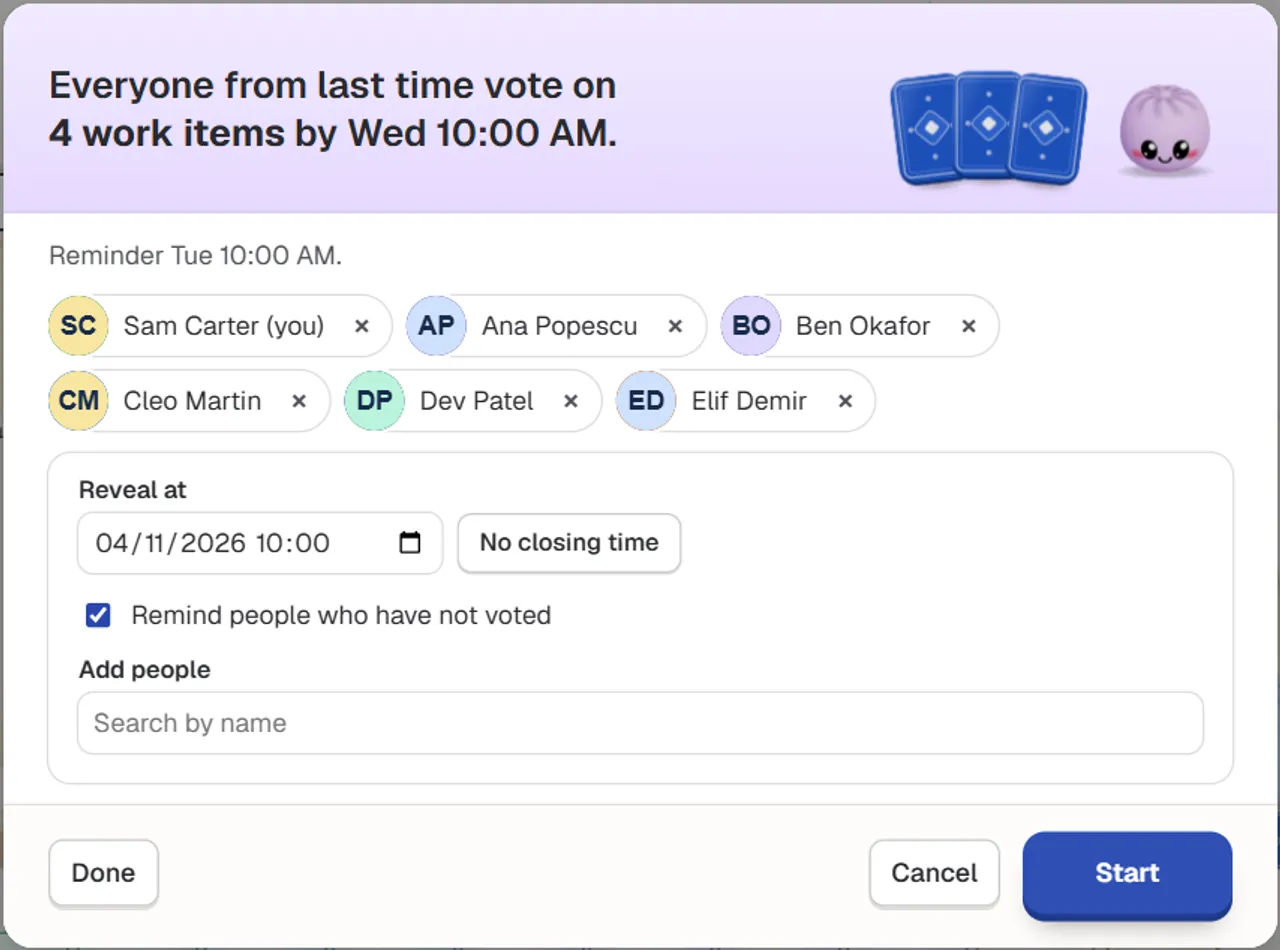
The start window, with a sample team. The date shows in your browser’s own format.
- Who votes: everyone from last time is filled in. Remove someone with the x next to their name, or add someone with Search by name.
- By when: pick a Reveal at time. The cards open then, or when the last person has voted, whichever comes first. Choose No closing time instead and the cards open when the last person has voted.
- Hidden until then: nobody sees a vote before the cards open.
Press Start. From here, people vote when it suits them, whether that is 8:15 at their desk or after the school run.
How does Jira remind people who have not voted?
Tick Remind people who have not voted, and each person who still has not voted gets one Jira notification the day before. The window says when: a reveal on Wednesday at 10:00 shows “Reminder Tue 10:00 AM”.
Two details worth knowing:
- The reminder needs a Reveal at time. With No closing time there is no “day before”, so there is no reminder.
- Reminders are Jira notifications, not Slack or Teams messages. People get them wherever they already get Jira news.
Where do people see what is waiting for their vote?
At the top of Bunlings home, right next to their name: a line such as 5 items wait for your vote, one click away.
Everyone signs in with the Jira they already use, so there is no new login and no separate account. People only see what Jira lets them see.
What happens when the cards open?
The cards flip together, and for the first time you see what everyone really thought. Then the team decides what to do, and nothing is saved until someone chooses. After a round without a meeting, the room’s note says, for example, Opened with 5 of 5 votes and Ready to save.
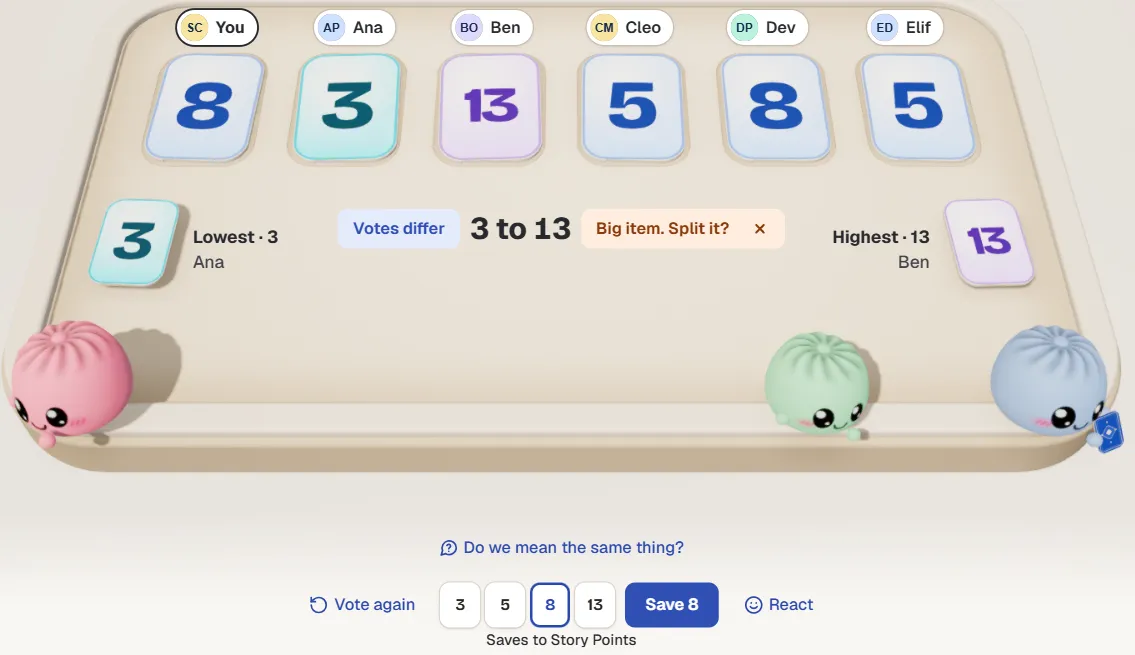
Votes from 3 to 13: talk, vote again, or pick a number and save. Sample team.
Read the spread before the number:
- Everyone within one card of each other: agree and move on.
- One person far from the rest: ask what they know, then press Vote again.
- A 3 and a 13 on the same work item: it is probably too big or too vague. Split it, or put it on the agenda. When votes are far apart covers what to ask.
When the votes match, press Agree (the button shows the number, such as Agree · 5). When they differ, pick the number first and the button becomes Save, such as Save 8. Either way the number goes to your board’s own estimate field, such as Story Points, as the person who clicked. Jira’s History shows their name, and there are 10 seconds to undo. Only people who can edit the work item can save. Can’t edit it? Ask a teammate who can to save it.
When is a meeting still the better choice?
When nobody understands the work item yet. Skipping the meeting is a tool, not a rule.
| In a meeting | Without a meeting | |
|---|---|---|
| Everyone online at the same hour | Needed | Not needed |
| Votes hidden until the reveal | Only with hidden cards | Yes |
| Time zones | Someone gets an early or late slot | Everyone votes in their own day |
| A small, familiar work item | More than it needs | A good fit |
| A work item nobody understands | Good: talk it through | Weak: expect votes far apart |
| Talking about a gap | Straight away | After the reveal |
A pattern that works with or without an app: vote the small, familiar work items without a meeting, and keep a short call for the rest. The reveal tells you which is which. Every 3 next to a 13 is an agenda item, already written.
For a very long backlog, voting one work item at a time is slow in any format. Sorting a big backlog into sizes together suits that job better.
What should you check before you press Start?
- Each work item has enough detail to vote on. A title alone gets you a guess.
- The right people are in, including whoever knows the risky part.
- The Reveal at time leaves people at least one working day.
- Remind people who have not voted is ticked.
- The team knows what a wide spread means: talk first, then Vote again, or split.
- Someone who can edit the work items will be around to save.
Try it on your next sprint
Bunlings runs inside Jira Cloud (not Data Center or Server), with no outside servers and no new login. It is free for up to 10 users, then from $2.00 per user a month.
Install Bunlings from the Atlassian Marketplace, open your board’s room and choose Estimate without a meeting.
Rather look first? Watch the demo video, or see Bunlings, scrum poker and retros inside Jira.