
 Bunlings: sprint apps for Jira





Every retro starts with “How was the sprint?” and a polite silence. Someone says “fine”. Two people nod. The one person who is quietly drowning says nothing, because “fine” was already taken.
A team health check gives that person a way to answer without saying a word. This page covers what it is, six questions you can copy, how often to run it, and what to do when the numbers look worse than the room sounds.
What is a team health check in a retro?
It is a short round, usually the first five minutes, where everyone rates a few statements on a scale instead of answering out loud. The team then looks at the combined result, not at who said what.
That last part is the point. A spoken “fine” is shaped by whoever spoke before you. A number you set on your own is not.
You can run it on paper, in a spreadsheet or in a form. What matters is that answers stay private until the round is over, and that you only look at the team picture.
Which questions should you ask?
Six plain statements are enough, plus one warm-up about the sprint itself. Statements work better than questions, because people can answer “how true is this for me?” in a second.
| Ask | Low end | High end |
|---|---|---|
| What was the sprint weather? (warm-up) | Stormy | Sunny |
| When I am stuck, I get help | Rarely | Always |
| We can keep this pace up | Not for long | Easily |
| We know what matters most | Unclear | Clear |
| I am proud of what we shipped | Not much | Very |
| I am learning here | Not lately | A lot |
| We enjoy working together | Not really | Very much |
The six statements each look at a different part of how a team works: help, pace, focus, quality, growth and the team itself.
They are about working conditions, not about people. Nobody has to rate a colleague, and nobody has to admit anything they would not say in a corridor.
Use a slider from 0 to 100 if your tool allows it, or a 1 to 5 scale if you use a form. A slider gives you more spread, which is useful later.
How do you run the check-in in five minutes?
Keep it small and keep it moving.
- Say what it is. “A few sliders, no talking, answers are anonymous, we only look at the average.”
- Give everyone two minutes. No discussing answers while people are still answering, and no peeking over shoulders in the room.
- Wait for enough people. With only two answers, the average points at someone. Wait for at least three.
- Show the result. Look at the team average and at how the answers spread.
- Pick one thing. Not all six. Read the result out loud, then choose the lowest or the most split statement to talk about.
Then move on to the retro itself. The check-in is the opener, not the meeting.
How should you read the results?
Look at the spread before the average. An average of 50 can mean “everyone is lukewarm” or “half the team is thrilled and half is struggling”. Those need very different conversations. An average of 50 is the retro version of “fine”.
Three patterns you will see:
| What you see | What it might mean | A first step |
|---|---|---|
| Low average, narrow spread | A shared problem | Name it as a team and pick one change |
| Middling average, wide spread | The team is having two different sprints | Ask what is different between the two groups |
| High average, narrow spread | Things are working | Say so, then ask what to protect |
These are prompts for a conversation, not diagnoses. A number tells you where to look. It does not tell you why.
One more rule: never ask who gave the low score. If the answers are anonymous, keep them that way, even when you think you know. The first time someone is identified, the next round gets politer numbers.
What do you do with a low score?
Pick one statement, talk about it for ten minutes, and leave with one action that has an owner.
A low “When I am stuck, I get help” could become: “Pair on anything blocked for more than a day.” A low “We can keep this pace up” could become: “Plan the next sprint with one work item fewer than we think we can do.” Small, specific, doable.
Then turn it into a work item so it does not live only in the retro. In Bunlings, a retro action becomes a Jira work item in two clicks, and anything still open comes back at the next retro under “Still open from last time”. More on that in retro action items that get done.
How often should you run a team health check?
Every retro or every second retro is a good starting point. The trend matters more than any single reading, and you only get a trend by asking the same questions more than once.
Atlassian’s Team Playbook has its own Health Monitor play, which recommends a quarterly cadence and a regular rhythm for checkpoints. The same page says some teams fold checkpoints into an existing ritual, even in place of a sprint retrospective. A five-minute opener is lighter still, so it can run every sprint.
Three habits that keep it honest:
- Keep the questions the same for at least a few rounds. Changing them every time makes the numbers hard to compare.
- Do not turn it into a report card. Scores per person or comparisons between teams make people answer for the audience.
- Skip it when the team is tiny or in crisis. With fewer than three people, it cannot stay anonymous. In a rough week, a conversation is kinder than a slider.
Where does a health check fit in the retro?
First. It is the opener, and it warms the room before the cards come out.
In a 45-minute retro, give it five minutes, as in the agenda in how to run a sprint retrospective in 45 minutes. If you want something lighter, an icebreaker does a similar job. See retro icebreakers that aren’t cringe. Use the health check when you want a pattern over time, and the icebreaker when you just want people talking.
For the rest of the session, see retro formats and when to use each.
What does a team health check look like in Bunlings?
Bunlings runs this inside Jira. The person running the retro picks Spectrum check-in under Opener in Retro options, then presses Start. Everyone gets a slider for each statement, starting with “What was the sprint weather?”, and the screen says “Move each needle. Only the team average is shown, never your answer.”
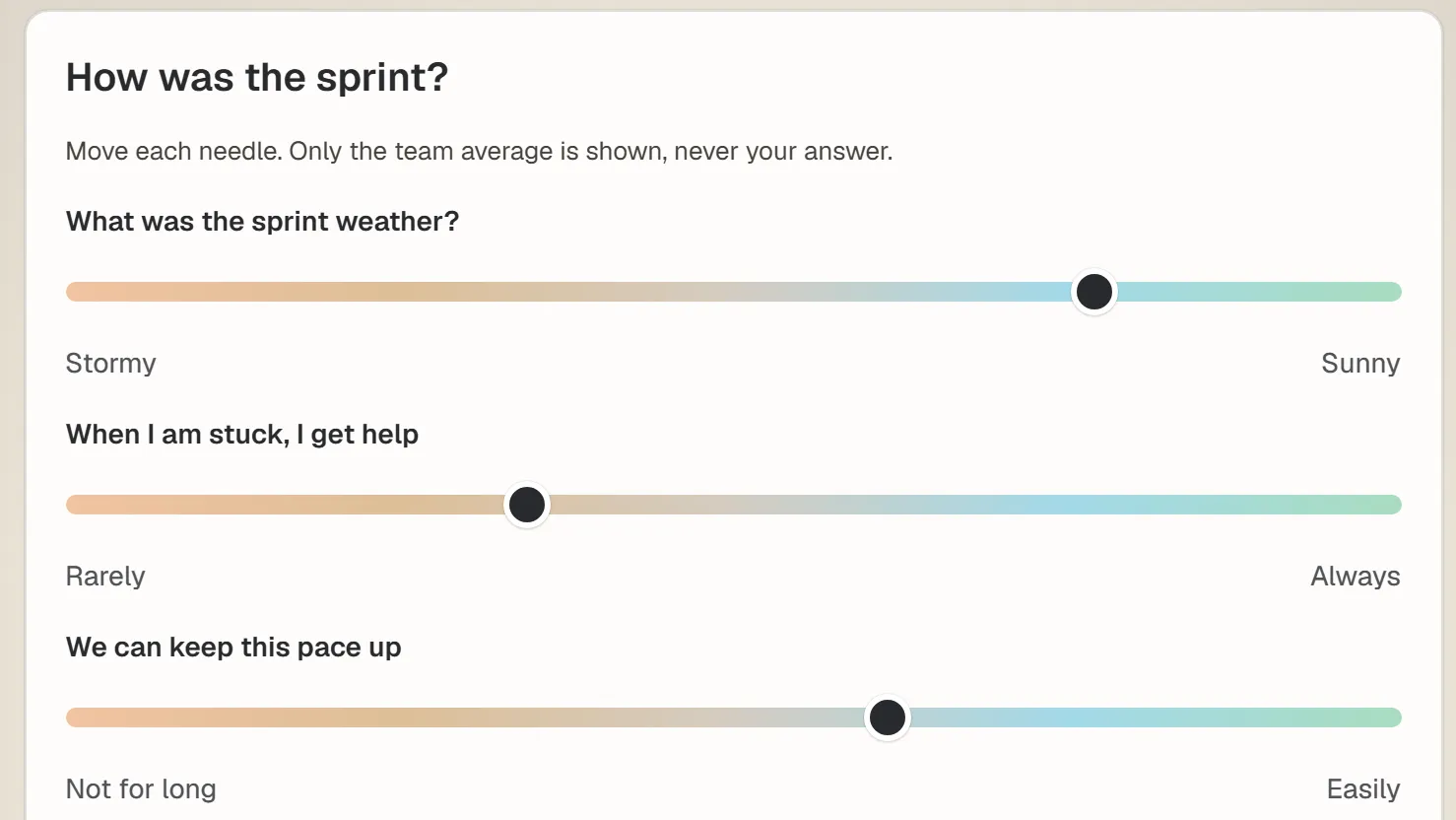
The check-in in a Bunlings retro, sample team.
Results stay closed until 3 people have answered. Then the person running the retro presses “Show the needle”, and the team sees two gauges, Mood and Team health, plus a small chart for each statement showing how the answers spread.
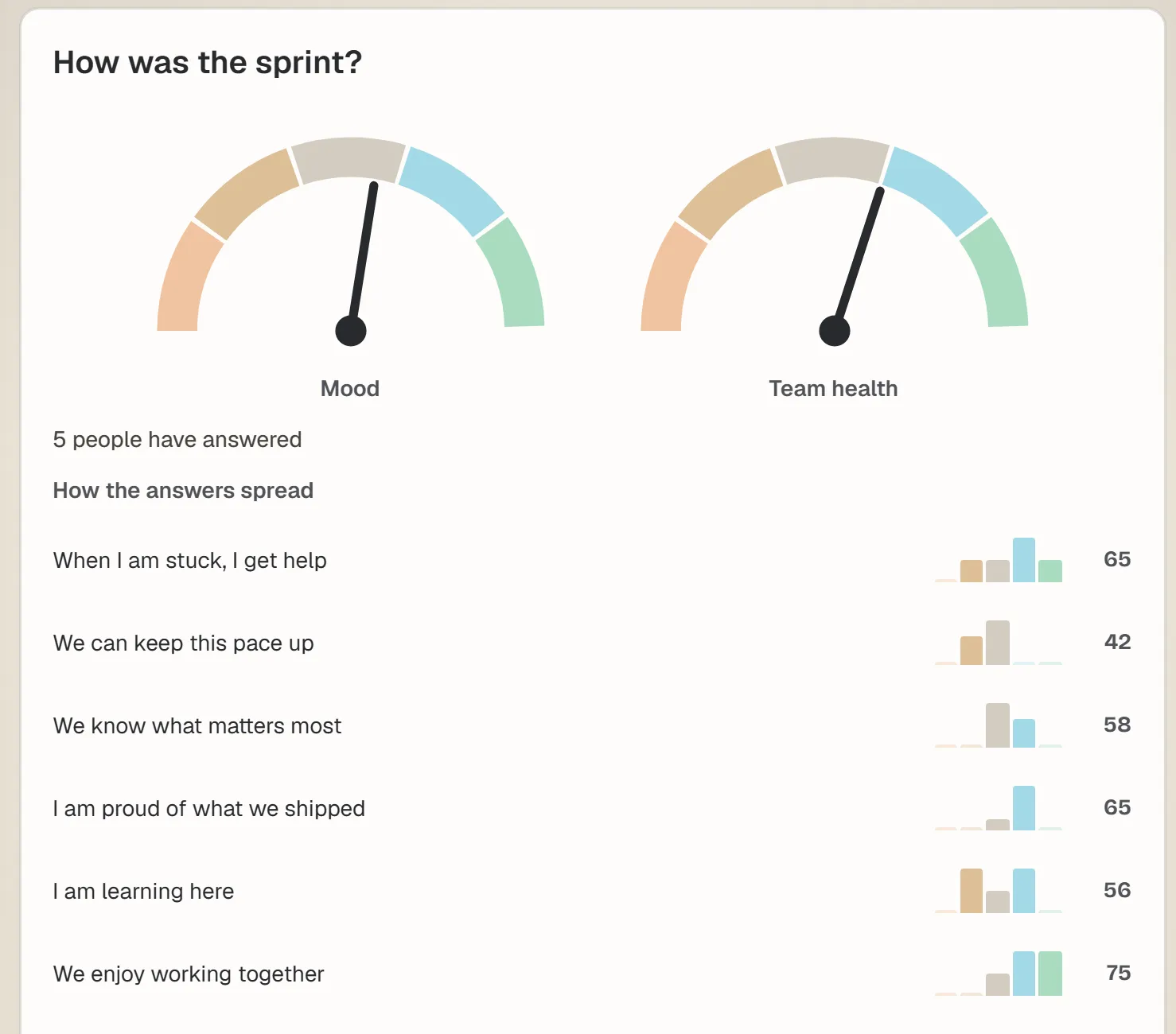
The result after five answers, sample numbers. Only the team picture shows, never one person’s answer.
- It is optional. The opener only runs if the person running the retro picks it.
- Nobody sees an individual answer. The team sees averages and how the answers spread.
- After the check-in, the retro moves on to writing, and cards stay hidden until someone presses Show all.
Try Bunlings in your Jira
Open the menu on a sprint, choose Open sprint retro, and pick Spectrum check-in as the opener. The room is already on your board, and everyone signs in with the Jira they already use. Free for up to 10 users, 50 retro formats, ten languages and dark mode.