
 Bunlings: sprint apps for Jira





Good talk, three sticky notes, a promise to “look at that”. Two weeks later nobody can say what was decided.
The talk was fine. The actions died on the way out of the room. The fix is boring and it works: one owner, one Jira work item, and last time’s list on screen before anyone writes a new card.
Why do retro action items not get done?
Because nobody owns them and nobody looks at them again. An action that lives on a whiteboard photo, in a Confluence page or in a chat thread has no due moment, no assignee and no place in the sprint.
Four causes show up again and again:
- No owner. “We” will do it. So nobody does.
- Too big. “Improve our testing” is a quarter, not an action.
- Too many. Seven actions means zero. People pick the easy one or none.
- Out of sight. The action is not where the team works every day, so it never meets the sprint.
The fix for all four is the same idea: treat an action like any other piece of work.
What makes a good retro action?
One owner, one clear first step, small enough to finish in the next sprint. If you can’t say who does what by when, it’s still a wish.
A quick test. A good action:
- Starts with a verb (“Add a review rota”, not “Better reviews”).
- Has a named person, not a group.
- Fits inside one sprint.
- Would be obvious to someone who missed the retro.
- Has a way to see if it happened.
Not every retro outcome has to be an action. Some are “keep doing this”. Those are worth saying out loud, but they don’t need an owner or a work item.
How many actions should a retro produce?
One or two. Three at the very most.
It feels stingy. It is not. A team that finishes two actions per sprint changes a lot over a few months. A team that writes seven and finishes none changes nothing and gets quietly cynical about retros.
If the room has more ideas, vote. Keep the top one or two, and leave the rest in the retro notes for next time. They are not lost, just waiting their turn.
Should every action become a Jira work item?
Yes, every action you plan to do. A Jira work item has an assignee, a status, a place on the board and a history, and your team already looks at all of that every day.
That is the whole trick. You don’t need a new tracker for retro actions. You need them in the one you already use.
The native Jira way. Create the work item in your space, assign it, and add a label such as
retro-action. Then keep one saved filter:labels = "retro-action" AND statusCategory != Done ORDER BY created ASC. Add it to the team’s dashboard with a Filter results gadget, or open it at the start of every retro. It costs nothing and it works.
How do you stop actions from being forgotten?
Open last time’s leftovers first, before you write a single new card. Ask one question of each: done, keep or not needed.
Here is the loop in four steps:
- Start with the open list. Not the happy cards, not the icebreaker. The list of what you said you would do.
- Decide each one in seconds. Done (close it), keep (still matters, stays open), or not needed (let it go, and say so).
- Write the new actions after that. Now the team knows how much it actually finished, and sets a realistic number.
- Put each new action in the sprint. An action nobody can see on the board is not in the sprint.
The “not needed” answer is the most useful one. Dropping an action on purpose is honest. Letting it rot is how a team learns that actions don’t matter.
What kinds of actions work, and what kinds don’t?
Small, specific changes work. Big intentions don’t. Here is a rough guide.
| Type of action | Example | Works? | Why |
|---|---|---|---|
| A tiny experiment | “Try a rotating review buddy for one sprint” | Yes | Small, has an end date, easy to judge |
| A concrete fix | “Add on-call handover notes to the template” | Yes | One owner, clearly finished or not |
| A conversation | “Ask the product owner about release timing” | Yes, if named | Someone owns the ask |
| A habit | “Write release notes earlier” | Sometimes | Needs a visible first step and a check |
| A vague intention | “Communicate better” | No | No first step, no owner, no end |
| A big rewrite | “Rewrite our test suite” | No | Split it, then take the first piece |
When an action sounds like the last two rows, ask: “What is the smallest first step someone could do this week?” Write that instead.
A short checklist for your next retro
Copy this into your retro page, or read it out loud before the Actions block.
- Did we review last time’s open actions first?
- Is every action a verb, small and finishable in one sprint?
- Does each action have one named owner?
- Is each one a Jira work item, in the sprint or on the board?
- Do we have one or two actions, three at most?
- Did we say “not needed” out loud for anything we are dropping?
- Will the open list be on screen at the start of the next retro?
If you can tick all seven, your actions have a good chance. If you tick five, you are still ahead of a retro that ends with sticky notes.
What if people still don’t do them?
Then the action was probably wrong, not the people. Ask at the next retro, calmly: was it too big, too vague, or not important enough? Any of those is a fine answer.
A good habit: if the same action has been open for three retros, make a decision. Split it, rewrite it or drop it. An action on its third retro is not an action any more. It is furniture. An old action that nobody touches teaches the team the wrong thing.
For the retro itself, see how to run a sprint retrospective in 45 minutes, which gives the Actions block seven of the 45 minutes, and retro formats and when to use each.
What does this look like in Bunlings?
Bunlings is a Jira app, so the work item part is built in. In the Actions step, write the action in the Something we will do box, or start from a topic the team voted on. Press Create a work item, then Create, and it becomes a Jira work item, made as you. That is two clicks, and you can undo for 10 seconds.
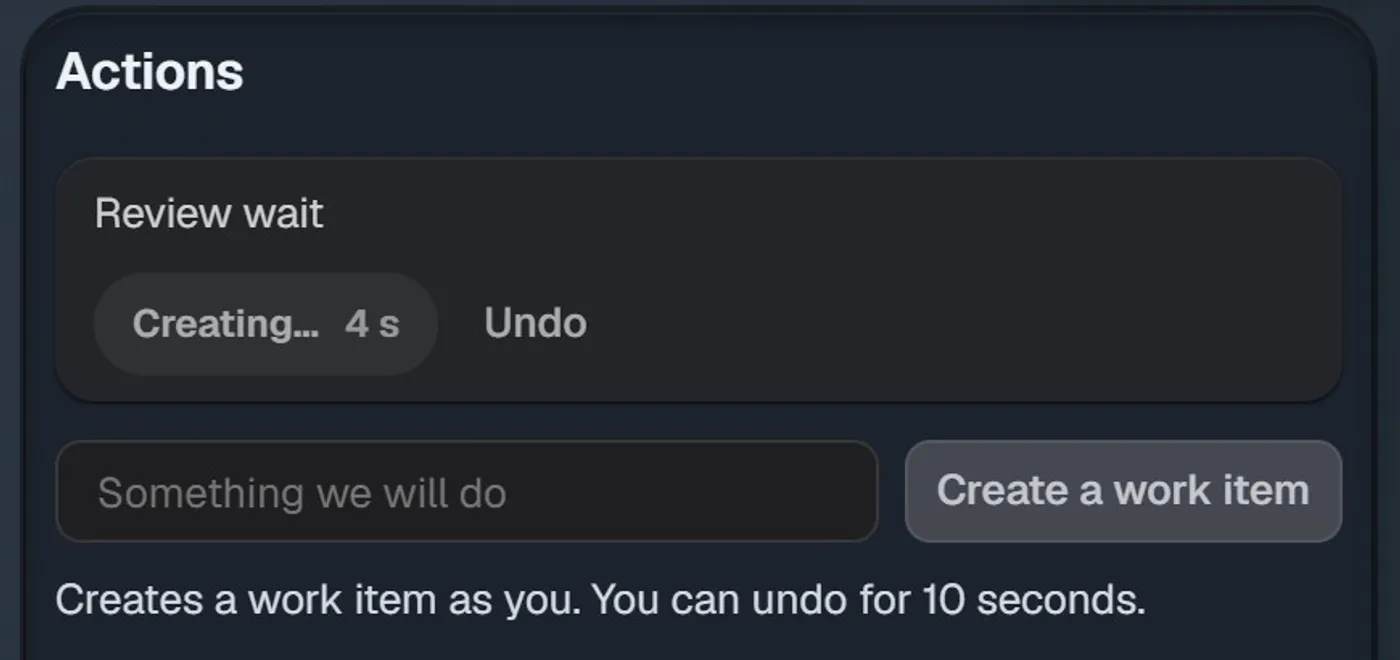
The Actions panel on a sample team, a moment after Create. The Undo button stays for 10 seconds.
At the next retro, the open ones come back. Before anyone writes a card, the Write step shows “Still open from last time” with the work item, its status in Jira and where it came from. For each one you choose Keep or Not needed, or Done once it is linked to a work item.
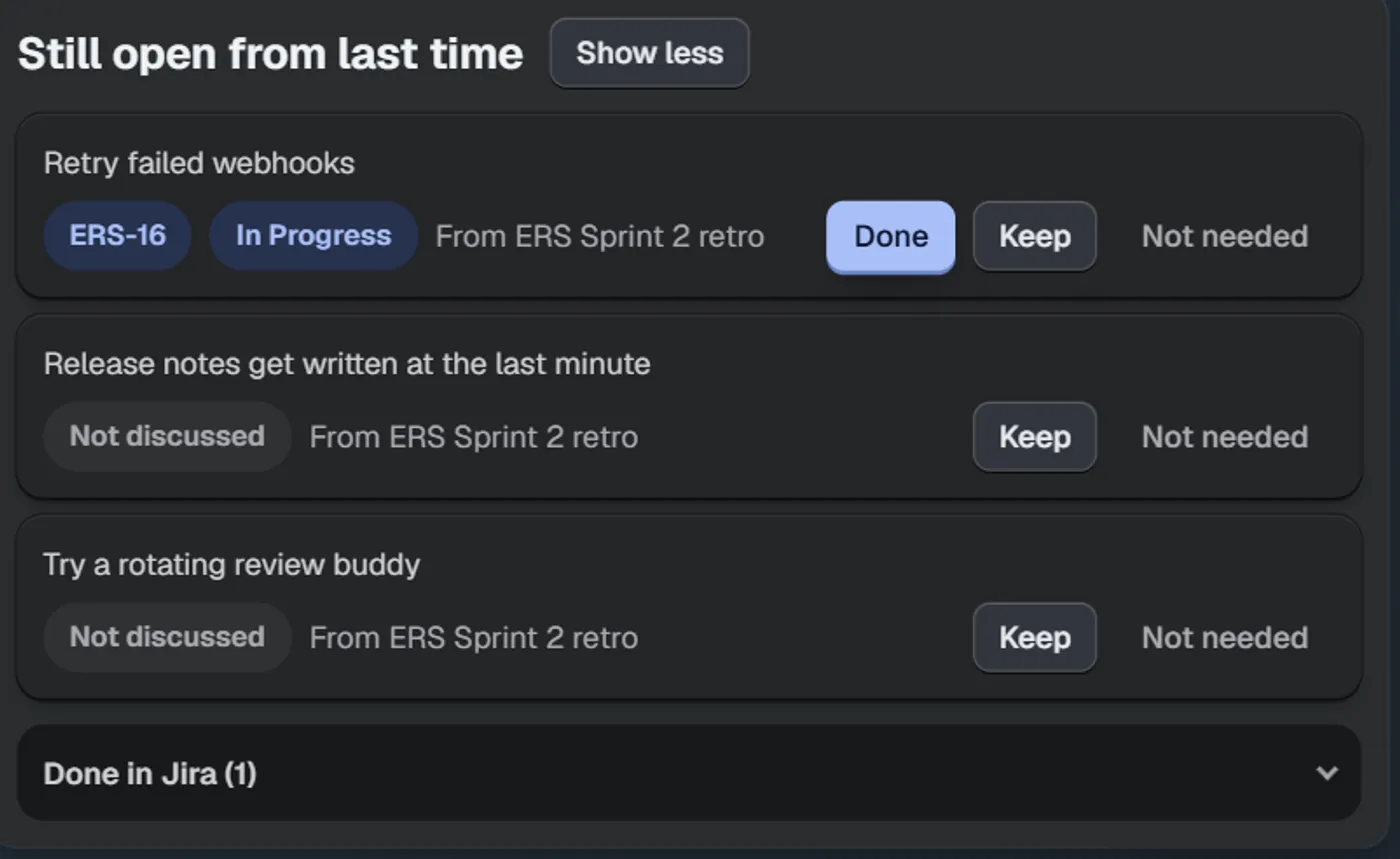
Open actions come back at the next retro, before anyone writes a card. Sample team.
Two smaller things help the loop. Cards stay hidden until someone presses Show all, so nobody writes their card to match the first one they saw. And when the retro is over, the recap copies for your manager or for Confluence.
What it can’t do. Bunlings doesn’t make people finish things. It makes it easy to give an action an owner, keep it in Jira and bring it back in front of the team next time. The rest is still your team. It runs on Jira Cloud only, and it is not a free-form whiteboard.
Actions become work items in two clicks, and the open ones are waiting at the next retro. Bunlings is free up to 10 users, then from $2.00 per user per month.