
 Bunlings: sprint apps for Jira





Someone unmutes, says “I think it went fine”, and five faces nod in their little boxes. The retro ends early. The real answer, the one about the review queue, goes home with whoever was thinking it.
Hybrid retros fail more politely. Four people in the meeting room chat away, and the two on the call wait for a gap that never arrives.
Both have the same fix, and it is not a better question. It is a better order: write, reveal, group, vote, then talk.
How do you run an anonymous retro with a remote team?
Let everyone write alone, hide the cards until the team is ready, then open them all at once. Three rules carry it.
- Everyone writes at the same time, in silence. A few quiet minutes of typing beat waiting for a turn to speak.
- Cards stay hidden until everyone is ready. Nobody reads, reacts to or quietly copies a card that is still being written.
- Names stay off the cards, unless the team chooses to show them.
Then reveal everything together, give everyone a quiet minute to read, and group similar cards before anyone discusses. If several people wrote about slow code reviews, that is a topic. If one person did, it is still worth a look.
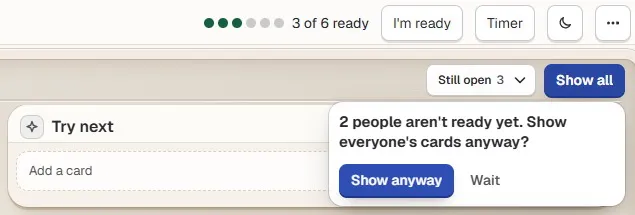
Three of six are ready, so Show all asks first. Sample team and sample data.
Why do remote retros go quiet?
Because speaking on a video call is a small performance, and typing is not.
Three things work against the quiet person on a call. On a call, a pause takes a beat to notice. Cutting in on a screen feels ruder than in a room. And the first voice sets the theme: if the first comment is about deploys, the next five are too.
Writing first takes all three away. Every answer is on the board before a word is spoken, so nobody waits for a turn and nobody sets the agenda by going first.
Should retro cards be anonymous?
Usually yes, at least to start. A card without a name lets someone write “the review process is slowing me down” without it turning into a conversation about them.
Names have their uses too. A quick way to choose:
| Situation | Names on cards? | Why |
|---|---|---|
| New team, or a sprint that went badly | Off | People write what they think, not what feels safe |
| Team that already trusts each other | Either | Names help when you want to ask “can you say more?” |
| A topic that needs one person to explain | On, for that retro | You know who to turn to |
| A manager joins and the team is unsure | Off | Hidden names lower the stakes for everyone |
Anonymous on screen is not the same as untraceable. In a small team people recognise each other’s wording, and Bunlings links votes and sessions to Atlassian accounts. Promise your team that cards will not carry names, not that nobody could ever tell who wrote one.
In Bunlings, cards start without names. A Show names switch in the retro options turns them on for cards written after that.
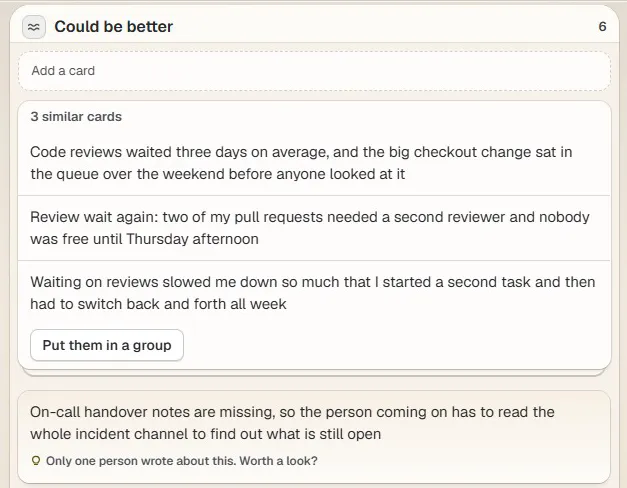
After Show all: no names, three cards about code reviews stacked together, and a nudge on the card only one person wrote. Sample team and sample data.
How do you keep answers honest while people write?
Keep it short, keep it visible, and let people say when they are done.
Put a timer on the writing that everyone can see, so it does not stretch. Ask people to mark themselves ready, so nobody has to guess who is still typing. And if one person always finishes last, wait for them: their card is often the one the retro needed.
A light warm-up question gets every voice into the call before the harder part. Some that work: retro icebreakers that aren’t cringe.
What changes in a hybrid retro?
The room becomes the problem. People sitting together talk to each other, read each other’s faces and laugh at each other’s jokes. The people on the call get the delayed, flattened version. And the person nearest the microphone becomes the team’s spokesperson without anyone voting for it.
Four habits fix most of it.
- Everyone joins on their own laptop, including the people in the meeting room, to write and vote from their own screen. Laptop microphones and speakers stay off in the room, or the call will echo.
- One camera and one microphone for the room. The people in it turn their chairs so the people on the call can see faces, not the backs of heads.
- The call speaks first. Open each topic with someone who is not in the room.
- Use names out loud. “Ana, what do you think?” works far better than “anyone online?”
The short version, for a sticky note:
| What goes wrong | What to do |
|---|---|
| The room talks past the call | Everyone writes and votes on their own screen |
| People on the call cannot find a gap | Ask them first, by name |
| The first loud card sets the mood | Hide cards until everyone is ready |
| Nobody knows who has finished | Use a ready count, not a guess |
| Notes live in one person’s head | Turn actions into work items before you close |
How should the discussion run when people are in different places?
Dots first, opinions second: vote quietly, then talk about the top topics only.
Quiet voting keeps the loudest voice from choosing the agenda. In a hybrid room it matters even more: nobody’s dots count double for sitting in the room.
Take the top topics one at a time, each with its own slice of the clock. After each one, ask: “What is the smallest thing we could try next sprint?” That question turns a complaint into something a person can own. For a full timed agenda, see how to run a sprint retrospective in 45 minutes.
Before you close, give each action an owner and a home, ideally a Jira work item. Then bring anything still open to the next retro. Remote teams need this most, because nobody walks past a whiteboard to be reminded. More in retro action items that get done.
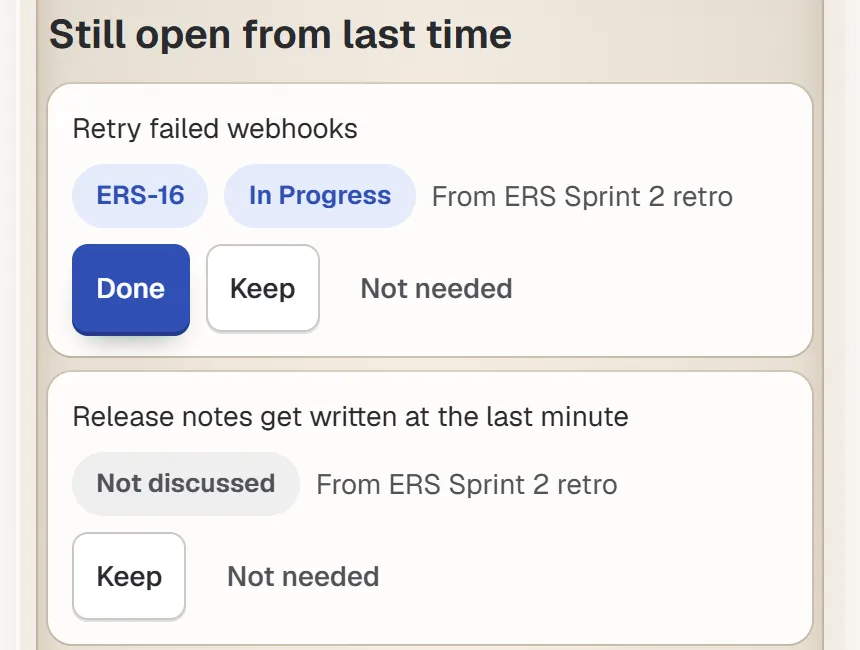
Still open from last time: last retro’s actions come back, so you can mark each one done, keep it or drop it. Sample team and sample data.
What will a tool not fix?
Trust. If people are afraid to write the honest card, hiding the name helps, but it does not make the team safe to talk in.
Follow-up. If last sprint’s actions faded away, a new format will not bring them back. Start with what is still open.
And the call itself. Keep using the video tool you already have.
Where does Bunlings fit in?
Bunlings is scrum poker and retros inside Jira. Open the menu on a sprint, choose “Open sprint retro”, and everyone signs in with the Jira they already use. Cards start without names and stay hidden until Show all, each step shows how many people are ready, and if someone is still writing, Show all asks before it opens the cards. An action becomes a Jira work item in two clicks, and open actions come back at the next retro.
It is free up to 10 users, then from $2.00 per user per month. It runs on Jira Cloud only, and it is not a free-form whiteboard: the retro moves through set steps, from writing to actions.
See Bunlings on the Atlassian Marketplace
More about the app: Bunlings, scrum poker and retros inside Jira