
 Bunlings: sprint apps for Jira





Retro, minute 40. The team is still on the second card, and the actions get whatever time is left. Usually none.
Retros rarely run long because people talk too much. They run long because no block on the agenda has an end. Here is a 45-minute agenda where every block has a start time and a finish line, plus what to do inside each one.
What does a 45-minute retro agenda look like?
Seven blocks, each with a clear “done” moment.
| Starts at | Block | Minutes | Done when |
|---|---|---|---|
| 0:00 | Check-in | 5 | Everyone has spoken once |
| 0:05 | Write | 8 | Every card is written |
| 0:13 | Show all and group | 7 | Similar cards sit together |
| 0:20 | Vote | 5 | The top topics are clear |
| 0:25 | Talk | 10 | Each topic has one thing to try |
| 0:35 | Actions | 7 | One or two actions have an owner |
| 0:42 | Close | 3 | You stop at 0:45 |
Watch the last column, not the clock. When a block reaches its finish line, move on, even with a minute to spare. Spare minutes go to Talk.
Why does the order matter more than the minutes?
Because each block protects the next one. Three rules hold the whole agenda together:
- Write before anyone talks. Otherwise the first speaker sets the topic for everyone.
- Vote before anyone discusses. Otherwise the loudest topic wins, not the biggest one.
- Decide before anyone leaves. Otherwise the retro was a nice chat.
Break one rule and you can feel the clock slip. Keep all three and the minutes mostly look after themselves.
How do you open a retro in 5 minutes?
Ask one light question that takes a breath to answer, and go round once. The point isn’t depth. It’s getting every voice into the room early, so the quiet people have already spoken before the first real topic.
Questions that work:
- What was the sprint weather? Sunny, cloudy or stormy.
- Which song title describes this sprint?
- One word for how the sprint felt.
If answers start turning into stories, thank the person and save the story for Talk. That’s what Talk is for.
For more openers that don’t make people wince, see retro icebreakers that aren’t cringe.
Why should everyone write alone first?
Because the first card anyone reads shapes every card after it.
If cards appear while people are still typing, someone writes “releases were painful” and four more cards about releases follow. The thing only one person noticed never gets written. Silent writing gives that card a chance.
Eight minutes, three columns (went well, could be better, try next), no talking. Write first, read later.

The Write step in Bunlings. Seven cards are in, and each one stays private until someone presses Show all. Sample team and sample data.
Tired of the same three columns after forty sprints? Retro formats and when to use each helps you pick another.
What do you do when the cards open?
Read them together, then put similar ones side by side. Don’t discuss anything yet. Seven minutes is enough.
This is when people see how many others wrote the same thing. “Reviews waited three days”, “Review wait again” and “Waiting on reviews slowed me down” are one topic, not three. Grouped, they get voted on once. Three cards about reviews isn’t three problems. It’s one problem with a fan club.
Then look for the lonely card. A card only one person wrote can be the blind spot everyone else shares.
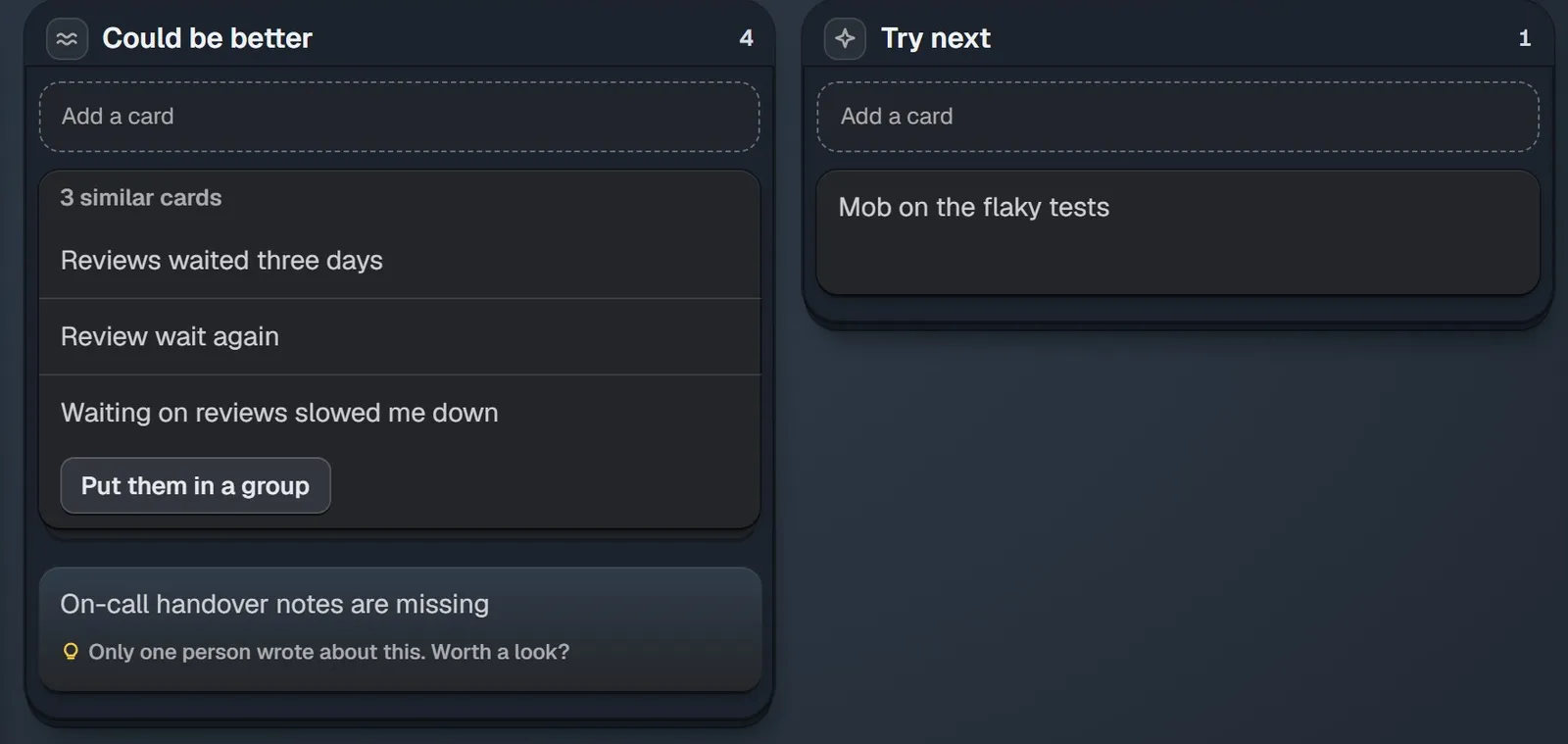
After Show all in Bunlings, similar cards sit together and a lone card gets its own nudge. Sample data.
How do you decide what to talk about?
Vote with dots, quietly, before anyone discusses. Each person gets a few dots and spreads them across the topics. Count them and take the top two or three.
Voting first stops the agenda from being set by volume. It also saves you the meeting about which topic to have the meeting about. Without dots, the agenda belongs to whoever unmutes first.
Five minutes is plenty. On a tie, pick the topic the team can actually change.
How do you keep the talk to 10 minutes?
Give each top topic a fixed slice. Two topics get about 5 minutes each, three get about 3 each. Put a timer where everyone can see it.
When a slice ends, ask one question: “Do we need more time, or do we know what to try?” If you need more time, take it from the next topic, never from Actions.
Three questions move a topic toward a decision:
- What happened, in one sentence?
- Why do we think it happened?
- What’s the smallest thing we could try next sprint?
If a topic is a complaint with no fix, name it and park it. The coffee machine will still be broken next sprint. That’s fine.
How many actions should a retro end with?
One or two. A retro that produces eight actions usually finishes none of them.
Each action needs three things: what changes, who owns it, and where it lives. “Where it lives” is the one teams skip. An action on a sticky note is gone by Wednesday. An action that’s a work item in Jira sits where the team already looks every day.
Don’t start from a blank page. Take the “smallest thing we could try” from each topic in Talk, and pick the one the team believes in most.
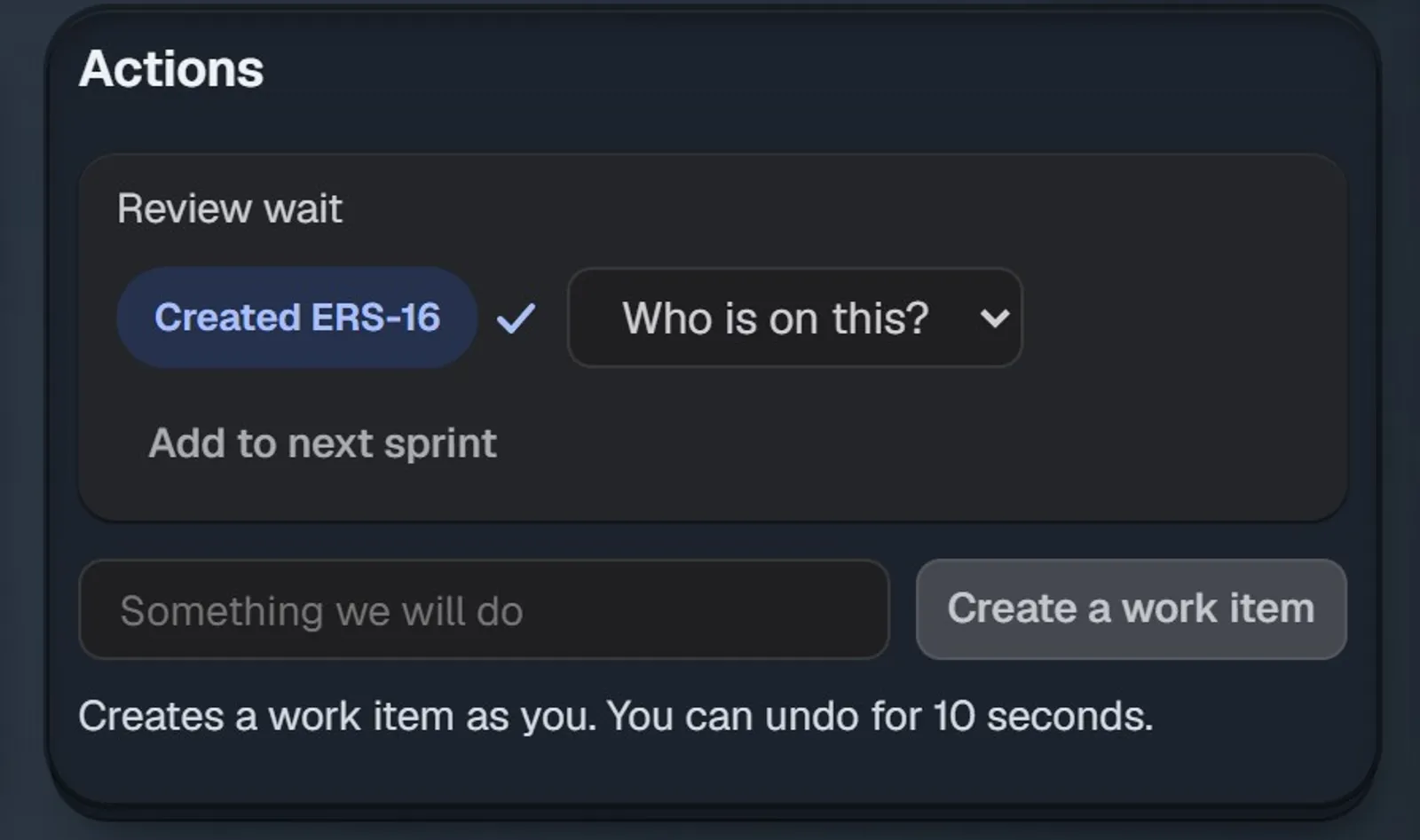
In Bunlings, a topic from the talk becomes a Jira work item in two clicks, created as you, and Who is on this? sets the owner. Sample data.
Why do actions die, and how do you keep them alive? See retro action items that get done.
How do you end a retro in 3 minutes?
Three minutes, three moves. Read each action and its owner out loud. Ask “Does everyone know what they own?” Say thanks, and mean it.
Then stop. Skip the extra round of “any other feedback?”. People leave a retro that ends on time with energy. People leave a retro that ran over remembering that it ran over.
What if you only have 30 minutes, or a full hour?
Keep all seven blocks and change their size. Talk and Actions grow or shrink the most. Check-in and Close barely move.
| Block | 30 minutes | 45 minutes | 60 minutes |
|---|---|---|---|
| Check-in | 3 | 5 | 5 |
| Write | 5 | 8 | 8 |
| Show all and group | 4 | 7 | 7 |
| Vote | 3 | 5 | 5 |
| Talk | 8 | 10 | 20 |
| Actions | 5 | 7 | 12 |
| Close | 2 | 3 | 3 |
If your 45-minute retro keeps running over, find the block that overruns and fix only that one. Talk running long usually means too many topics, so take the top two. Write running long usually means people started chatting, so say “write first, read later” again. And if every block runs a little over, book the hour. That’s a 60-minute retro, and it’s allowed.
Does this agenda work for remote and hybrid teams?
Yes, and arguably better. Silent writing, hidden cards and dot voting mean nobody has to find a gap in the conversation to be heard, whether they’re in the room or on a call. More in remote and hybrid retros.
How do you run this agenda inside Jira?
Bunlings runs the retro inside Jira. Open the menu on a sprint and choose “Open sprint retro”. Nothing to set up, no new login. Here’s how it maps to the agenda:
- Check-in: “What was the sprint weather?”, or an icebreaker from 30 work-safe questions.
- Write: cards stay hidden until someone presses Show all. If someone is still writing, Bunlings asks first: “Show everyone’s cards anyway?”
- Show all: similar cards sit together with a Put them in a group button.
- Every step: shows how many people are ready, and has a Timer.
- Actions: become work items in two clicks, and open ones come back next time under “Still open from last time”.
- Close: the recap copies for your manager or Confluence.
It has 50 retro formats, and the whole app runs in ten languages. It isn’t a free-form whiteboard. Its five steps follow this agenda: Write, Show all, Vote, Talk, Actions. It runs on Jira Cloud only, and it’s free up to 10 users, then from $2.00 per user a month.
See Bunlings, scrum poker and retros inside Jira