
 Bunlings: sprint apps for Jira





Retro, minute one. “Let’s go round: if you were a kitchen appliance…” Six cameras stay off.
An icebreaker isn’t there to bond the team. It has a smaller job: get every voice into the room early, so the quiet person has already said something before the hard topics arrive. The 30 questions below are written for that job. They’re about the sprint, they’re safe at work, and none of them asks anyone to share a childhood memory. For the rest of the meeting, see make agile meetings fun.
What makes a retro icebreaker cringe?
It’s cringe when it’s mandatory, personal or long. Those three are the whole list.
- Mandatory. Going round the table with everyone on camera turns a warm-up into a small performance. People start rehearsing their answer while someone else is talking.
- Personal. “Share something nobody knows about you” asks for more than a retro should. Keep it about the work, the week or a harmless preference like snacks.
- Long. If the icebreaker takes ten minutes, the team has spent almost a quarter of a 45-minute retro hearing who likes tea.
A good one is the opposite: optional, about work, and answerable in a few words. Written answers beat spoken ones for most teams, because nobody has to find a gap in the conversation.
How long should an icebreaker take?
About two minutes, and never more than five. One question, a minute or so to write, a minute to read the answers together.
The whole routine:
- Pick one question before the retro starts. Don’t workshop it live.
- Ask everyone to answer in a few words, in writing.
- Read out a few answers, or all of them if the team is small.
- Say “thanks” and move on. No follow-up on every answer.
The time limit matters more than the question. A so-so question that ends on time beats a clever one that eats the retro.
Which icebreaker should I pick?
Pick by the mood of the sprint, not by what sounds funniest. Here are 30, in six moods. Every one can be answered in a few words.
Gentle, for a tired sprint
When the team is worn out, ask for small things that are easy to answer.
- Which day of the week did this sprint feel like?
- What is the smallest win you would still like a sticker for?
- Which browser tab are you proudest of closing?
- What took less time than you feared?
- What is one thing that went quietly well?
Silly, for a team that likes a joke
Humour works when it points at the situation, not at a person.
- This sprint is a pizza topping. Which one?
- What would the sprint’s podcast be called?
- Which board column deserves a holiday?
- Write the sprint’s text message to the next sprint.
- If this sprint had a soundtrack, what would be skipped first?
About the work, for a team that wants to get going
These point at real work items, so the retro starts close to the facts.
- Which work item are you glad to see in Done?
- Which work item surprised you most, bigger or smaller than you thought?
- What did we almost forget?
- What would you tell yourself on day one of this sprint?
- Which work item taught you the most?
Curious, for a team that is looking ahead
Good before a retro that is mostly about what to try next.
- What would make next Monday easier?
- What is one small thing you want to try next sprint?
- What would you ask a customer if they were in the room?
- Which tiny change to our workflow would you vote for?
- What are you still wondering about from this sprint?
Appreciative, for a team that had a good one
Keep these specific, so they don’t turn into a round of polite applause.
- Whose question made the work better this sprint?
- What did a teammate do that you would happily copy?
- What is something a teammate explained that finally clicked?
- What is one thing we were right not to change?
- What helped you focus this sprint?
Quick, for a retro that is already short on time
Ten seconds each, no discussion.
- Sum up the sprint in one word.
- Finish the sentence: “This sprint was …”
- Name the sprint like a chapter in a book.
- Which work item would you rename, and to what?
- If this sprint were a font, which one?
When should you skip the icebreaker?
Skip it when the retro is short, the sprint was hard, or the team isn’t in the mood. Skipping is allowed. Nobody has ever left a retro wishing it had more icebreaker.
| Situation | Do this instead |
|---|---|
| The retro is running late | Skip it and start on the first topic |
| The sprint was tense, or something broke badly | Go straight to the facts, or use a quiet check-in (see team health check in retros) |
| A new person has just joined | Choose a Gentle or Quick question, in writing only |
| The team has had icebreakers for many sprints and sighs at them | Rotate in a different opener, or give it a break for a few sprints |
| Actions from last time are still open | Start with those, as in retro action items that get done: people care more about them than about snacks |
A useful rule: if the question needs an explanation, it’s the wrong question for that day.
How do you run an icebreaker in a remote team?
Collect the answers in writing, and show them all at once. On a call, the first person to speak sets the tone for everyone after them. Written answers revealed together remove that.
If the team is spread across time zones, ask whether the icebreaker belongs in the live session at all. A question posted a day earlier, answered whenever it suits people, gives you the same warm-up with no one staying up late. More in remote and hybrid retros.
Is an icebreaker the same as a check-in?
No. An icebreaker is a light question for warming up, and a check-in is a quick read on how people feel. They overlap, and you rarely need both.
| Icebreaker | Check-in | |
|---|---|---|
| Question | “If this sprint were a font, which one?” | “What was the sprint weather?” |
| Purpose | Warm up, get a first answer in | Read the mood of the sprint |
| Answer | A few words | A position on a scale |
| Good for | Teams that are comfortable together | Teams that need a quick temperature before diving in |
Pick one. Use the check-in when you want a read on the team, and the icebreaker when you just want everyone talking. Our 45-minute retro agenda gives the opener one five-minute slot, whichever you pick, and retro formats and when to use each covers what comes after it.
Can Jira pick the icebreaker for you?
Not on its own, but an app can. Bunlings has icebreakers built into the retro. It’s a Jira Cloud app from Unitlane Apps that gives every board a sprint retrospective. Retros open from the sprint menu (more in sprint retrospectives in Jira), and the facilitator picks an Opener in Retro options: Spectrum check-in, Icebreaker or No opener. Turning on More fun adds Sprint quiz and Caption the sprint.
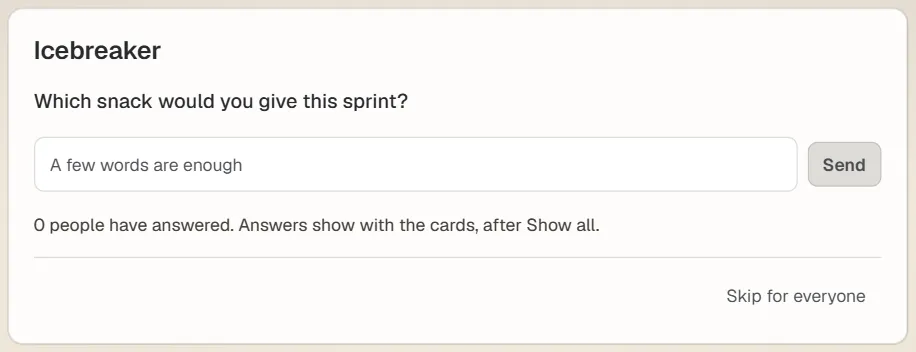
The Icebreaker step in a Bunlings retro, light mode. Sample team.
Bunlings has its own pool of 30 work-safe questions, different from the list above, and picks one for you. Everyone answers in the box that says “A few words are enough”, nobody sees whose answer is whose, and the answers show with the cards, after Show all. Each person can skip, and the facilitator can press Skip for everyone.
Remember the last row of the skip table, open actions first? Bunlings brings them back on its own, in a Still open from last time panel, so you can check them off before anyone talks about snacks.
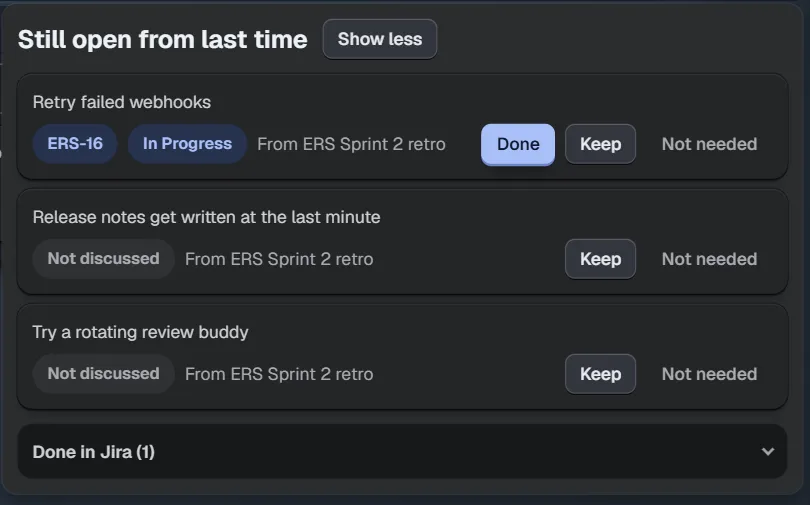
Last retro’s actions come back to be checked off. Sample team.
If your team would use the questions above as they are, a printed list or a shared page works fine too. Bunlings just saves the picking and keeps the answers in the retro, next to the cards.
Try it with your team
Bunlings runs inside Jira Cloud, with no new login. It comes with 50 retro formats and speaks 10 languages. Free for sites with up to 10 users; bigger sites pay from $2.00 per user a month.
- Find Bunlings on the Marketplace: https://marketplace.atlassian.com/apps/289625722/bunlings-scrum-poker-retrospectives-for-jira?utm_source=website&utm_medium=social&utm_campaign=bunlings_launch&utm_content=retro-icebreakers-that-arent-cringe
- Watch the demo: https://youtu.be/bWA0bRC4NH0?utm_source=website&utm_medium=social&utm_campaign=bunlings_launch&utm_content=retro-icebreakers-that-arent-cringe
- More about the app: Bunlings for Jira