
 Bunlings: sprint apps for Jira





An agent asks the customer for a screenshot and moves the request to Waiting for customer. It disappears from her list, which feels like progress. Three weeks later someone opens the queue and finds forty requests in that status, some of them older than the customers’ patience.
The status is a label. It says whose turn it is. Whether the customer gets a message, whether the status changes back, and whether anyone looks again are all things you build around it.
What the status does, and what it doesn’t
- It is a status in your workflow. Admins can add or rename statuses in the workflow editor, and every status belongs to one of three categories: To do, In progress or Done. A request in Waiting for customer is still an open request.
- It does not message the customer by itself. The agent’s public reply does that. Jira sends customer notifications to the person who raised the request, and to request participants and approvers who have verified their email address.
- It does not move back by itself. Something has to change the status when the customer answers. In service spaces created before 30 August 2021, Atlassian’s preset flow Comment updates reply status does it: a customer comment moves the request to Waiting for support, and a comment from your team moves it to Waiting for customer. In newer spaces you build a flow with the Work item commented trigger.
- It does not pause the SLA unless you add it as a pause condition. How to set that up, step by step.
- Customers see a name you can change. Under Space settings, Request management, Request types, choose Edit fields for a request type and open the Workflow Statuses tab. The field Status name to show customer sets what the portal says. Giving two statuses the same name hides the move between them from the customer.
Sources: Atlassian, Add statuses to a Jira workflow, What is a workflow status?, What notifications do customers and the team receive, Available preset automation flows, Customize the workflow statuses for a request type.
Find the stuck ones
A queue that shows everything in the status is only a start. What matters is how long each request has been there. This search finds requests that have not changed status for three days:
status = "Waiting for customer" AND NOT status CHANGED DURING (-3d, now())Change the three to what you want. To save it as a queue:
- In your service space, next to Queues, choose More actions, then Queue settings.
- Choose Create new queue and name it, for example Waiting for customer, 3 days or more.
- Under Filter by, choose Advanced and paste the search.
- Pick your columns and choose Create.
Do not use
updated < -3dfor this. Every comment counts as an update, including a reminder your own flow posts, so the request looks fresh again after each one. A Community thread from April 2026 shows exactly this problem with reminders that drift. Looking at when the status last changed avoids it.
Sources: Atlassian, Create a new queue, Automated follow-ups. The Community thread is Automatic Customer reminders.
Three ways it goes wrong
It becomes a parking lot. If agents use it for anything that is not the customer’s turn, such as an approval or another team’s task, the list stops meaning anything. Agree on one rule: the status means the customer has the next step, and nothing else.
Nobody asked a clear question. A request can sit in the status because the message said “please send more information”. Name the missing items. Eight message templates you can copy are here.
Nobody follows up, and nobody closes. Jira has no switch for either. Both are built with Automation, with the traps described in Customer follow-ups and auto-close in Jira Service Management.
Seeing it in RequestOps
RequestOps adds a Waiting on column that you can show in your own Jira queues and filters. It reads, for example, Customer since 1 Oct, and it changes only when a request starts waiting on someone else. In a space with a RequestOps checklist turned on, it is filled in for the open requests there, and it catches up once a day after that.
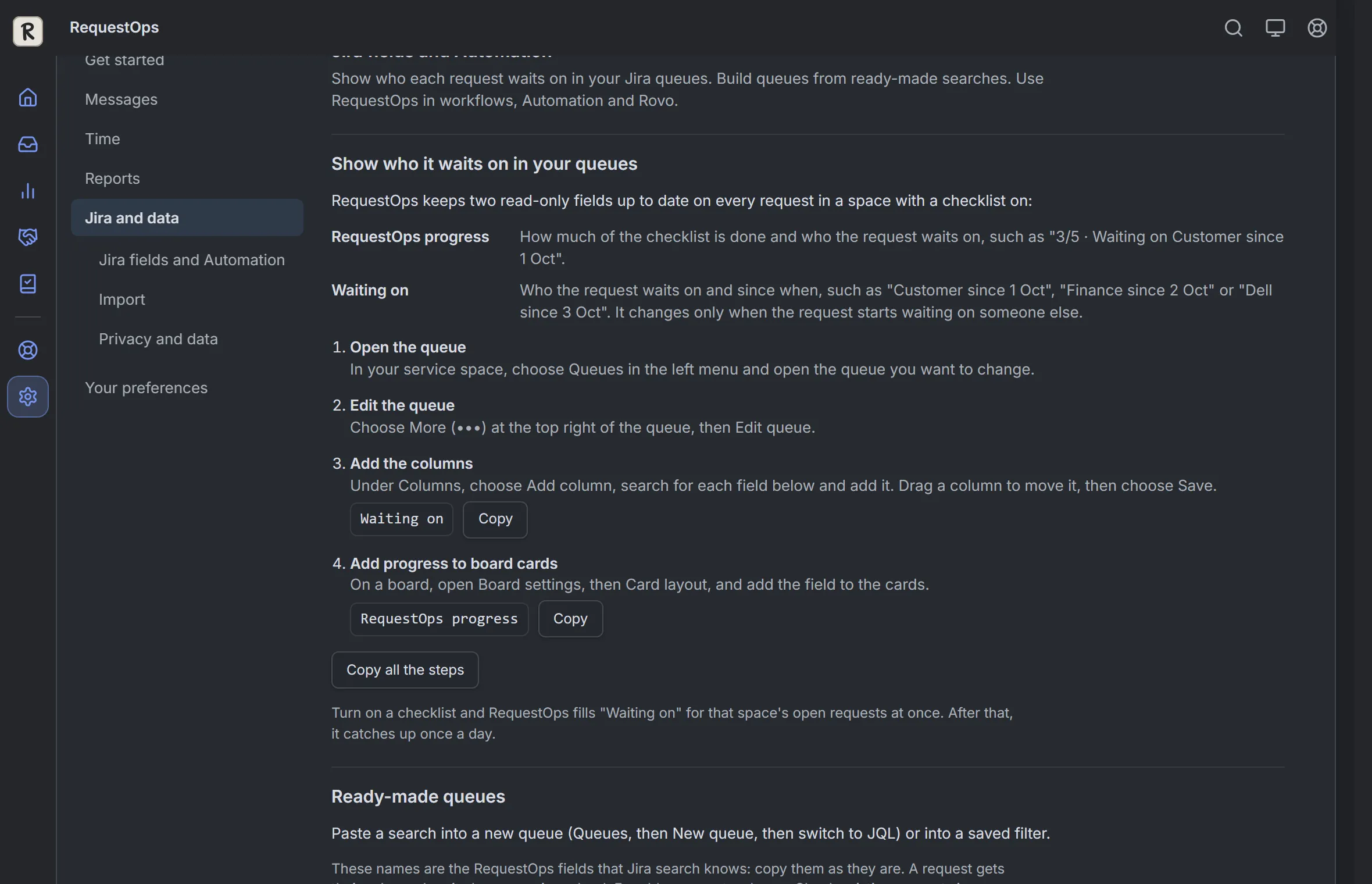
Settings, then Jira and data, then Jira fields and Automation. Sample data.
The same page has ready-made searches for queues. With the column, a queue shows who each request waits on, instead of one status name that agents may use in different ways.
You also decide what each status means. An admin opens Settings, then Time, then Waiting time, and under Who each status waits on chooses Customer, Your team, Approver, Another team, Vendor or Not waiting for each one. Choosing Customer also lets RequestOps ask the customer again while a request is in that status.
For the follow-up itself, Ask the customer writes a message from what is still missing, and shows it to the agent first, with about 10 seconds to undo after sending. A Jira admin can turn on Ask customers again, which repeats the ask a set number of days apart, and stops when the customer replies.
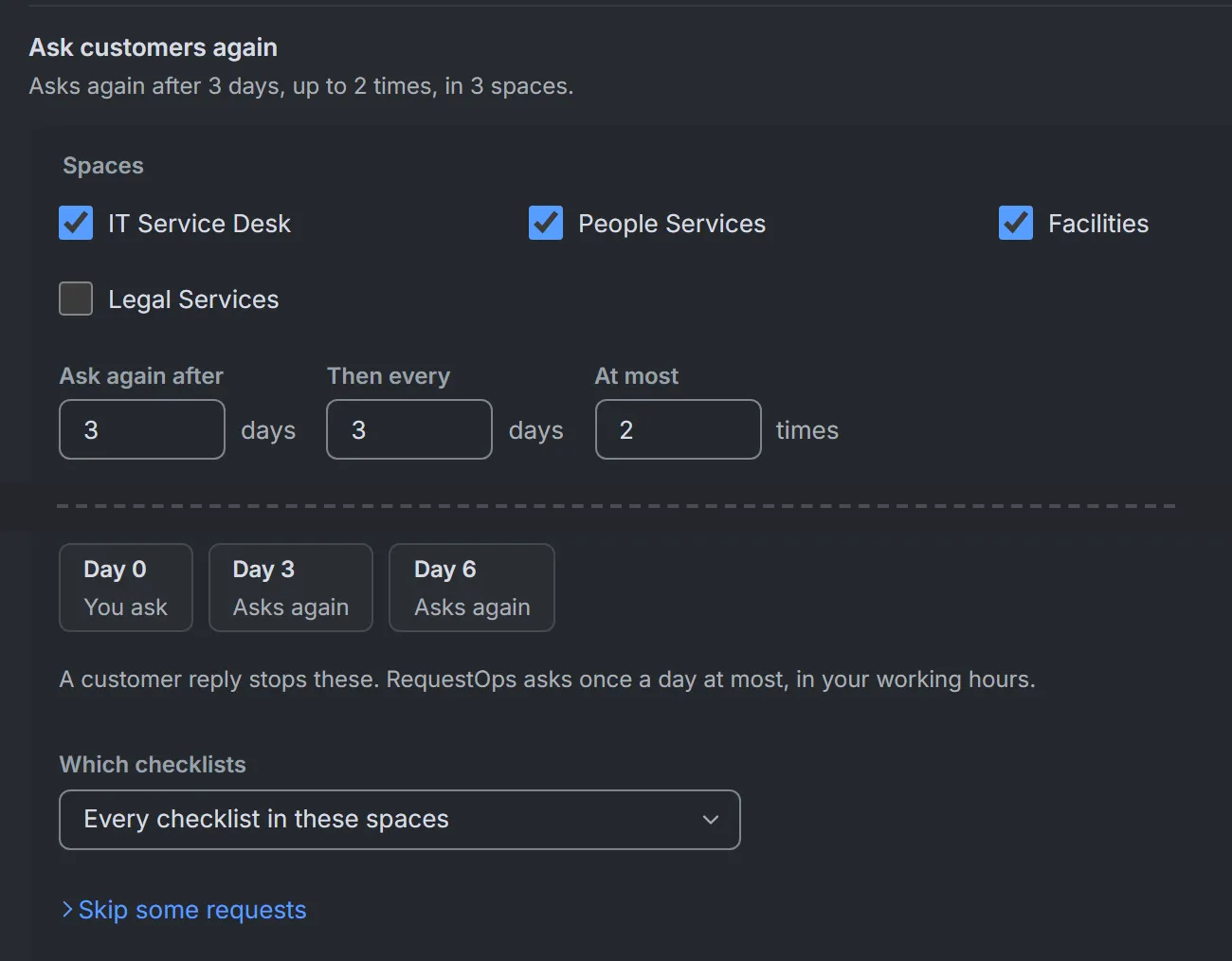
Ask customers again, at its default timing. It stays off until an admin turns it on. Sample data.
The guides are The “Waiting on” column in Jira queues, Tell RequestOps what a status means and Ask customers again and close unanswered requests.
Before you rely on the status
- Everyone agrees what Waiting for customer means, and uses it for that only.
- Something moves the request back when the customer replies, tested with a real customer account.
- A saved queue shows requests that have been in the status for three days or more.
- The first message names exactly what is missing.
- Someone looks at that queue every week.