
 Bunlings: sprint apps for Jira





A client wants to follow one space’s work items. A contractor needs to comment on a single board for three months. You’d rather not buy two Jira seats for that.
Jira has a way for exactly this: guest access. It’s fairly new, and its rules matter more than its price.
The short version
| Question | Answer |
|---|---|
| Are guests free? | Yes, up to 5 guests per paid user. |
| Which plans? | Standard, Premium and Enterprise. Not Free. |
| Who can be a guest? | Someone outside your organization, such as a client, vendor, freelancer or external consultant. |
| Where can a guest work? | In one Jira business or software space per site. |
| Can I turn a paid user into a guest? | No. Atlassian says you may not convert current or former paid users to guests. |
Atlassian also says the total number of users, paid and guests together, can’t exceed your Jira site’s user limit.
Who qualifies
The guest’s email domain must not match a domain connected to your organization, its affiliates or its subsidiaries. A colleague with a company address can’t be a guest, even if they only need to read one board.
Guest access is for people outside the organization, so it is not a cheaper seat for your own staff. Atlassian says it may restrict access when the feature is used outside its intent.
That is why nobody can just downgrade a contractor from a paid seat. The Atlassian feature request to allow it (JRACLOUD-98504) had 34 votes on 6 November 2026 and is still gathering interest.
What a guest can and can’t do
A guest sees the work shared with their space, under the guest role’s permissions. They can’t:
- open other spaces on the site
- administer a space (workflows, layouts, people, permissions)
- archive or restore work items
- edit or delete other people’s comments, attachments or worklogs
- manage sprints
- be a service project agent
- use Jira global permissions
- see site-level dashboards or goals, unless that’s explicitly supported
If a person needs more than one space, or any of those, they need a paid seat.
How to add a guest
You’ll need two people, because the role has two halves.
- A site admin invites the person. The site admin invites or approves a user to access Jira and selects Guest as their role.
- A space admin adds them to a space. The space admin adds the guest to the space and gives them a space role.
- Company-managed spaces only: a site admin also adds the guest role to the space’s permission scheme, and the role needs the Browse spaces permission, otherwise the guest can’t see the space.
Community members reported in mid-2026 that guest access was still rolling out to their sites. If you can’t pick Guest as a role yet, it may not have reached yours.
Where it stops
- Guests are not a loophole. Atlassian’s rules are about who the person is, not what they do. An outsider who needs one space fits. Your own team doesn’t.
- The allowance moves with your paid users. Five guests per paid user means that if you cut paid seats, you also lower the number of free guests. Check your guest count before a clean-up.
- Jira Service Management is different. Customers who only use the help center to send requests don’t take an agent license. That’s a separate rule from guest access.
- Confluence has its own guest rules. Don’t assume the two products match.
Where Seatwise helps
Seatwise doesn’t manage guests. It’s built for the paid side: Seatwise shows who holds a Jira seat, which groups give it, and when they last worked in Jira, so you know the paid count that your guest allowance depends on. When someone leaves a seat in a clean-up, it shows a preview first and lets you undo it for 30 days.
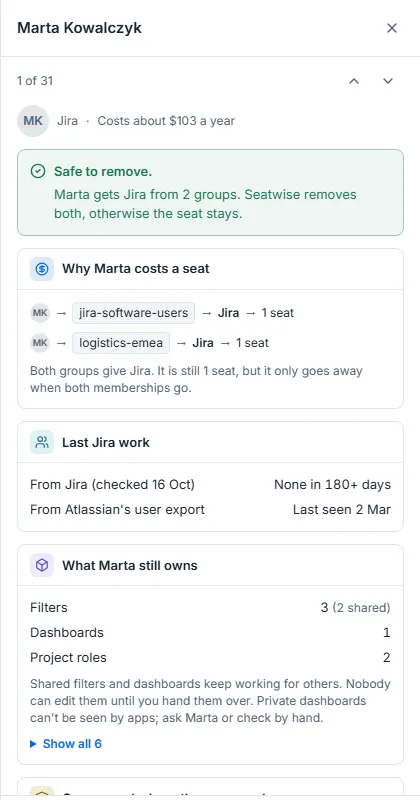
A paid Jira seat in Seatwise, with the two groups behind it. Sample data.
Checklist
☐ Is the person outside your organization (a different email domain)? ☐ Do they need only one business or software space? ☐ Are you on Standard, Premium or Enterprise? ☐ Is the guest count within 5 per paid user? ☐ Site admin invites as Guest, space admin adds the space role ☐ Company-managed space: guest role added to the permission scheme with Browse spaces
Sources: Atlassian: invite guests to Jira, Atlassian: manage guest access in Jira, Atlassian ticket JRACLOUD-98504, Atlassian: cloud licensing. Checked 6 November 2026.