


Your Jira renewal quote arrives, and the number is higher than last year’s. Nobody joined, nothing changed on your site. What changed is Atlassian’s price list: new cloud list prices took effect on 13 October 2026, for new purchases, renewals and upgrades.
Here is what that means for your bill, when it reaches you, and when cleaning up users really lowers it.
The 10-second version
About 7% more per user
Jira Standard and Premium, on sites up to 5,000 users. About 10% above that.
Your next bill or next quote
Monthly plans: every bill from 13 October 2026. Annual plans: every quote made from that date, renewals included.
Removing users saves only at a step
You save when you pay for fewer users: fewer on the next monthly bill, or a lower user tier at an annual renewal.
Prices last checked 16 October 2026 against Atlassian’s published tables. All prices are Atlassian’s list prices in US dollars, before tax and before any discount. If Atlassian changes its tables, its page wins.
How much more you pay
On Atlassian’s own tables, a Jira user on a monthly plan costs about 7% more on sites up to 5,000 users. Above 5,000, each band goes up by about 10%.
Jira monthly price per user: the rise in each user band
StandardPremium
Above 5,000 users: about 10%
Up to 5,000 users, each band rises by 6.7% to 7.4%. Above 5,000, by 9.4% to 10.5%, and above 10,000 users both plans also rise by between 9.4% and 10.5% per band. Worked out from Atlassian's price tables; every price is under "All the prices" below.
The other plans, worked out the same way:
+5.4% to +10.1%
Jira Standard and Premium, annual (price per user tier), depending on the tier
+7.8% to +8.2%
Jira Enterprise, annual (user tiers from 1,000)
+7.2% to +7.9%
Service Collection (Jira Service Management) Standard and Premium, monthly (price per agent)
+6.6% to +8.8%
Service Collection (Jira Service Management) Standard and Premium, annual
Which apps? Atlassian’s FAQ lists Jira, Confluence, Teamwork Collection and Jira Service Management / Service Collection (Standard, Premium and Enterprise), Atlassian Guard (Standard and Premium), Bitbucket Premium, Jira Product Discovery (Standard and Premium) and Atlassian Government Cloud. The Free plan is not on that list.
Three more points from the FAQ:
- Prices in Japanese yen also follow a new exchange rate. Atlassian updated the conversion rate from US dollars to yen by roughly 7.3%, and says app price changes come on top of that.
- Marketplace apps (made by other companies) are not changing price as a direct result of this update.
- Discount percentages for Academic, Social Impact, Social Impact Global Access, Classroom and Open Source licenses stay the same.
When the new price reaches your bill
The date is 13 October 2026, Pacific time. What happens next depends on how you pay.
13 October 2026New list prices start.
Your next bill New priceEvery bill on or after 13 October 2026 uses the new prices.
Quote made before 13 October Old priceAtlassian honours it at the old price until the quote expires.
Quote made or changed from 13 October New priceQuotes generated or modified on or after 13 October 2026 use the new prices, renewals included.
Renewing automatically by card New priceCharges on or after 13 October 2026 use the new price.
- Your renewal quote may already be here. Annual customers usually get one automatically 90 days before the subscription ends. If your renewal is close, check the date your quote was made and when it expires before you ask for a new one.
- Growing or adding? A higher user tier, a new plan or a new app on the site is calculated at the new prices if done on or after 13 October 2026.
- Monthly to annual at the old price? That had to be requested before 13 October 2026. Such a quote can’t be extended beyond 11 November 2026, and payment must arrive before it expires.
Monthly or annual: how the bill is worked out
Per user, in bands
Your first 100 users are charged at the first band's price, users 101 to 250 at the second band's price, and so on.
Atlassian's own example: Jira Standard with 450 users is 100 × $9.70, plus 150 × $8.20, plus 200 × $6.85. That is $3,570 a month at the new prices, an average of $7.93 per user.
Per user tier
You pay a fixed price for the tier at or above your user count, not for each user.
Atlassian's example: Jira Standard with 480 users is billed at the 500-user tier.
Two things follow. A 150-user site on an annual plan pays for 200 users, because there is no tier in between. And the jump at renewal is a fixed amount per tier, so it is the same whether you have 401 users or 500.
Thinking of switching to annual? Atlassian’s FAQ says moving from monthly to annual “may offer a discount of up to 2 months free”, depending on the number of users. On the list prices, 450 users on Jira Standard cost $3,570 × 12 = $42,840 over a year of monthly bills, against $39,000 for the 500-user annual tier. But an annual plan is a fixed tier: if you grow past it during the term, you move to the next tier and pay the difference for the rest of the term.
Potential saving vs actual saving
Atlassian’s FAQ suggests deactivating inactive users so they no longer count toward your bill. For annual plans it adds: reduce your user count, then contact Atlassian when your renewal is due to move to a lower tier. Removing someone’s Jira access also stops them counting for Jira, and keeps their account.
Before you start, keep two numbers apart:
What inactive users cost
What the seats of inactive users cost at your price. It is an estimate from your own inputs, and it is what our inactive Jira users cost calculator shows.
What changes on the invoice
It depends on how you are billed, which user tier you land in, and when you make the change.
Removing inactive users only saves money if, after the change, you pay for fewer users.
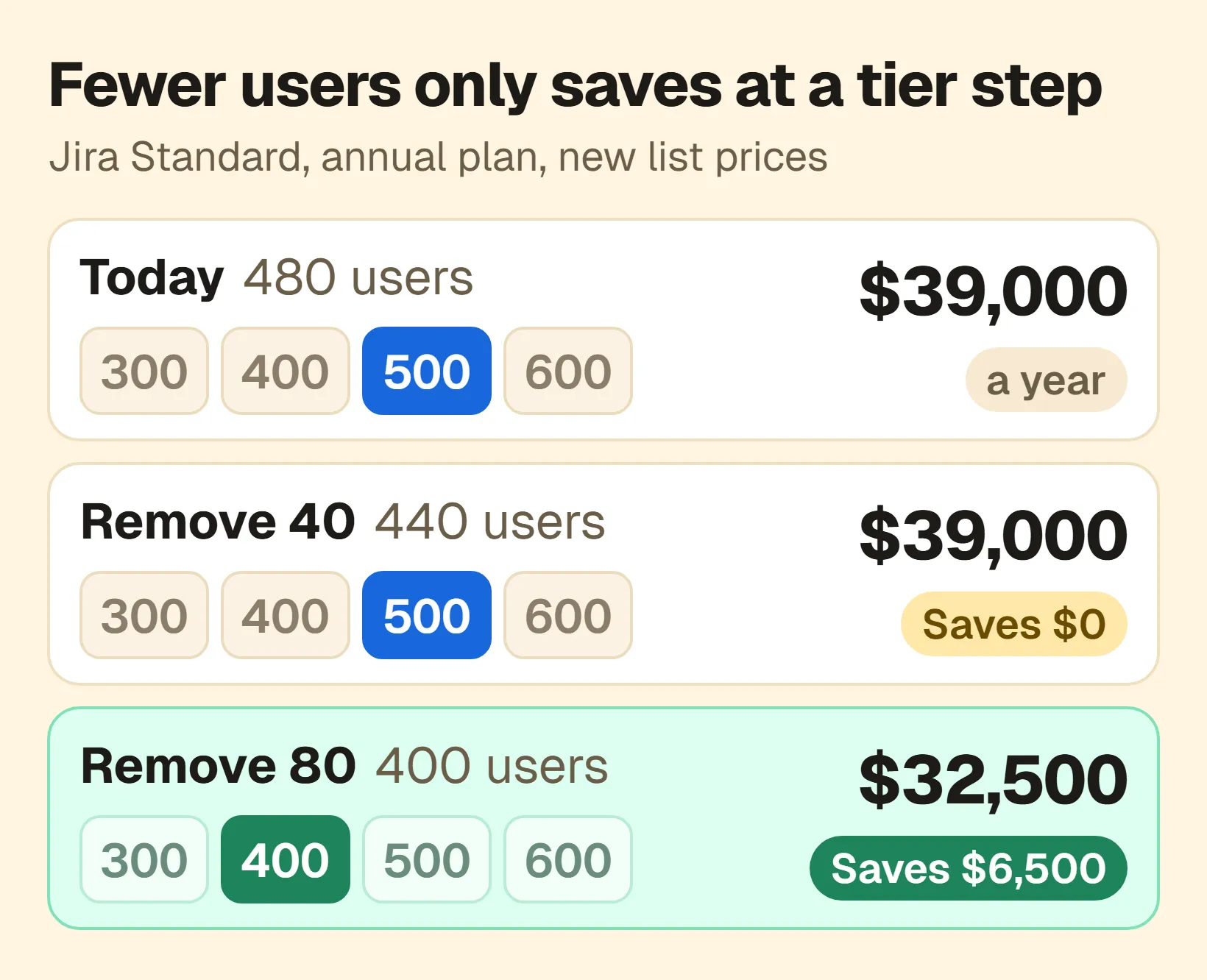
Same price rise, different results. Atlassian list prices from 13 October 2026, per year; the user counts are an example.
One site, 480 users, annual plan
Take Atlassian’s own example: Jira Standard with 480 users, renewing at the new prices. It pays for the 500-user tier: $39,000 a year. A review finds 40 people with Jira access who haven’t worked in Jira for months.
- Potential saving: 40 seats at the tier’s average of $78 per user a year ($39,000 ÷ 500) is $3,120 a year.
- Actual saving if 40 go: $0. 480 − 40 = 440 users is still the 500-user tier, at $39,000. What you gain is room: 60 people can join before you need a higher tier.
- Actual saving if 80 go: $6,500 a year. 400 users fits the 400-user tier at $32,500.
The same site on a monthly plan
On a monthly plan every user counts, so the saving is real sooner.
Jira Standard, monthly plan, one month's bill at the new prices
$274 a month less, from the next billing cycle
The timing still matters. Monthly bills use the highest number of users during the billing cycle, so removing people mid-cycle doesn’t lower that cycle’s bill. The count on the last day of the cycle sets the billed number for the next one.
What else decides the actual saving
- Every path to Jira has to go. A person stops counting only when no group or direct role still gives them Jira access. See why removing a user from a group did not remove Jira access.
- People can come back. Default groups add people automatically when they are given access, so check them before renewal.
- Record both numbers. Write down the potential saving when you remove access, then the actual change when the next invoice arrives. They may be weeks or months apart, and they are often different.
A renewal checklist
Before your Jira renewal (October 2026 prices)

1. Find your plan (monthly or annual), renewal date and current user tier on your last invoice or in Billing in Atlassian Administration.
2. If you have an open renewal quote, note when it was made and when it expires. A quote made before 13 October 2026 keeps the old price until it expires.
3. Look up your tier's new price in Atlassian's table.
4. Work out the next lower tier, and how many fewer users you need to reach it.
5. List people with Jira access but no Jira work in, say, 90 days. Ask their managers or space owners whether they still need it.
6. Remove Jira access through every group and role that gives it.
7. Check default groups, so people are not added back.
8. Check the billable user count again shortly before renewal. On an annual plan, contact Atlassian to renew at the lower tier.
9. When the invoice arrives, record the actual change next to your estimate.
Where Seatwise fits
Seatwise is our app, so read this part with that in mind. It lists the people who have a Jira seat but no Jira work for a period you choose, shows every group that gives each person their seat, and removes people from the groups that give them a seat, with Undo for 30 days. It never deletes or deactivates accounts.
Atlassian doesn’t tell apps your plan or price, so you enter them once. On an annual plan you also add the user steps from your quote, and Seatwise’s Home page shows Price step at renewal: how many fewer people you need to pay for the next lower step. See plan details and the renewal report or how Seatwise works.
You don’t need an app to do any of this. The checklist above works with Atlassian’s user export and a spreadsheet.
All the prices
Atlassian’s list prices in US dollars, before tax and before any discount, from Atlassian’s tables. Prices last checked 16 October 2026. Your own numbers can differ: other currencies, taxes, partner pricing and earlier discounts all change the total. Your last invoice and your renewal quote are the real figures.
Monthly plans use progressive pricing, so each band’s price applies to the users in that band. Above 10,000 users, both plans rise by between 9.4% and 10.5% per band; the full tables are on Atlassian’s page.
SJira Standard, monthly: per user per month
| Users | Before | From 13 Oct 2026 | Change |
|---|---|---|---|
| 1-100 | $9.05 | $9.70 | +7.2% |
| 101-250 | $7.65 | $8.20 | +7.2% |
| 251-1,000 | $6.40 | $6.85 | +7.0% |
| 1,001-2,500 | $5.80 | $6.20 | +6.9% |
| 2,501-5,000 | $5.40 | $5.80 | +7.4% |
| 5,001-7,500 | $5.10 | $5.60 | +9.8% |
| 7,501-10,000 | $4.80 | $5.30 | +10.4% |
PJira Premium, monthly: per user per month
| Users | Before | From 13 Oct 2026 | Change |
|---|---|---|---|
| 1-100 | $18.30 | $19.60 | +7.1% |
| 101-250 | $13.70 | $14.65 | +6.9% |
| 251-1,000 | $9.55 | $10.20 | +6.8% |
| 1,001-2,500 | $9.25 | $9.90 | +7.0% |
| 2,501-5,000 | $8.90 | $9.50 | +6.7% |
| 5,001-7,500 | $8.20 | $9.00 | +9.8% |
| 7,501-10,000 | $7.85 | $8.65 | +10.2% |
Annual plans are sold in user tiers at a fixed price per year. Atlassian publishes more tiers than shown here (15, 1,400, 1,800, 2,250 and so on, up to 100,000). Jira Enterprise starts at the 1,000-user tier: $166,000 → $179,000 a year.
SJira Standard, annual: per user tier per year
| User tier | Before | From 13 Oct 2026 | Change |
|---|---|---|---|
| 10 | $900 | $950 | +5.6% |
| 25 | $2,250 | $2,450 | +8.9% |
| 50 | $4,550 | $4,850 | +6.6% |
| 100 | $9,050 | $9,700 | +7.2% |
| 200 | $16,500 | $18,000 | +9.1% |
| 300 | $23,500 | $25,500 | +8.5% |
| 400 | $30,000 | $32,500 | +8.3% |
| 500 | $36,500 | $39,000 | +6.8% |
| 600 | $43,000 | $46,000 | +7.0% |
| 800 | $55,500 | $59,500 | +7.2% |
| 1,000 | $68,500 | $73,500 | +7.3% |
| 1,200 | $80,000 | $86,000 | +7.5% |
| 1,600 | $103,500 | $111,000 | +7.2% |
| 2,000 | $126,500 | $135,000 | +6.7% |
| 2,500 | $156,000 | $166,000 | +6.4% |
| 5,000 | $291,000 | $311,000 | +6.9% |
| 10,000 | $538,000 | $584,000 | +8.6% |
PJira Premium, annual: per user tier per year
| User tier | Before | From 13 Oct 2026 | Change |
|---|---|---|---|
| 10 | $1,850 | $1,950 | +5.4% |
| 25 | $4,600 | $4,900 | +6.5% |
| 50 | $9,150 | $9,800 | +7.1% |
| 100 | $18,300 | $19,500 | +6.6% |
| 200 | $32,000 | $34,500 | +7.8% |
| 300 | $43,500 | $46,500 | +6.9% |
| 400 | $53,000 | $57,000 | +7.5% |
| 500 | $62,500 | $67,000 | +7.2% |
| 600 | $72,500 | $77,500 | +6.9% |
| 800 | $91,500 | $97,500 | +6.6% |
| 1,000 | $110,500 | $118,000 | +6.8% |
| 1,200 | $129,000 | $138,000 | +7.0% |
| 1,600 | $166,000 | $177,000 | +6.6% |
| 2,000 | $203,000 | $217,000 | +6.9% |
| 2,500 | $249,000 | $267,000 | +7.2% |
| 5,000 | $472,000 | $504,000 | +6.8% |
| 10,000 | $873,000 | $945,000 | +8.2% |
=What five site sizes pay, before → from 13 Oct 2026
A monthly plan bills every user, one month at a time:
| Users | Standard, per month | Premium, per month |
|---|---|---|
| 50 | $452.50 → $485.00 (+$32.50) | $915.00 → $980.00 (+$65.00) |
| 150 | $1,287.50 → $1,380.00 (+$92.50) | $2,515.00 → $2,692.50 (+$177.50) |
| 450 | $3,332.50 → $3,570.00 (+$237.50) | $5,795.00 → $6,197.50 (+$402.50) |
| 1,200 | $8,012.50 → $8,577.50 (+$565.00) | $12,897.50 → $13,787.50 (+$890.00) |
| 3,000 | $18,252.50 → $19,537.50 (+$1,285.00) | $29,372.50 → $31,407.50 (+$2,035.00) |
An annual plan bills the tier at or above the user count, per year:
| Users | Tier | Standard, per year | Premium, per year |
|---|---|---|---|
| 50 | 50 | $4,550 → $4,850 (+$300) | $9,150 → $9,800 (+$650) |
| 150 | 200 | $16,500 → $18,000 (+$1,500) | $32,000 → $34,500 (+$2,500) |
| 450 | 500 | $36,500 → $39,000 (+$2,500) | $62,500 → $67,000 (+$4,500) |
| 1,200 | 1,200 | $80,000 → $86,000 (+$6,000) | $129,000 → $138,000 (+$9,000) |
| 3,000 | 3,000 | $183,000 → $195,000 (+$12,000) | $294,000 → $314,000 (+$20,000) |
Sources
All checked on 16 October 2026.
- Atlassian: future cloud pricing FAQ: effective date, the list of changed apps and plans, monthly and annual timing, quotes, early renewal, upgrades, how monthly and annual prices are calculated, ways to reduce the bill, Marketplace apps and discounts.
- Atlassian: cloud pricing tables, current and new: every price on this page. The percentages are worked out from these tables.
- Atlassian: currency conversion rate change, US dollar to Japanese yen: the roughly 7.3% yen rate update.
- Atlassian: how maximum quantity billing works: monthly bills use the highest user count in the cycle.
- Atlassian: manage users and user tiers: annual subscriptions use user tiers, monthly subscriptions per-user pricing.
- Atlassian: understand default groups: people are added to default groups automatically.