


A contractor’s work ends, but they may come back next quarter. An employee leaves for good. A shared account turns out to belong to an integration. Each case calls for a different action in Atlassian Administration. The wrong choice costs you either a slow, manual rebuild later or money every month.
Atlassian gives you five actions. They differ in four ways: how far the cut reaches, whether you keep paying, what happens to groups and data, and how easy it is to undo.
The five actions side by side
| Action | What it cuts | Billing | Groups, roles and data | Way back | Who can do it |
|---|---|---|---|---|---|
| Remove app access (for example, Jira only) | One app. Other apps and the account stay. | The person stops counting toward that app’s plan once no group gives them the app. | They are taken out of every group that gives that app. The account stays. | Grant access again. | Organization admins. User access admins for apps they administer. Site admins in the original experience. |
| Suspend access | Every app in this organization (or this site, in the original experience). | Not billed while suspended. | Roles and group memberships are kept. The account stays. | Restore access: previous roles and groups come back. | Organization admins. User access admins, with limits. Site admins in the original experience. |
| Remove user | Every app in this organization (or this site). | Not billed once removed. | Roles and group memberships here are lost. The account is not deleted. | Invite them again, then reassign roles and groups by hand. | Same as suspend. |
| Deactivate account (managed accounts only) | The account itself, in every organization. | Billing for the account stops. | Personal data is not deleted. Roles and groups are kept. | Reactivate account at any time; billing resumes. | Organization admins. |
| Delete account (managed accounts only) | The account, permanently, after 14 days. | Billing stops. | Most profile data is deleted. Work items, pages and comments they created stay, shown as Former user. | Cancel deletion within the 14 days. After that, none. | Organization admins. |
Sources: Remove or suspend a user, Remove app access for users, Deactivate a managed account, Delete a managed account, checked 13 October 2026.
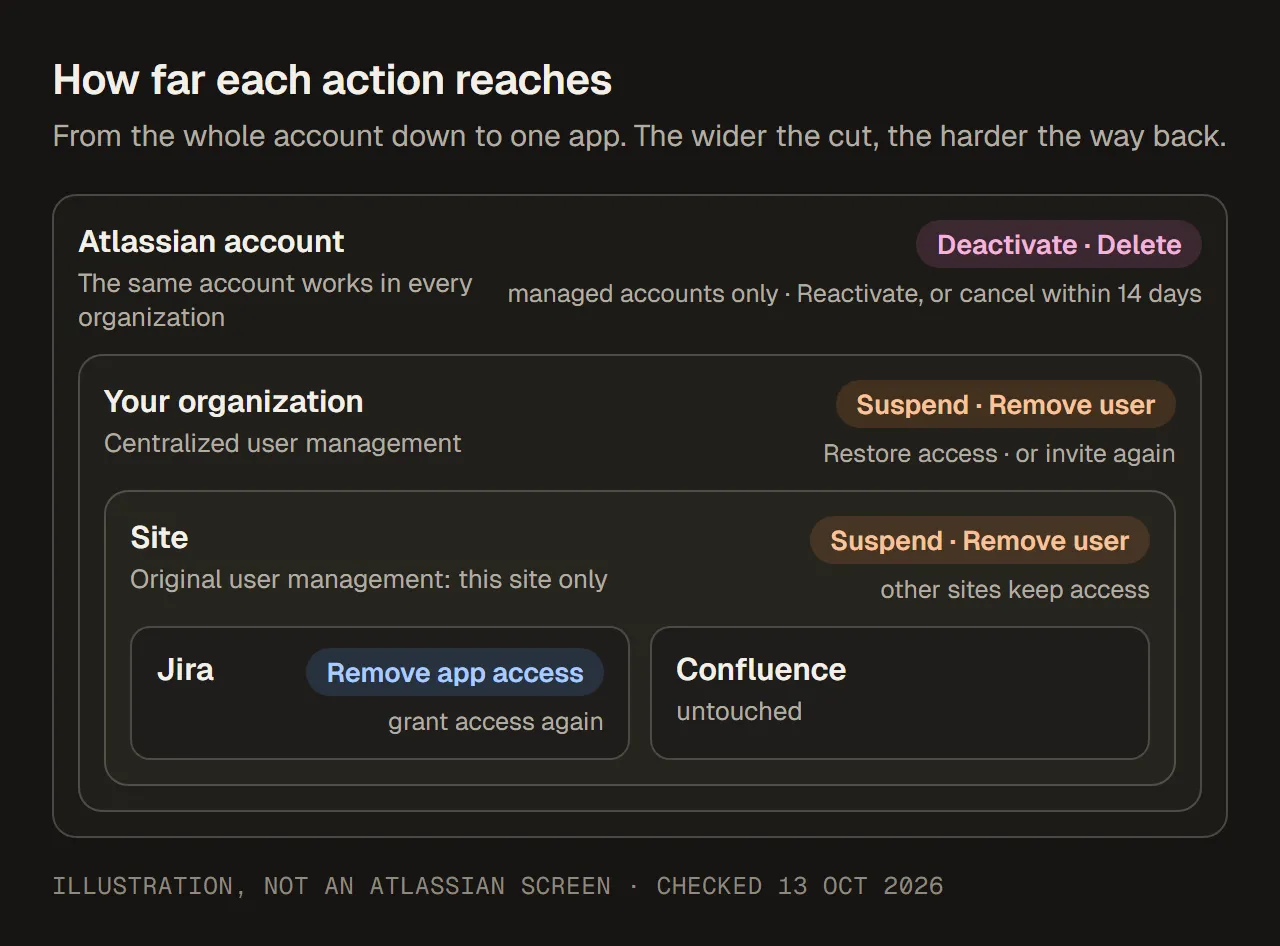
How far each action reaches. Illustration, not an Atlassian screen.
First, check which user management experience you have
Atlassian Administration comes in two versions, and suspend and remove reach different distances in each.
- Centralized user management: Users sits under Directory, and the Users page has no Site filter. Suspend and remove act on the whole organization. Access to other organizations is not affected.
- Original user management: you pick a site first, and the Users page has a Site filter. Suspend and remove act on that site only. The person keeps access to other sites in the organization.
So in the original experience, removing someone from one site can leave them working on another. If you have more than one site, check each one.
Sources: Remove or suspend a user, checked 13 October 2026.
When to suspend access
Suspend when access should stop now and is likely to come back. Typical cases are leave, a paused contract, an investigation, or an access freeze while ownership is sorted out.
What makes suspension useful is the way back. Restore access gives the person their previous roles and group memberships, so nobody has to remember which groups they were in. You are not billed for them while they are suspended.
To suspend:
- Go to Atlassian Administration and select your organization.
- Centralized: select Directory › Users. Original: select the site, then Users.
- Find the person, open More actions (•••) and select Suspend access.
Restore access is in the same menu.
Sources: Remove or suspend a user, checked 13 October 2026.
When to remove the user
Remove the user when they no longer belong in the organization (or site): a former employee, a contractor whose work has ended, an external collaborator whose project is over. You are not billed for them once they are removed.
The cost of removing is the way back. If they return, you must invite them again and reassign their roles and group memberships by hand. Before you remove anyone, write down their groups and roles.
Removing a user does not delete their Atlassian account. It does not touch their access to other organizations either.
The steps match suspension. In the same More actions (•••) menu, select Remove user.
Sources: Remove or suspend a user, checked 13 October 2026.
When to remove only app access
Sometimes the person should keep Confluence but lose Jira. Then neither suspend nor remove is right: remove app access for Jira only.
- Centralized: Directory › Users › select the person › Apps tab. Original: select the site › Users › select the person › Apps tab.
- Find Jira, open More actions and select Remove access.
This takes the person out of every group that gives Jira. That matters, because Jira access often comes through several groups at once. If the person holds an admin role for the app, Atlassian asks you to remove that role first. If your groups are synced from an identity provider, make the change there and let it sync.
If access survives anyway, see why removing a user from a group did not remove Jira access.
Sources: Remove app access for users, checked 13 October 2026.
Deactivate and delete: for managed accounts only
A managed account is one your organization controls fully: you verified the email domain and claimed the account. Only managed accounts can be deactivated or deleted. For everyone else, such as people with personal email addresses or accounts you have not claimed, the strongest actions are suspend and remove.
Deactivate closes the account itself, not just your access to it. The person can no longer use that account for apps in any organization. This can include a partner’s or client’s site, so think about that before you deactivate. Billing stops, and personal data is not deleted. Reactivate account brings it back at any time, and billing resumes.
Delete is for permanent departures where the account should go. Scheduling a deletion deactivates the account for 14 days, and Atlassian says that period cannot be shortened. During those 14 days you can Cancel deletion. After that, the account is deleted and shows as Former user. Most profile data is removed (name, email, job title, picture and similar). The work items, pages and comments the person created stay.
Both actions start from the same place:
- Directory › Users, filter Account type › Managed accounts.
- Select the person, then More actions (•••) › Deactivate account or Delete account.
If your users come from an identity provider, deactivate or remove the person there. Atlassian warns that a deleted account will otherwise be created again and the person can log in.
Sources: What are managed accounts?, Deactivate a managed account, Delete a managed account, checked 13 October 2026.
What happens to the bill, and when
App access is the billing link. A plan’s user count is everyone with access to at least one app under that plan, including people who have been invited but haven’t accepted yet. Suspending or removing someone who had no paid app access saves nothing. It is account hygiene, not licence savings.
Timing depends on how you pay:
- Monthly subscriptions (Jira, Jira Service Management, Confluence and others) are billed on the highest number of users during the billing period. If you remove users partway through, the bill for that period does not drop and there is no credit. You can give the freed seats to other people until the period ends. The user count on the last day sets the next period’s quantity. Atlassian’s page describes removal and does not mention suspension separately.
- Annual subscriptions are bought for a user tier. If your user count goes over the tier, you need to move up a tier or lower the count. Atlassian emails you when you reach 80% of the tier.
To see the numbers, go to Atlassian Administration › Billing, open the subscription, and select Manage. The Billed user tab shows the billed quantity and the next bill estimate.
Sources: Monitor your plan’s user counts, How maximum quantity billing works, checked 13 October 2026.
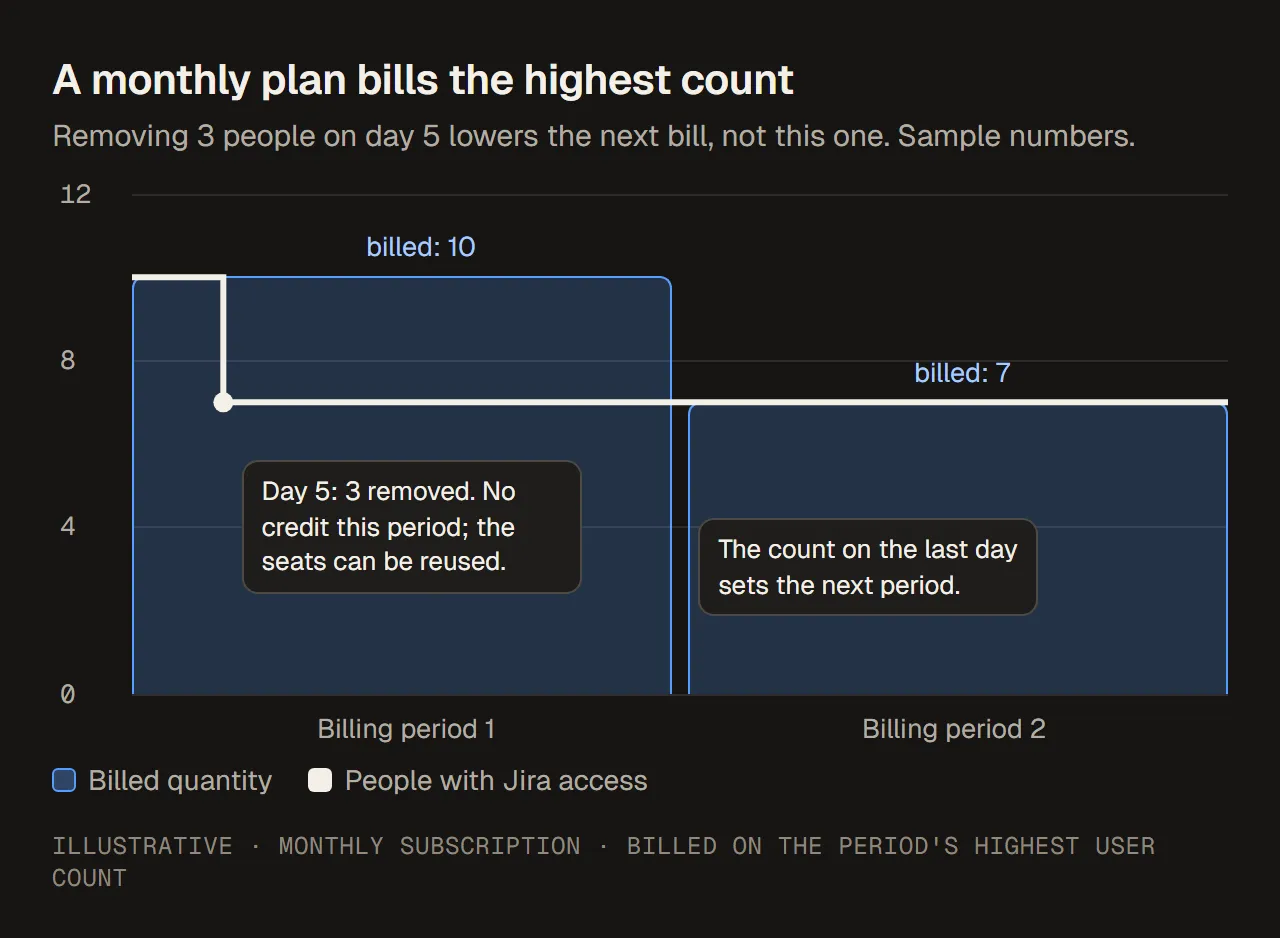
Removing users on a monthly plan lowers the next bill, not the current one. Sample numbers.
If an identity provider manages your users
With user provisioning (SCIM) from an identity provider such as Okta or Microsoft Entra ID, the identity provider is in charge:
- Synced groups are read-only in Atlassian. You change their members in the identity provider.
- When you delete a user in the identity provider, Atlassian deactivates the account. It does not delete it.
- A change you make only in Atlassian can be undone by the next sync, or never take effect.
So for provisioned users, take the access decision in the identity provider, then check Atlassian Administration after the sync. User provisioning needs Atlassian Guard Standard.
Sources: Understand user provisioning, Remove app access for users, checked 13 October 2026.
Before you act: a short checklist
The same checks apply whether you suspend, remove or hold, and whether it is one person or a list of unused accounts.
- Is there app access at all? Check the person’s Apps tab. No paid app means no licence saving.
- What kind of account is it? A person, a contractor, an external collaborator, or an account used by an integration or script. Hold integration accounts until their owner confirms that nothing depends on them.
- Is it a managed account? If not, suspend or remove are your options.
- Does an identity provider own it? If so, make the change there.
- Is the need temporary or permanent? Temporary: suspend. Permanent: remove, or deactivate or delete if it is a managed account.
- Write it down first. Record the groups, roles and admin roles, the owner who approved the change, the reason, and whether the person may return. After removal, the groups are gone from the user and hard to reconstruct.
- Check afterwards. Confirm that the Apps tab is empty for the plan you meant to reduce, and that the next bill reflects it.
Which to choose
| Situation | What to check | Choose |
|---|---|---|
| Leave, paused contract or investigation | Expected return date and who approves restoring | Suspend access and note the restore owner |
| Employee or contractor has left for good | Leaving date, remaining app access, other sites | Remove user. For managed accounts, deactivate or delete if your policy says so. |
| Should keep some apps but not Jira | Which groups give Jira | Remove app access for Jira |
| External collaborator | Business owner and whether work continues | Suspend if the work pauses, remove if it ended |
| Looks unused but runs an integration | Integration owner and what depends on it | Hold until the owner confirms |
| Licence cleanup before renewal | Paid app access and billing timing | The action that actually removes paid access, in time for the next period or tier |
Common mistakes
- Removing when suspension would do. If the person returns, you rebuild their groups and roles from memory.
- Suspending someone who had no paid app access and expecting the bill to drop.
- Removing Jira from one group while another group still gives it. The person keeps Jira and keeps counting.
- Removing in one site, forgetting another (original user management).
- Deactivating a managed account to block one site, and cutting the person off from every organization they work with.
- Changing a provisioned user only in Atlassian. The next sync can undo it.
- Expecting a refund mid-period on a monthly plan.
- Not recording why. Without the reason, an urgent request to restore access turns into guesswork.