
Cleanup-ready, needs-review, protected, and estimated-impact rows appear before a cleanup plan is built.
License Guard for Jira License Cleanup
Find wasted Jira seats before renewal.
Find wasted Jira seats before your next bill or renewal. License Guard for Jira License Cleanup runs a savings scan, explains why each Jira seat is billable, and lets admins preview cleanup before changing access.
Preview-first by defaultNo Atlassian account deletionEstimated next-cycle / renewal impactNo Admin API token required for the default scan
Demo with sound
Billable paths help reviewers understand product access, groups, and protected cases before changing access.
License Guard for Jira License Cleanup does not delete Atlassian accounts or guarantee billing savings; it helps admins review candidates before action.
Quick verdict
Use License Guard for Jira License Cleanup when renewal pressure, wasted-seat review, or finance questions require more than a stale-user export. Do not use it as a guarantee of savings, a replacement for identity governance, or proof that an external signal does not exist.
Best fit
Jira admins who need cleanup-ready seats, billable-path context, protected-row handling, and a preview before access changes.
Not a fit for
Teams looking for Atlassian account deletion, SCIM replacement, contract billing advice, or automatic cleanup without admin review.
Review record
Review lanes, billable paths, cleanup preview, skipped rows, exports, and cycle records that can survive finance or audit follow-up.
See value in the first scan
Start with a scan, not a setup project. License Guard for Jira License Cleanup shows cleanup-ready users, review rows, protected accounts, and estimated impact before you configure deeper workflows.
Estimate the cleanup opportunity
Estimate the cleanup opportunity
| Current Jira users | |
|---|---|
| Estimated inactive or reviewable users | |
| Monthly cost per seat | |
| Billing model | |
| Renewal or billing date |
Estimated monthly impact: $216
Estimated annualized impact: $2,592
Estimated seats to review: 18
This is an estimate. Actual billing impact depends on your Atlassian plan, billing model, timing, and contract.
What License Guard for Jira License Cleanup does
Fast discovery first, then cleanup controls and proof.
Savings Finder
See cleanup-ready seats, review rows, protected accounts, and estimated next-cycle or renewal impact in one screen.
Billable-path detail
Trace the group or product-access path that keeps a Jira user billable before deciding whether to remove access.
Cleanup preview
Build a selected action plan, see skipped/protected users, export the plan, and apply changes only if live cleanup is enabled.
Scheduled checks
Run recurring savings checks in preview mode by default so cleanup candidates surface before renewal pressure hits.
Proof when needed
Keep cycle proof, exported evidence, and decision records for teams that need finance handoff or audit follow-through.
Screenshots
See the License Guard for Jira License Cleanup workflow
Each screenshot shows one workflow step: savings discovery, billable-path explanation, and cleanup preview.
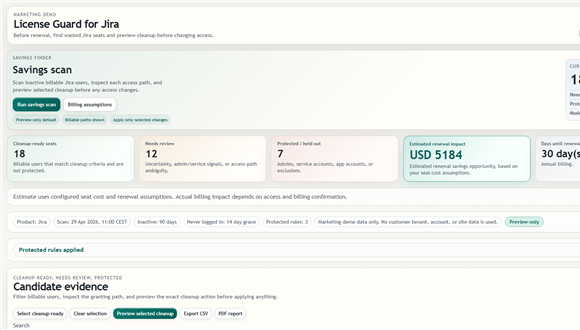
Find wasted seats
See cleanup-ready seats, review rows, protected users, and estimated next-cycle or renewal impact in one scan. This is the first screen a Jira admin can use to decide where review time is worth spending.
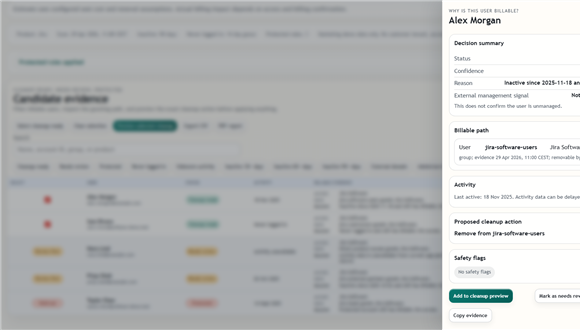
Explain billable access
The billable-path drawer shows why a user still costs money and flags admin, service, external, or uncertain rows. It gives the reviewer enough context before access is removed or left alone.
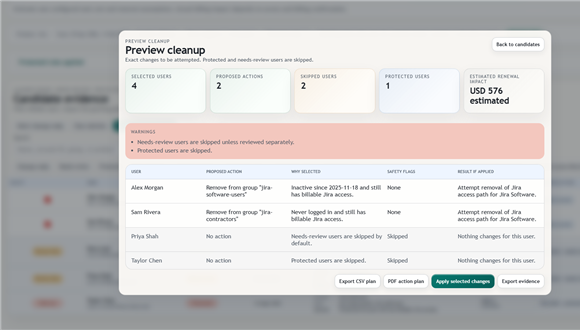
Preview cleanup first
Cleanup preview shows what would change, what will be skipped, and what impact is estimated before access changes. Export the plan or apply only supported selected changes after review.
Best first review
Install the app, run a savings scan, set billing assumptions if you want impact estimates, open a cleanup-ready row, then preview cleanup or export an action plan.
FAQ
Questions before the first scan
Does License Guard for Jira License Cleanup guarantee savings?
No. It estimates next-cycle or renewal impact based on assumptions and selected cleanup candidates.
Does it delete Atlassian accounts?
No. License Guard for Jira License Cleanup is for Jira access and license cleanup workflows, not account deletion.
Do I need Atlassian Admin API tokens?
No, not for the default scan. Some org-level identity-management signals may be unavailable without additional admin data.
Is cleanup automatic?
No. Scheduled checks are preview-only by default. Live cleanup, if supported and enabled, requires explicit admin action.