


A Jira admin is asked about one name on the bill: “This person left the team months ago. Why are we still paying for them?” The honest answer usually has nothing to do with when they last logged in. It has to do with which paths still give them access to Jira.
This article is about one person and Jira: what makes them billable, who doesn’t count, how to check, and what has to happen before the bill changes. If your question is how one person is counted across several apps, sites or plans, read Atlassian unique billable users explained.
The rule: access, not activity
Atlassian prices its cloud apps on the number of users who can access the app. For Jira, that means everyone with a role that lets them use Jira on your site. The role can be given to the person directly, or to a group they belong to.
Three consequences surprise people:
- Logging in is not required. People added to an app count toward billing even if they don’t accept the invite or log in.
- Inactivity doesn’t stop the count. Someone who hasn’t opened Jira for six months still counts while their access is there.
- Group rows don’t add up. A person in three groups that all give Jira access is still one Jira user. But removing them from one of those groups changes nothing while another path remains.
Sources: Atlassian: manage users and user tiers, Atlassian: cloud licensing, Atlassian: how app access works. Checked 13 October 2026.
Who counts for Jira, and who doesn’t
| Situation | Counts for Jira? | Note |
|---|---|---|
| Has the User role on Jira, directly or through a group | Yes | The normal case |
| Invited and given access, never accepted or logged in | Yes | Counts from the moment access is given |
| Has access but hasn’t been active for months | Yes | Activity is a reason to review, not a billing rule |
| Guest in one Jira space | No, within the limit | Free up to 5 guests per paid user. Standard, Premium and Enterprise plans only. Current or former paid users can’t be converted to guests. |
| No role on Jira (None), even if they are in other groups | No | Groups only matter if they give Jira access |
| Access suspended | No | Not billed while suspended. Access can be restored. |
| Removed from the site or organization | No | |
| Account deactivated | No | |
| Site admin with no Jira access | No | Admin roles and app access are assigned separately |
| Jira Service Management portal-only customer | No | Not a licensed user |
Jira Service Management and Jira Product Discovery are separate apps with their own rules. In Jira Service Management, agents are billed and portal-only customers aren’t. In Jira Product Discovery, creators are billed and contributors only need a free account.
On the Free plan, Jira is available for up to 10 users.
Sources: Atlassian: manage guest access in Jira, Atlassian: remove a user or suspend their access, Atlassian: cloud licensing, Atlassian: site administrator role, Atlassian: give users access to apps, Atlassian: understand default groups, Atlassian: Jira Product Discovery licensing. Checked 13 October 2026.
How to check one person
The steps below are for centralized user management. If your Users page has a Site filter, you have the original experience: open Users for the site instead. The tabs work the same way.
- See their Jira role. In Atlassian Administration, select your organization, then Directory › Users, and select the person. The Apps tab shows the apps they can use and their role in each.
- Find every group that gives Jira access. Go to Apps › Atlassian apps and select Manage app for Jira to see the groups that grant it (in the original experience, use App access). Then check which of those groups the person is in. For many people at once, use Directory › Users › Export users with Group membership and App access included: you get each person’s groups and a Role column for each app.
- Mark the default group. Every app role has at least one default group, and people are placed in it automatically when they are given access. For Jira, its name usually looks like
jira-users-yoursite, orjira-usersorjira-software-userson older sites. - Mark synced groups. Groups synced from an identity provider are read-only in Atlassian Administration. Their membership is changed at the identity provider.
- Check the count. In the improved billing experience, Billing › Subscriptions shows the number of billable users for each app. In the original billing experience, open Manage subscriptions in admin.atlassian.com, where each app shows its billable users or user tier.
One export is easy to misread. The managed accounts export has a Billable column, but it means “counts toward the Atlassian Guard Standard bill”, not toward Jira.
For a full walk-through of step 2, see How to check which groups give Jira access.
Sources: Atlassian: remove app access for users, Atlassian: give users access to apps, Atlassian: export users from a site, Atlassian: understand default groups, Atlassian: export managed accounts. Checked 13 October 2026.
Worked example: one person, two groups
Sam (a fictional person on a fictional site called sample) moved from the mobile team to a sales role three months ago. Sam is in two groups that both give Jira access:
jira-users-sample, the default group for Jira, added automatically when Sam was invitedteam-mobile, which the mobile team’s lead set up and gave Jira access
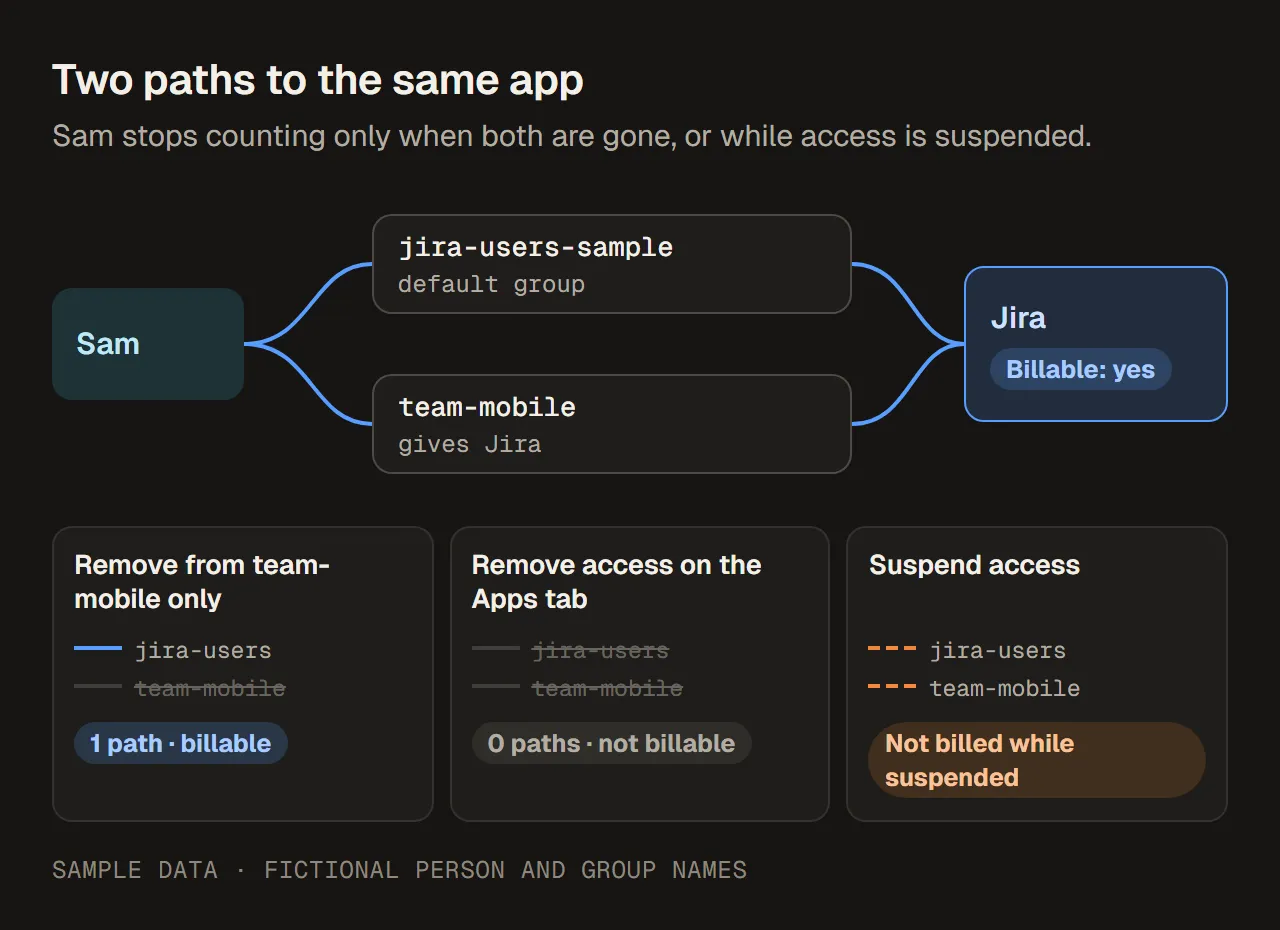
Two paths to the same app. Sam stops counting only when both are gone, or while access is suspended. Sample data.
What each action does:
| Action | Paths to Jira left | Billable for Jira? |
|---|---|---|
| Starting point | 2 | Yes |
Remove Sam from team-mobile only | 1 (jira-users-sample) | Yes |
| On Sam’s Apps tab, select Remove access for Jira | 0. Sam is removed from every group that grants Jira. | No |
| Suspend Sam’s access instead | Not changed | Not billed while suspended |
Removing Sam from one group is the classic reason a cleanup “didn’t work”. If it happened to you, see Why removing a user from a group did not remove Jira access. For the choice between suspending and removing, see Suspend vs remove user access in Atlassian.
Sources: Atlassian: remove app access for users, Atlassian: remove a user or suspend their access. Checked 13 October 2026.
Five questions that are easy to mix up
“Billable” is only one of five separate questions. Answer them in order, and write the answer down.
| Question | Where the answer comes from | Sam (sample data) |
|---|---|---|
| 1. Does the person have Jira access? | The Apps tab, or the Role column in the user export | Yes, role User |
| 2. Do they count for Jira? | The rules above | Yes, through two groups |
| 3. Do they still need it? | Their manager or the space owner. Last seen in the user export is a hint, not an answer. | No: the sales manager confirms Sam doesn’t work in Jira |
| 4. Who approves, and who makes the change? | The business owner approves. An organization admin, a user access admin for Jira, or (in the original experience) a site admin makes the change. | Sales manager approves; organization admin removes access |
| 5. Did the bill change? | Billing, after the timing below | On a monthly plan, the Jira count is one lower from the next cycle |
Keeping these apart avoids the usual arguments. A person can be billable and still needed. A person can be unneeded and still billable because nobody approved the change. And a change can be made correctly without the invoice moving yet.
Sources: Atlassian: give users access to apps, Atlassian: export users from a site. Checked 13 October 2026.
When removing access changes the bill
The count drops when access goes, but the invoice follows your billing cycle.
- Monthly subscriptions use maximum quantity billing. The bill for a cycle is based on the highest number of users during that cycle. Removing people mid-cycle doesn’t reduce that cycle’s bill, but the freed seats can be given to someone else until it ends. The next cycle starts from the count on the last day. For example, with sample numbers: 40 Jira users on day 1 and 5 removed on day 10 means this cycle is still billed for 40, and the next one starts at 35 if nobody was added.
- Annual subscriptions are sold in user tiers. Removing people doesn’t change a tier you have already bought. It keeps you within the tier, and it gives you a lower count to work from the next time a tier is chosen.
- Enterprise plans are billed annually on a user tier, at the organization level.
So “we removed 10 people” and “the invoice went down” are two different facts, possibly weeks or months apart. Record both.
Sources: Atlassian: how maximum quantity billing works, Atlassian: cloud licensing, Atlassian: manage users and user tiers, Atlassian: manage your bill for Enterprise plans. Checked 13 October 2026.
Why the count comes back: default groups
People are placed in the default group for Jira automatically when they are given access. Atlassian itself warns that this automatic assignment can lead to unintended license consumption if it isn’t set up carefully.
Before you change a default group:
- Know that every role needs one. To change the default group for a role, assign the role to a new group first, then remove the old default group. Removing a group as the default doesn’t change its members’ access.
- Use more than one if it helps. You can have several default groups for a role, for example one for internal people and one for external people.
- Be careful with Jira Service Management. Everyone in its default group consumes an agent license.
Sources: Atlassian: understand default groups. Checked 13 October 2026.
Checklist for one billable person
- Open the person’s Apps tab and note their Jira role.
- List every group that gives Jira access and which of them the person is in.
- Mark the default group and any synced groups.
- Ask the owner whether the access is still needed, and record who approved.
- Remove access from the Apps tab (all Jira paths), or suspend it if the person may return.
- Check the Apps tab again: Jira should be gone.
- Note the date, and check the Jira count on the billing page after the cycle ends.