


RequestOps · Comparison · 7 min read
JSM Automation vs RequestOps for customer follow-ups
By Jonas Nilsson · Published 13 October 2026
This page compares two ways to run the same customer follow-up in Jira Service Management. It defines one scenario first, describes how each approach handles it from the vendors’ own documentation, and says where native Automation is the better answer.
How this comparison was made. Native behaviour comes from Atlassian’s documentation and templates, checked on 13 October 2026. RequestOps behaviour comes from its current product and settings. Neither approach was timed or load-tested for this page, so there are no claims about setup time, speed or reliability rates. RequestOps is made by Unitlane Apps, the publisher of this site.
The scenario
A customer raises an equipment request but leaves out two things: their line manager’s name and a signed equipment form. The team wants:
- One clear ask that names both missing items.
- Up to two reminders, three days apart, while the request waits on the customer.
- Reminders stop as soon as the customer replies.
- Closing after 14 days without an answer, with a note explaining how to reopen.
- Reopening if the customer replies after closing.
What counts as success:
- The customer is never reminded after they replied.
- Reminders don’t ask again for something the customer already sent.
- A request is never closed while someone else, such as an approver or another team, is holding it.
- Agents can keep replying the way they do today.
- The people who run the space can change the process themselves.
The first three favour an approach that knows what is missing. The last two favour native Automation. Both matter.
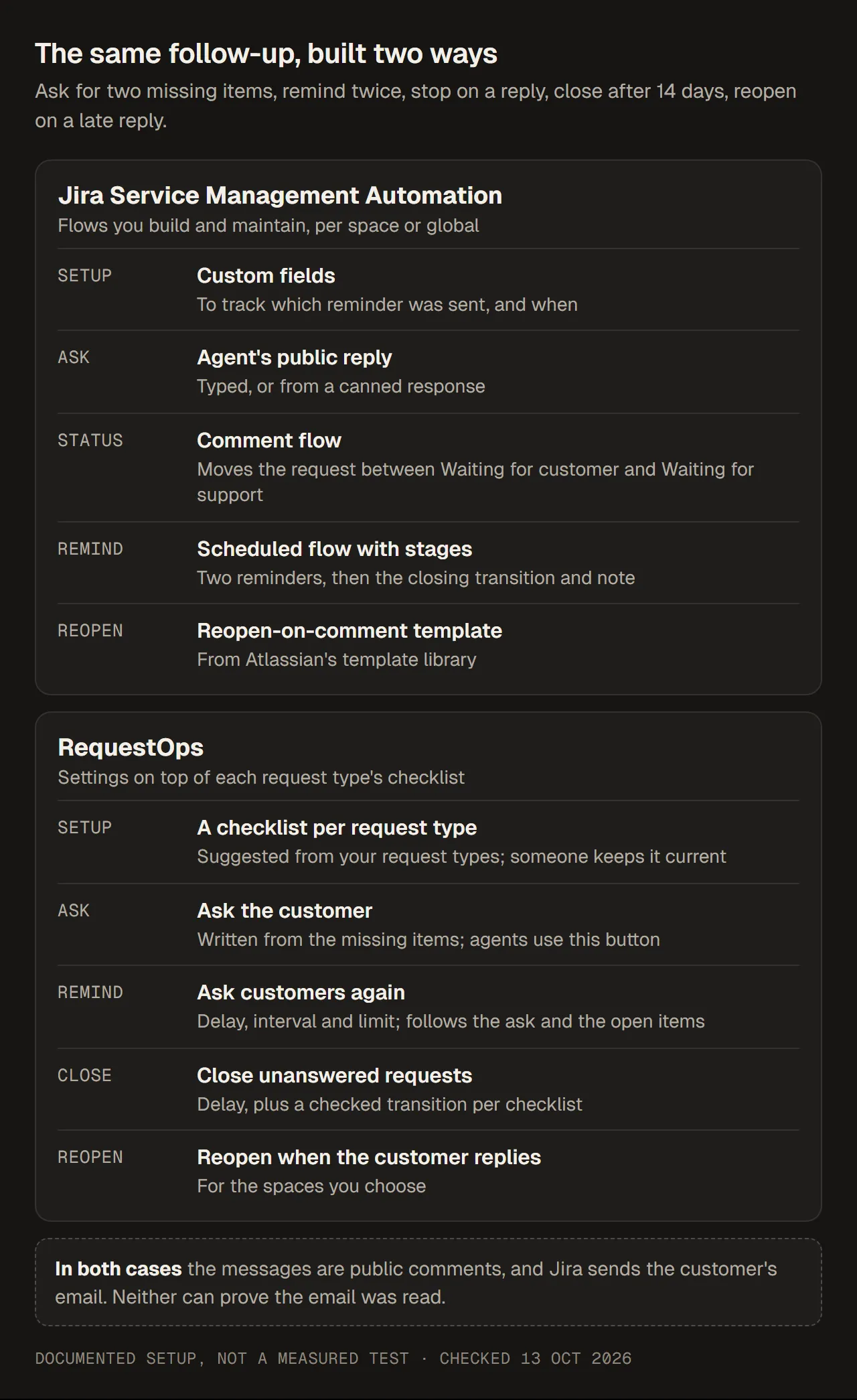
The parts each approach uses for the same scenario. Documented setup, not a measured test.
With Jira Service Management Automation
Automation’s building blocks are now called flows (until recently, rules). A short version of the build; the step-by-step setup is in Customer follow-ups in Jira Service Management:
- The ask: the agent’s public reply, typed or from a canned response. The agent types the missing items.
- The status: a comment flow moves the request to Waiting for customer when an agent replies publicly, and back when the customer replies.
- Reminders and closing: one scheduled flow with stages and custom fields that track which reminder was sent and when, as Atlassian’s follow-up article describes.
- Reopening: the template “Re-open issue if customer comments on a closed issue”.
How it meets the success conditions:
- Stopping on a reply: yes, through the status change. Atlassian documents one exception: the comment flow can fail for someone with two roles on the request, such as an agent who raised their own request (knowledge base). An ordinary customer’s reply moves the status as expected.
- Not asking again for what was sent: only if you track each item in fields. The reminder text comes from the flow; it can include field values through smart values, but it can’t know which items are still missing unless you record them.
- Not closing while someone else holds it: yes, if those requests are in other statuses, or if you add conditions, for example for pending approvals (
approval = pending()) or open linked work. A request that waits on another team’s linked task but sits in Waiting for customer would be closed unless you add that check. - Agents keep their habits: yes. Nothing changes in how they reply.
- Space admins can change it: yes, for flows in their own space (permissions).
Running it costs nothing beyond your Automation usage, which is counted in steps, including scheduled flows that find nothing (usage). A scheduled flow that fails 10 runs in a row is switched off (triggers).
With RequestOps
What you set up:
- A checklist for the request type, the list of what that type of request needs, with “Line manager named” and “Signed equipment form attached” as items the customer provides. RequestOps suggests checklists from your request types when you start.
- The ask. The agent selects Ask the customer. The message is written from the missing items, can be edited, is previewed exactly as the customer will see it, and waits about 10 seconds with Undo before it is posted as a public reply.
- Reminders. A Jira admin turns on Ask customers again: the spaces, the first delay (3 days), the interval (3 days) and the limit (2 times).
- Closing. Close unanswered requests, with a 14-day delay, and for each checklist the transition that closes a request.
- Reopening. Reopen when the customer replies, for the spaces you choose, with how long after closing it applies.
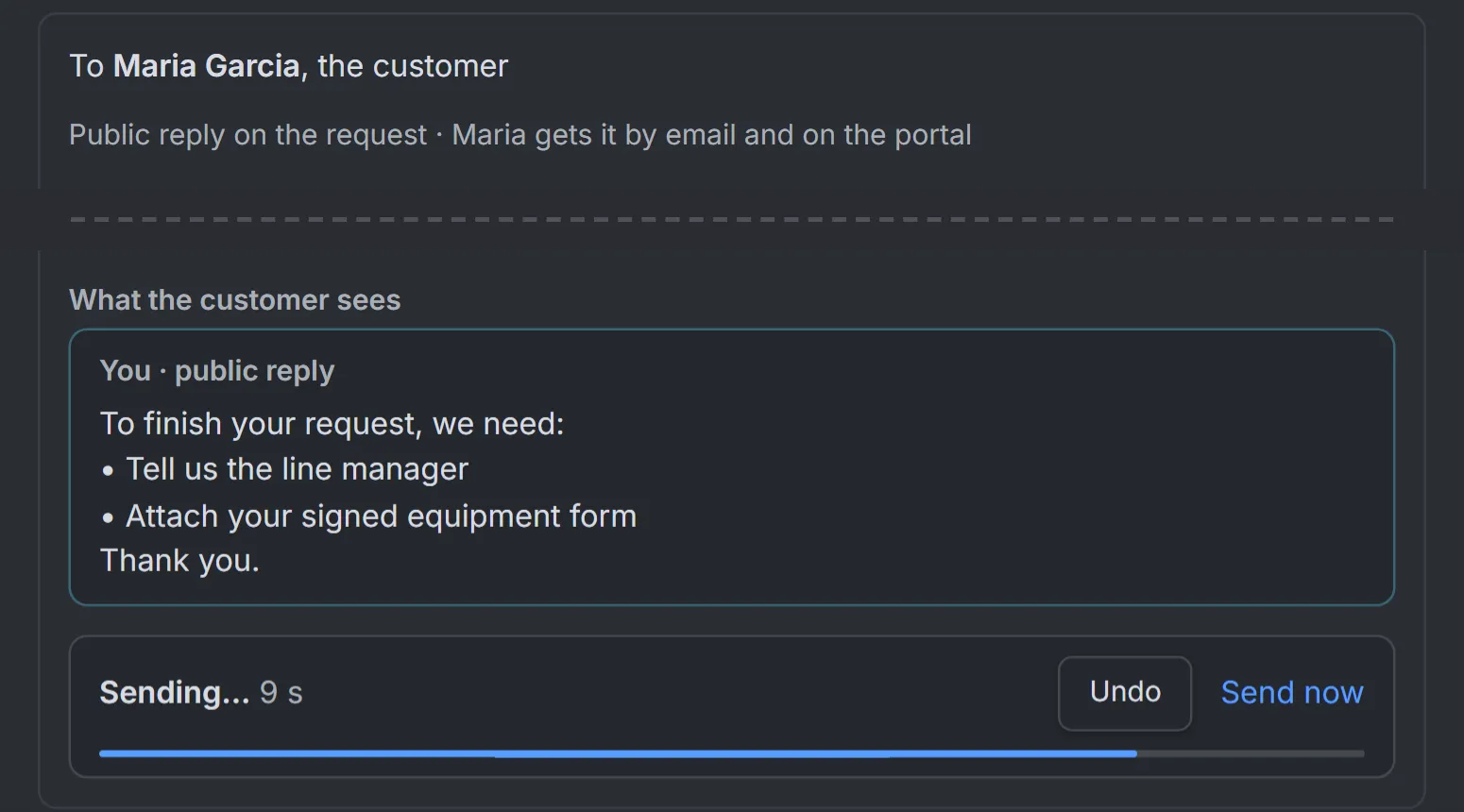
The ask is written from the checklist items that are still missing; reminders repeat only those. Sample data.
How it meets the success conditions:
- Stopping on a reply: yes. Reminders follow a posted ask and stop on any public reply from the customer. If someone other than the customer replies publicly, for example another agent, reminders stop too, to be safe.
- Not asking again for what was sent: yes. Each reminder lists only the items from the ask that are still open; when they are all done, reminders stop.
- Not closing while someone else holds it: yes. A request is closed only when no approval is pending, no vendor wait is active, and no open item waits on anyone but the customer. The closing transition is checked on each request before it is used.
- Agents keep their habits: no. Reminders only start after an agent uses Ask the customer; a normal reply in Jira doesn’t start them.
- Space admins can change it: no. Only Jira admins change these settings; agents see which ones are on.
Running it: a Marketplace app, free for up to 10 users, then priced by your Jira user count; see RequestOps. Messages go out on working days, at most once a day per request, under the app’s name. Each request type you follow up needs a checklist that someone keeps current. The reminder settings list service spaces only, and a closing transition that needs fields the app can’t fill (other than a resolution) can’t be chosen; the screen says why.
Side by side
| For this scenario | Native Automation | RequestOps |
|---|---|---|
| What you build | A comment flow, a scheduled flow with stages, custom fields, the reopen template | A checklist per request type, and three settings |
| How agents ask | Unchanged: a normal public reply | Must use Ask the customer |
| Message text | Any text, with field values (smart values) | Written from the missing items, editable per send |
| What stops reminders | A status change from the comment flow | The customer’s public reply, or the items being done |
| Closing safeguards | The conditions you add, for example no pending approval or open linked work | Built in: no pending approval, vendor wait or other party; transition checked per request |
| Who can change it | Space admins, for their space | Jira admins |
| Across many spaces | Flows per space, or global flows with Administer Jira | The same settings, with spaces ticked |
| Extra cost | None beyond Automation usage | App subscription above 10 users |
| Email delivery | Jira’s notifications; no proof the email was read | Jira’s notifications; no proof the email was read |
Which one to choose
Choose native Automation when:
- You have one or two service spaces, and “Waiting for customer” really means the customer has the next step.
- Space admins should own the process, and someone is comfortable building and testing flows.
- You only need auto-close, not a reminder sequence. The auto-close template covers that on its own.
- App budget is the deciding factor.
Choose RequestOps when:
- Requests often have several things missing, and you want each message to say exactly which ones.
- You run many spaces and want one set of follow-up settings instead of flows per space.
- Closing the wrong request is a real risk, because approvals, vendors or other teams are involved.
- Your agents are willing to use Ask the customer for requests that need an answer.