Seatwise – Inactive Users, Licenses & Leavers for Jira

Find the Jira seats nobody uses.

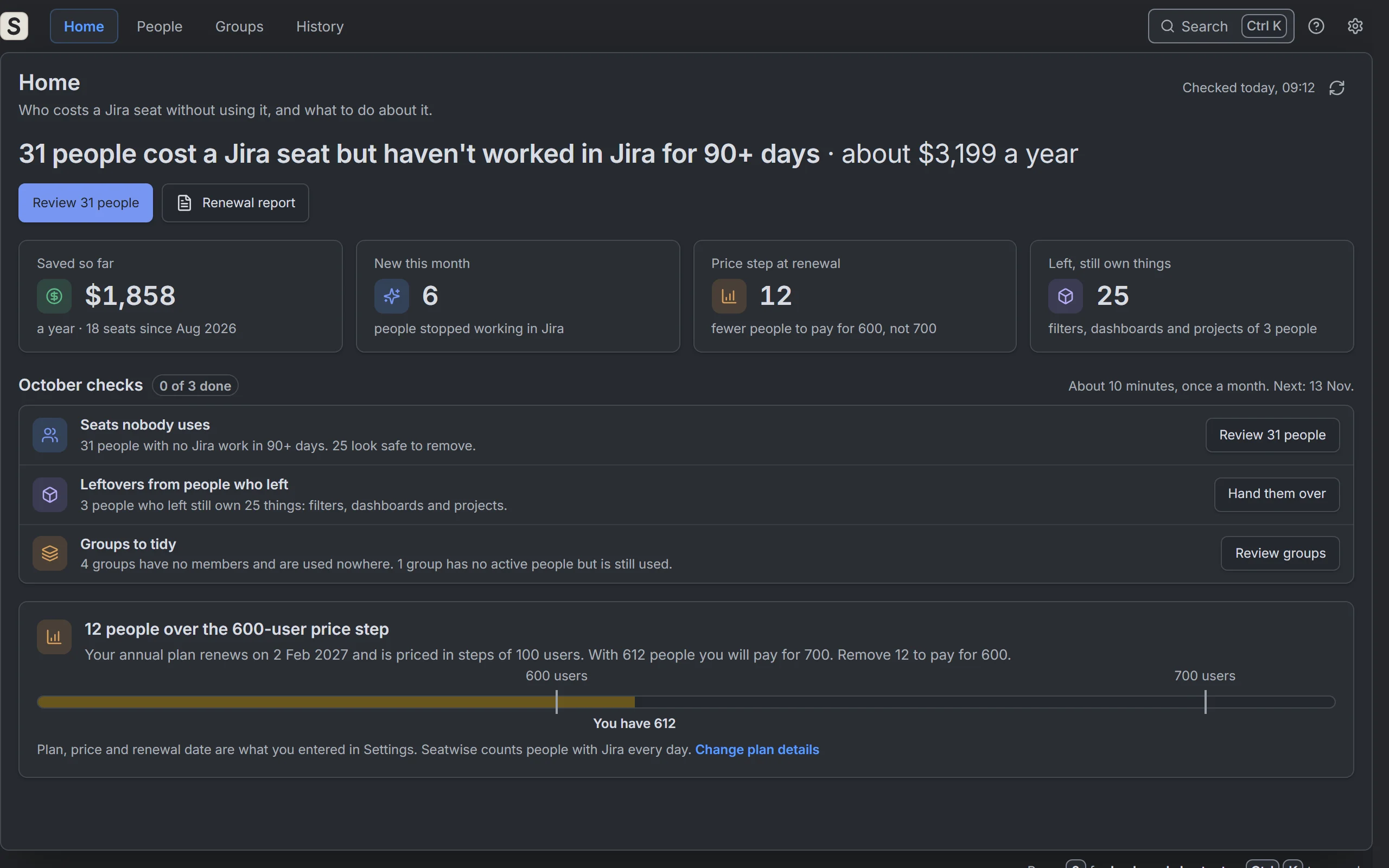
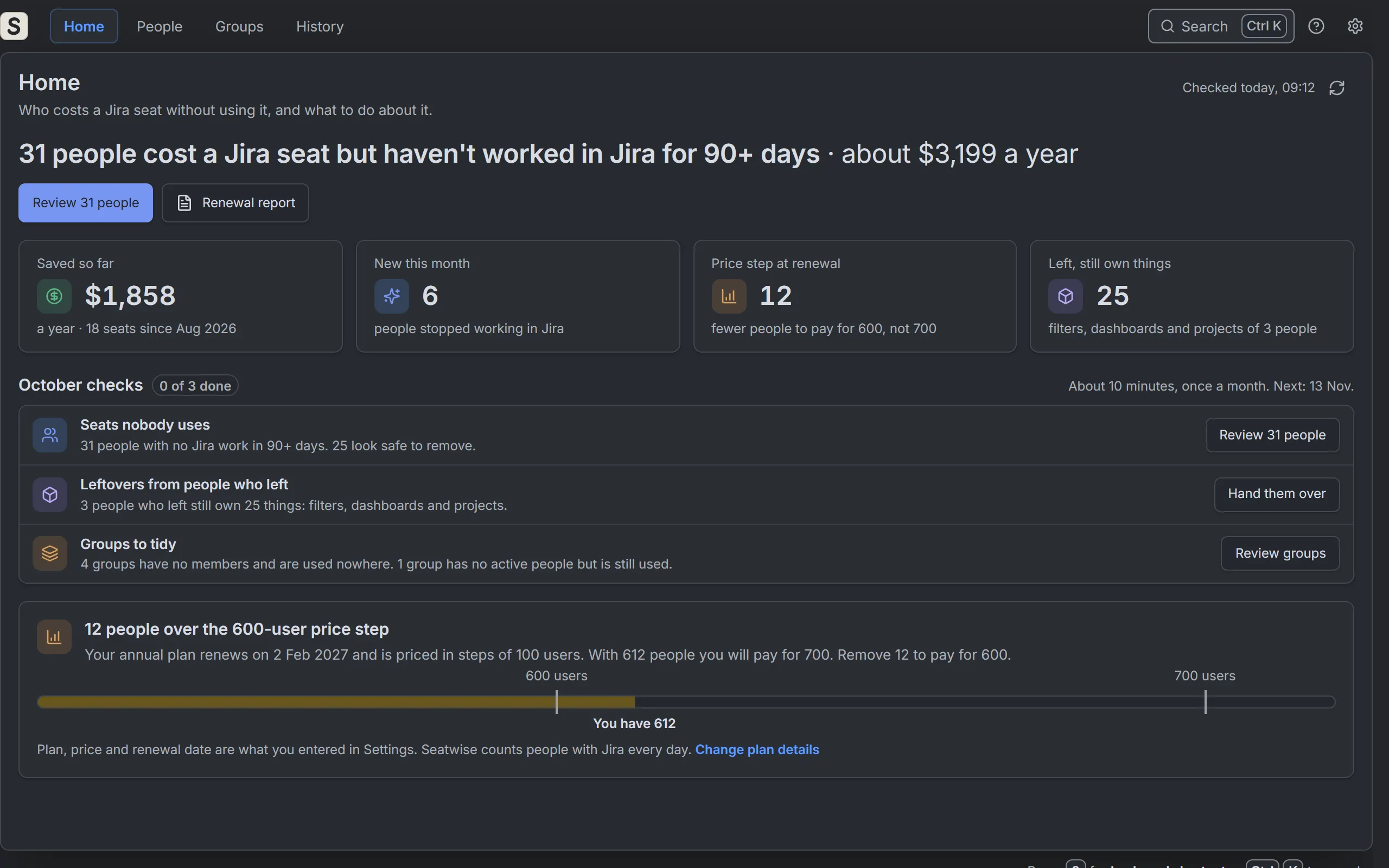
See why each person costs a seat and what they still own. Remove seats safely, with Undo for 30 days, and hand over what leavers left behind. No API key needed.

Free up to 10 users30-day free trialOne plan, everything includedNo API keyNo calls outside AtlassianIn English, German and Japanese

Seats nobody uses

See who costs a seat without using it

Open Seatwise and check your site. It tells you how many people have a Jira seat but haven't worked in Jira for 90 days, what they cost, and which groups give each one a seat.

  • Why each person costs a seat: the groups that give them Jira or Jira Service Management
  • Last Jira work: created, edited, moved, commented or logged time. Viewing Jira does not count, and Seatwise says so
  • What they still own: filters, dashboards, spaces they lead and space roles

Safe cleanup

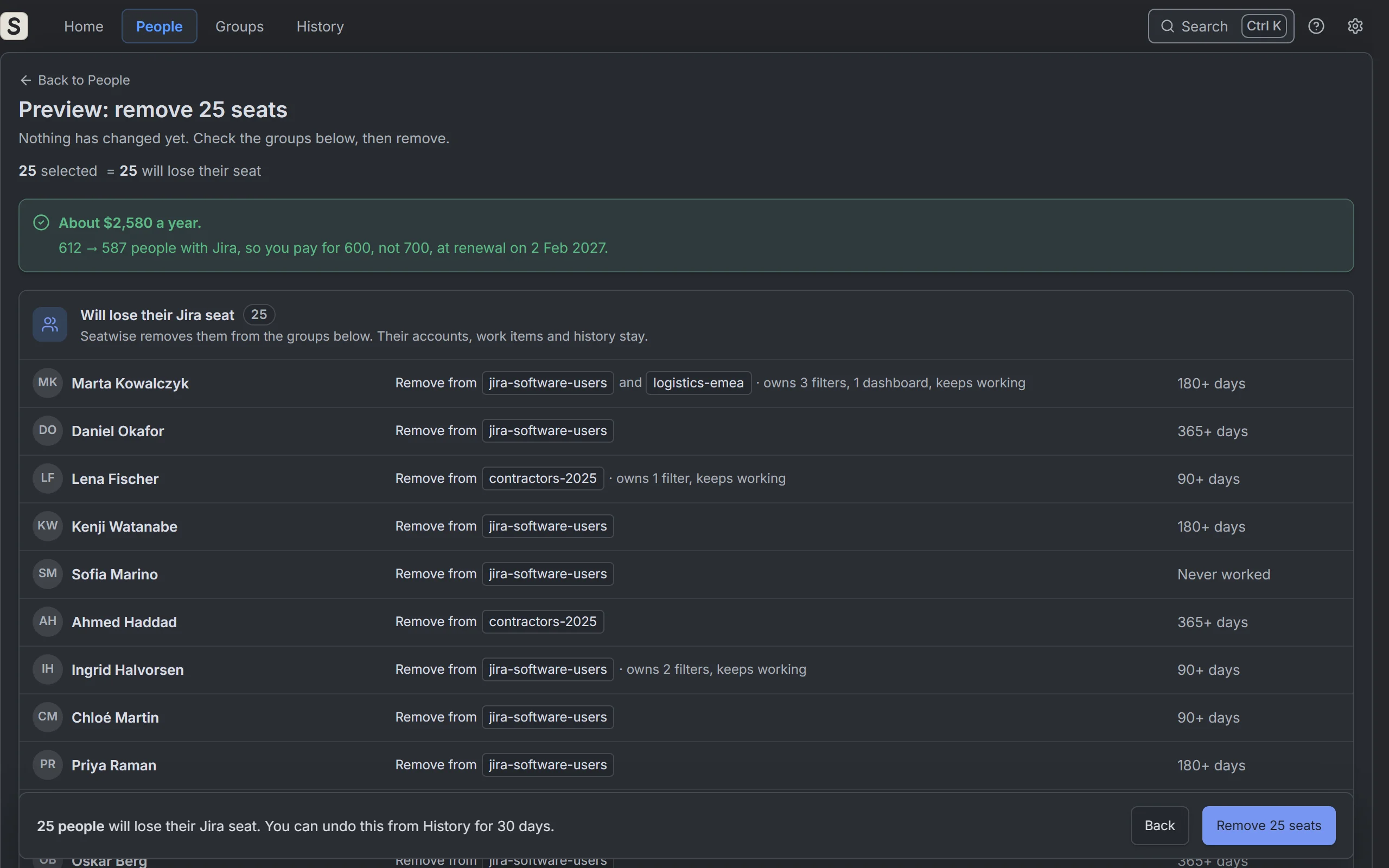
Remove seats safely, with Undo for 30 days

Preview who goes and who stays, and why. Seatwise removes people from the groups that give them Jira, shows what worked and what didn't, and lets you undo each removal for 30 days.

  • Only people who are ready to remove start ticked; the numbers always add up
  • A keep list and protected groups that Seatwise never touches
  • Try again for anything that failed, and a Recheck the next day

Leavers

Hand over what leavers still own

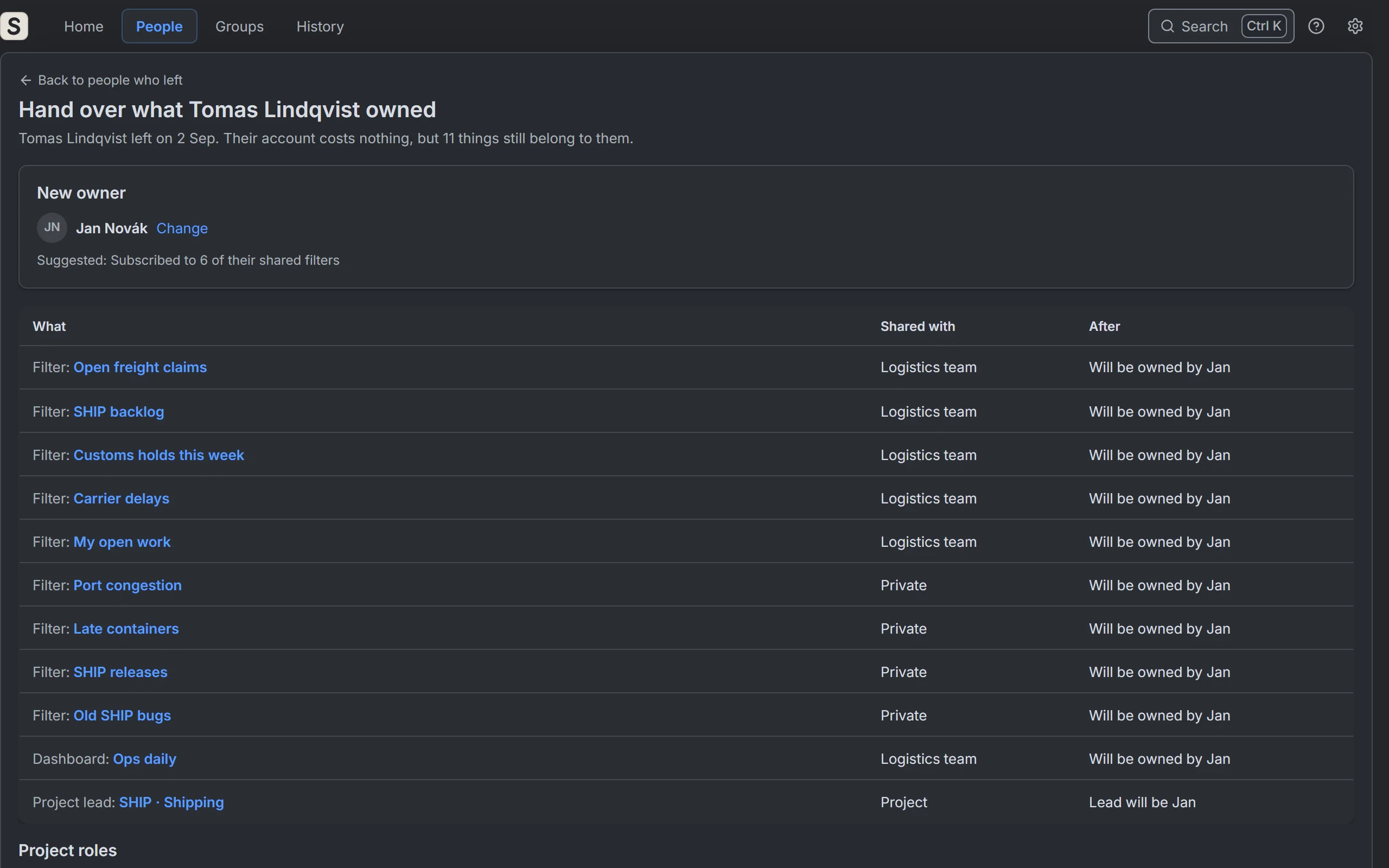
People who left can still own filters, dashboards, spaces and open work items that others rely on. Pick a new owner and hand it all over in one click. Seatwise lists what you change by hand.

  • Filters, dashboards, open work items, space, component and plan leads, and user-field defaults go to the new owner
  • Open work items move without an email for each one, and space roles are removed if you choose
  • Seatwise suggests a new owner when it can, or you search for anyone active in Jira

Groups

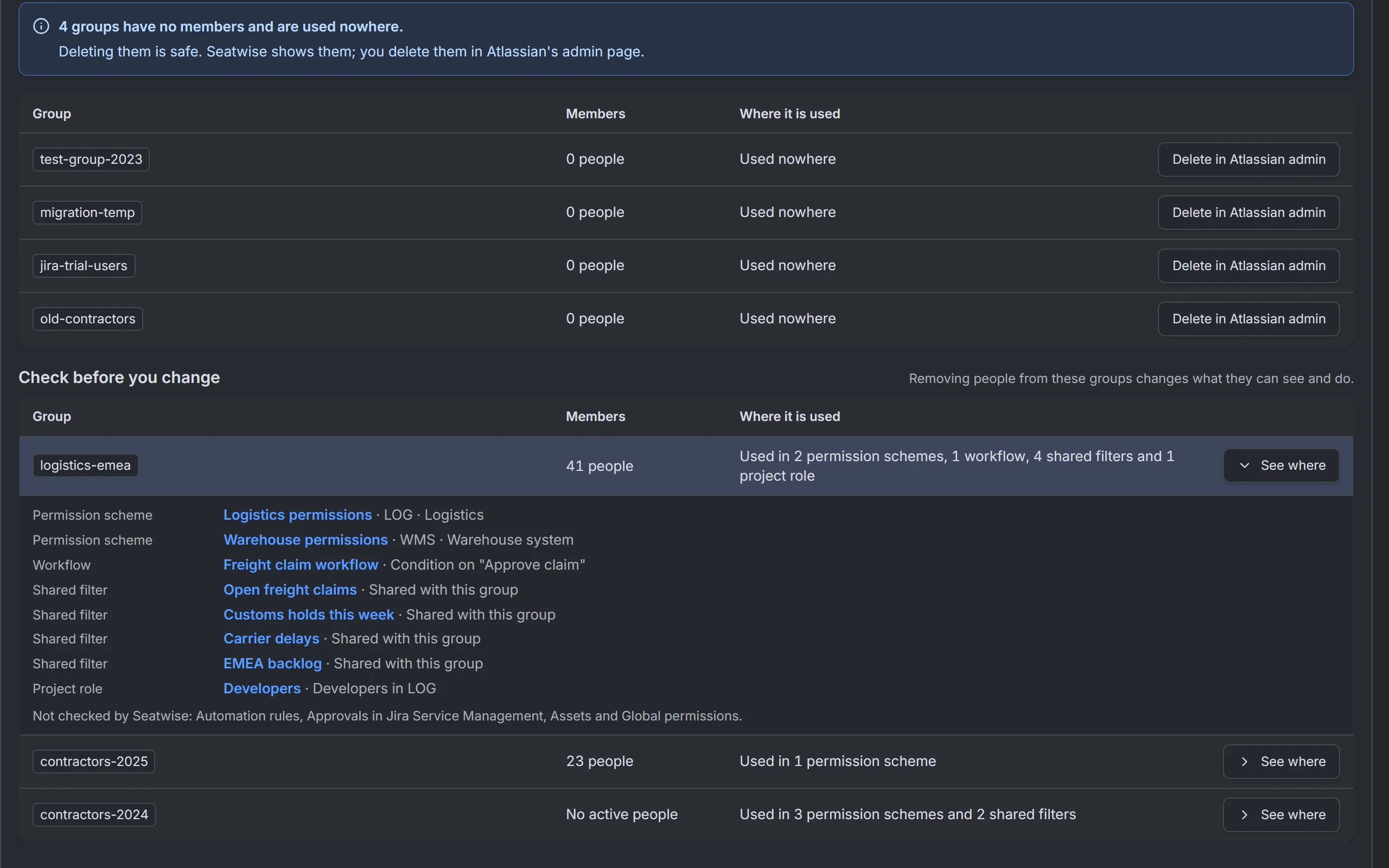
Know where a group is used before you change it

Seatwise lists empty groups that are used nowhere, and shows where every other group is used: permission schemes, space roles, filters, dashboards, work item security, workflows, notification schemes and service desk queues.

  • Atlassian's own groups are never suggested
  • Each place comes with a link
  • Places it cannot check are named: Automation rules, approvals in Jira Service Management, Assets and global permissions

Leavers

What happens to a leaver’s things

Each time you open a person who left, Seatwise checks what still belongs to them. What it can move goes on one hand-over list. What only you can change is listed with what to do in Jira.

Handed over in one click

Pick a new owner, check the list, then hand over.

  • Filters and dashboards get the new owner
  • Space leads, component leads and plan leads change to the new owner (plans need Jira Premium or Enterprise)
  • User fields that default to the person who left get the new owner as their default
  • Open work items are assigned to the new owner in bulk, with Jira’s emails turned off. Untick the box to leave them as they are
  • Their space roles are removed, unless you untick the box

Listed for you, with what to do

Jira does not let apps change these safely, so Seatwise lists them and says what to change in Jira.

  • Permission schemes, notification schemes and work item security levels that name them directly
  • Requests in Jira Service Management that wait for their approval
  • Other people’s filters whose search names them. Only the filter’s owner can change the search
  • Filter subscriptions, which only the subscriber or the filter’s settings can change

Before you delete the account

Seatwise never deletes accounts. You do that in Atlassian Administration, when you are ready.

  • “Ready to delete” shows when nothing that others rely on is left with them. Anything Seatwise could not check is named
  • Download the leaver record first: a spreadsheet file (CSV) of everything they owned and what happened to it. After a delete, Jira shows them as “Former user”
  • Guidance for what Seatwise cannot move: transfer their automation rules first, then find and revoke their API tokens

Why a seat stays

A seat only goes when every path to Jira goes.

People often get Jira from more than one group. Remove one membership and the seat, and the bill, stay the same. Seatwise shows every path, so a cleanup actually frees the seat.

Marta gets Jira from two groups. One person, one seat, two paths to it.

Remove her from one group: the seat stays. The other group still gives her Jira, so nothing is saved yet.

Remove her from both: the seat is free. Seatwise shows every path, so you know which memberships have to go.

How cleanup stays safe

Accounts are never deleted or deactivated. Every step can be checked, and undone for 30 days.

  1. 1

    Preview first

    Every cleanup starts with a preview, sorted by outcome: who loses their seat, who is kept on purpose, who needs you first and who is new.

  2. 2

    You click Remove

    Seatwise acts as the admin who clicked. It never removes anyone on a schedule or by itself.

  3. 3

    An honest result

    Who was removed, who wasn't and why, with Try again for anyone that failed.

  4. 4

    Undo for 30 days

    Undo one person or a whole cleanup. Seatwise adds them back to the same groups.

  5. 5

    Recheck

    Seatwise rechecks the next day, or when you click Recheck now, and tells you if someone got Jira back.

  6. 6

    History and a renewal report

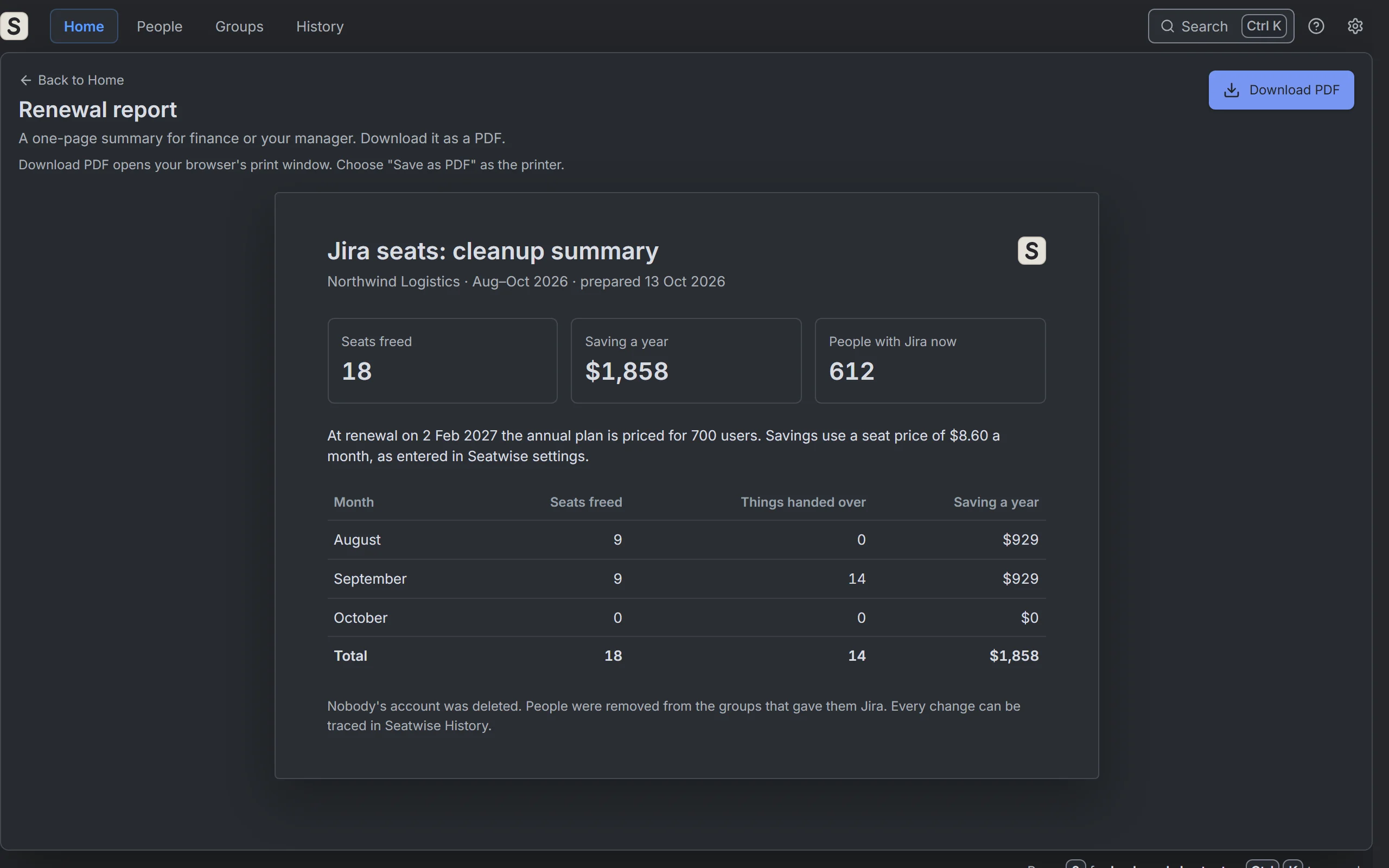
    Every change, who made it and the result. A one-page summary of seats freed for finance, saved as a PDF.

Try it here

The real Seatwise with a sample site. Click around: nothing you do here is saved or changed.

Open full screen
Open the app

Tap to open the real Seatwise with a sample site. Use your browser's Back button to come back.

Seatwise renewal report: seats freed, saving a year and people with Jira now, month by month. Sample data.
Renewal report. A one-page summary of seats freed and money saved, for finance or your manager.
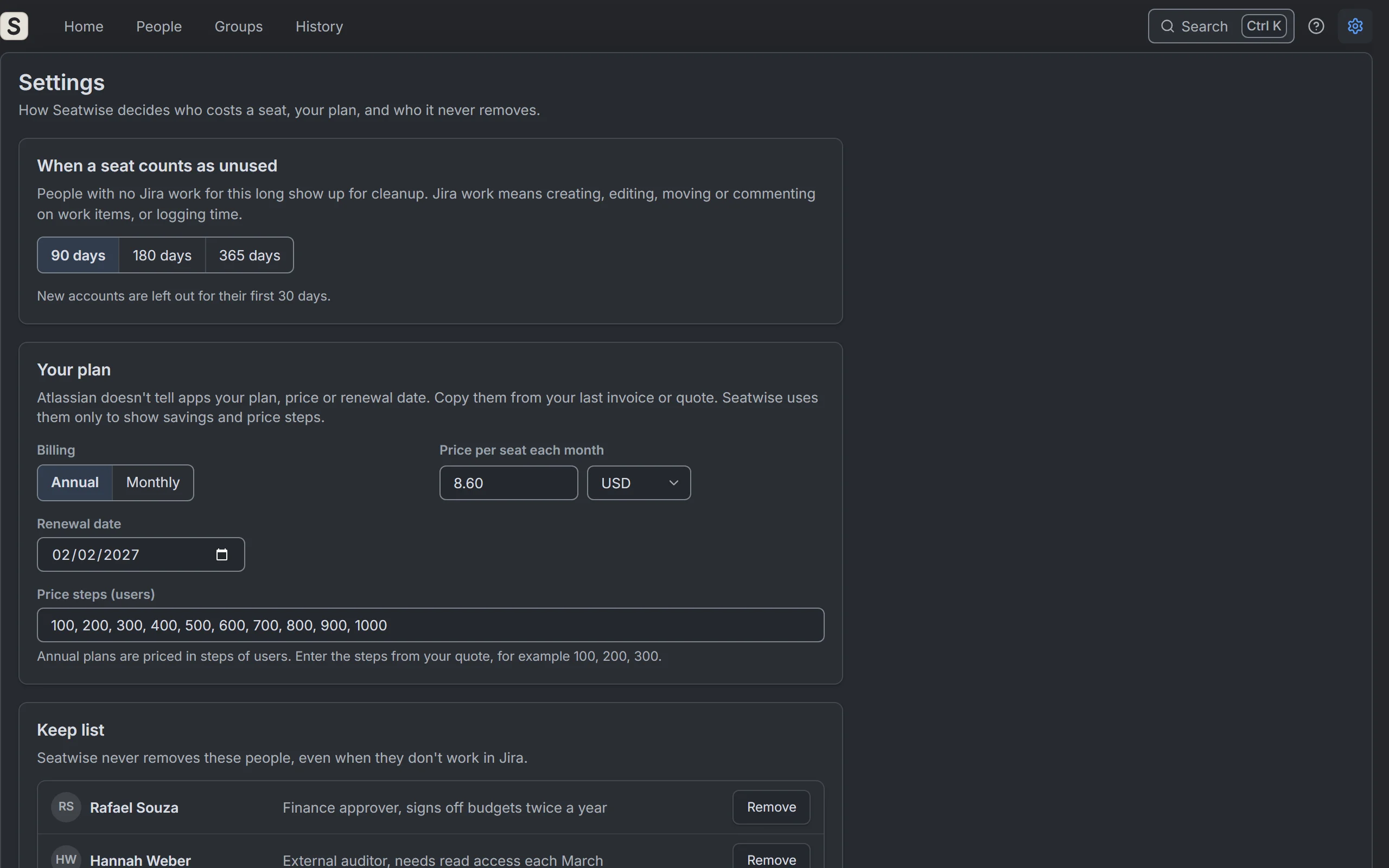
Seatwise Settings: when a seat counts as unused, your plan and the keep list. Sample data.
Your rules. When a seat counts as unused, your plan and price steps, and a keep list with reasons.

Pricing

Free for sites with up to 10 users. From 11 users, one plan with everything included, priced per user and billed through Atlassian Marketplace. 30-day free trial.

Who counts as a user? Users means the user count Atlassian bills your Jira for: everyone with access to Jira on your site, whether they use it or not. With more than one Jira app on the site, such as Jira Service Management, the largest count is used (for Jira Service Management, that is your agents). Portal customers don't count.

$40per month
$400 per year if billed annually

About $0.40 per user per month

100 × $0.40

Start the 30-day free trial
Price per user per month, for sites with 11 or more users
UsersPer user per month
Sites with up to 10 users in totalFree
Users 1 to 100$0.40
Users 101 to 250$0.25
Users 251 to 1,000$0.20
Users 1,001 to 2,500$0.12
Every user above 2,500$0.08

From 11 users you pay for every user, starting with the first. Each band of users is charged at its own rate. For example, 250 users cost 100 × $0.40 + 150 × $0.25 = $77.50 a month. The annual price is 10 times the monthly price, so $775 a year. Prices in US dollars, before tax. Atlassian Marketplace shows the exact price for your site.

Built on Atlassian. Nothing leaves it.

Seatwise runs on Atlassian Forge and asks for no API key. It makes no calls to servers outside Atlassian, and the user export is read in your browser, never uploaded as a file. Only Jira admins can open it.

What it can't do

  • It does not deactivate or delete Atlassian accounts, and it does not manage Confluence seats. Work items, comments and history stay exactly as they were.
  • For people who left, it does not change permission schemes, notification schemes, work item security levels, pending approvals or other people’s filters. It lists them with what to do in Jira.
  • It does not remove people on a schedule. Jira only lets a site admin change group membership, so a person always clicks Remove.
  • It cannot change groups that your identity provider manages (for example Okta or Microsoft Entra ID). Seatwise marks those groups and tells you to change them there.
  • "Last Jira work" is not a login date. Someone who only reads Jira looks inactive until you add Atlassian's user export, which Seatwise reads in your browser.
  • Money figures use the seat price you enter once in Settings; Atlassian does not tell apps your price. Savings are estimates, not a promise.

The 8 permissions, and why

Read Jira users
See who is in Jira, which groups they are in and who has left, and find a new owner by name.
Read Jira work
Find each person's last Jira work, and read the spaces, filters, dashboards, permission schemes, space roles, components and plans they are part of. Also check that you are a Jira admin.
Write Jira work
Give the filters, dashboards, plans and open work items of someone who left to a new owner, when you click Hand over.
Manage Jira projects
Make the new owner the space lead or component lead, and take the person who left out of space roles, when you click Hand over.
Manage Jira configuration
This one is broad. Seatwise needs it to change who is in a group: to remove people when you click Remove, and add them back when you click Undo. When you hand over, it also makes the new owner the default user of a field that named the person who left. Seatwise changes nothing else with it.
Read Service Management requests
List your service desks, so their queues can be checked for groups.
Store app data
Check results, your settings, the history of changes and what Undo needs, inside Atlassian.
Report personal data
Tell Atlassian about once a week which accounts Seatwise stores, so their data is erased when someone closes their Atlassian account and updated when their name changes.

Questions

Does it delete or deactivate accounts?

No. Seatwise only removes people from the Jira groups that give them a seat, and only when an admin clicks Remove. Accounts, work items, comments and history stay. You can undo for 30 days.

Do I need an API key?

No. There is nothing to set up. The first check reads Jira’s own work history. Nothing leaves Atlassian.

Why is there no exact last-login date?

Jira does not give apps a last-login date. Seatwise shows each person’s last Jira work instead. For the exact "last seen" date, add Atlassian’s user export from admin.atlassian.com; Seatwise reads it in your browser and keeps only each person’s account ID and last-seen date.

Does it work with Okta, Microsoft Entra ID or other SCIM groups?

Seatwise reads them and shows who gets a seat from them. It cannot change them: Jira does not let apps change groups that your identity provider manages. Seatwise marks them and the rest of the cleanup still runs.

Can it remove inactive users automatically on a schedule?

No. Jira allows group changes only by a site admin, so an admin always clicks Remove. Seatwise checks your site every day and every month, and tells you what is new.

Who can use it?

Jira admins can open Seatwise and see everything. Removing people from groups also needs a site admin, because that is Jira’s rule.

Does it cover Jira Service Management agents and Confluence?

Jira Service Management agents, yes: they are counted as seats. Confluence, no.

How does it know what I pay?

Atlassian does not tell apps your plan or price. Enter your seat price, billing, renewal date and price steps once in Settings. Seatwise then shows savings and how many people to remove to reach the next lower price step at renewal.

What happens to the things a person who left still owns?

Seatwise lists them on the person’s hand-over page: filters, dashboards, open work items, space, component and plan leads, user-field defaults and space roles. Pick a new owner and hand it all over in one click. Scheme entries that name them, pending approvals and other people’s filters are listed with what to do in Jira. When nothing others rely on is left, the person shows as “Ready to delete”. Seatwise never deletes the account itself.

What does it cost?

Free for sites with up to 10 users. From 11 users you pay for every user, at a per-user rate that falls as your site grows: 100 users cost $40 a month, or $400 a year. 30-day free trial, everything included.

Who counts as a user for the price?

Users means the user count Atlassian bills your Jira for: everyone with access to Jira on your site, whether they use it or not. With more than one Jira app on the site, such as Jira Service Management, the largest count is used (for Jira Service Management, that is your agents). Portal customers don't count.

How do I get help?

Email support@unitlane.net, Monday to Friday, 09:00 to 17:00 Central European Time. You get a first reply within 1 business day, whatever the email is about.

Stop paying for seats nobody uses.

Free up to 10 users. 30-day free trial for bigger sites.