


Finance asks a simple question: how many people do we pay Atlassian for? The admin exports the groups and gets one number, the billing page shows two more, and the Atlassian Guard bill shows a fourth. None of them is wrong. They count different things, and only some of them count each person once.
This article is about that counting: how one person is counted across groups, apps, sites and plans. For the other question, what makes a single person billable for Jira in the first place and how to check, read Jira billable users explained.
What “unique” means
A unique billable user is one Atlassian account that counts toward a bill. It is a person, not a row.
The same person can show up many times in your exports: once for every group they belong to, and once more for every app they can use. Deduplication is the step that turns those rows back into people. It answers “how many distinct people are behind these rows?”
That is a separate question from “does this person count at all?” A person can be one unique user and still have three different paths to Jira. And a person can appear in your exports without counting toward any bill, for example when their account is deactivated or none of their groups gives app access.
Where Atlassian counts each person once, and where it doesn’t
Whether a person is counted once depends on the bill you are looking at.
| Bill | How people are counted | A person with both Jira and Confluence |
|---|---|---|
| Standard or Premium subscription for one app, such as Jira or Confluence | The number of users who can access that app. Monthly plans are priced per user; annual plans use user tiers. | Counted in the Jira count and in the Confluence count |
| A collection | Unique users across all apps in the collection. A person with access to at least one app in it counts once. | Counted once, if both apps are in the collection |
| An Enterprise plan | A user tier. Each person with access to at least one app in the plan is paid for once in that plan. Enterprise requires annual billing. | Jira Enterprise and Confluence Enterprise are separate plans, so the person is in both bills |
| Atlassian Guard Standard | Once per organization, however many apps or sites the person can use. Only managed accounts and external users with app access count. | Counted once |
| Marketplace app, single-instance | The number of users of the Atlassian app it is installed on | Follows that app’s count |
| Marketplace app, multi-instance (Enterprise plans only, optional) | Unique users of the Marketplace app across the instances | Counted once across instances |
Two things follow from this table.
First, on Standard and Premium, “unique” only applies inside one app. Someone in three Jira groups counts once for Jira, because pricing is based on users who can access the app, not on group memberships. But the same person also counts for Confluence if they can use Confluence.
Second, Atlassian’s billing documentation describes counts per app subscription and, in the original user management experience, billing “for this user on this site”. It does not describe a cross-site deduplication for Standard and Premium. If you run the same app on two sites, check both subscriptions rather than assuming a person is counted once.
Sources: Atlassian: manage users and user tiers, Atlassian: how billing works for collections, Atlassian: manage your bill for Enterprise plans, Atlassian: manage your bill for Atlassian Guard Standard, Atlassian: how pricing works for multi-instance Marketplace apps, Atlassian: remove a user or suspend their access. Checked 13 October 2026.
How Atlassian Guard Standard counts
Atlassian Guard Standard is where “unique billable user” is used most directly. It is billed per organization, and each person is billed once, regardless of how many Atlassian apps they access.
A person counts for Guard Standard when they are a managed account or an external user, and they have access to at least one supported app. Atlassian lists cases that don’t count, including:
- accounts with no app access
- deactivated accounts
- people covered by a plan that already includes Guard Standard, such as an Enterprise plan
- members of a non-billable authentication policy or a non-billable external user security policy
- people who only use the Jira Service Management help center, or only Jira Product Discovery
Atlassian’s own examples show the effect. If 100 people use Jira on Standard and 50 of them also use Confluence on Standard, the Guard Standard count is 100, not 150. If 30 Jira Service Management agents serve 500 help seekers, the count is 30.
To see the number, go to Atlassian Administration, select your organization, then Billing. In the improved billing experience, find Atlassian Guard Standard and select Manage: the Subscription details page shows the unique billable users. In the original billing experience, select Manage subscription next to Atlassian Guard Standard.
To see who is counted, export managed accounts: Directory › Managed accounts › Export members. The file has a Billable column. That column means “counts toward the Atlassian Guard Standard bill”. It is not a Jira or Confluence count.
Sources: Atlassian: manage your bill for Atlassian Guard Standard, Atlassian: export managed accounts. Checked 13 October 2026.
Worked example: 12 rows, 7 accounts, 5 people
A fictional organization has one site with Jira Standard and Confluence Standard, and Atlassian Guard Standard. All accounts are managed accounts and there is no non-billable policy. Four groups matter:
jira-users-sample: the default group for Jira, grants Jirateam-dev: grants Jiraconfluence-users-sample: the default group for Confluence, grants Confluenceall-staff: used for permissions only, grants no app
The group export has one row per person per group:
| Person (sample data) | Groups (one export row each) | Rows | Jira | Confluence | Counts for Guard Standard |
|---|---|---|---|---|---|
| Ana | jira-users-sample, team-dev, confluence-users-sample | 3 | Yes | Yes | Yes, once |
| Ben | jira-users-sample, confluence-users-sample | 2 | Yes | Yes | Yes, once |
| Chen | team-dev | 1 | Yes | No | Yes |
| Dina | confluence-users-sample | 1 | No | Yes | Yes |
| Eli | all-staff | 1 | No | No | No: no app access |
| Fay | jira-users-sample (account deactivated) | 1 | No | No | No: deactivated |
| Gil | jira-users-sample, team-dev, confluence-users-sample | 3 | Yes | Yes | Yes, once |
| Total | 12 | 4 | 4 | 5 |
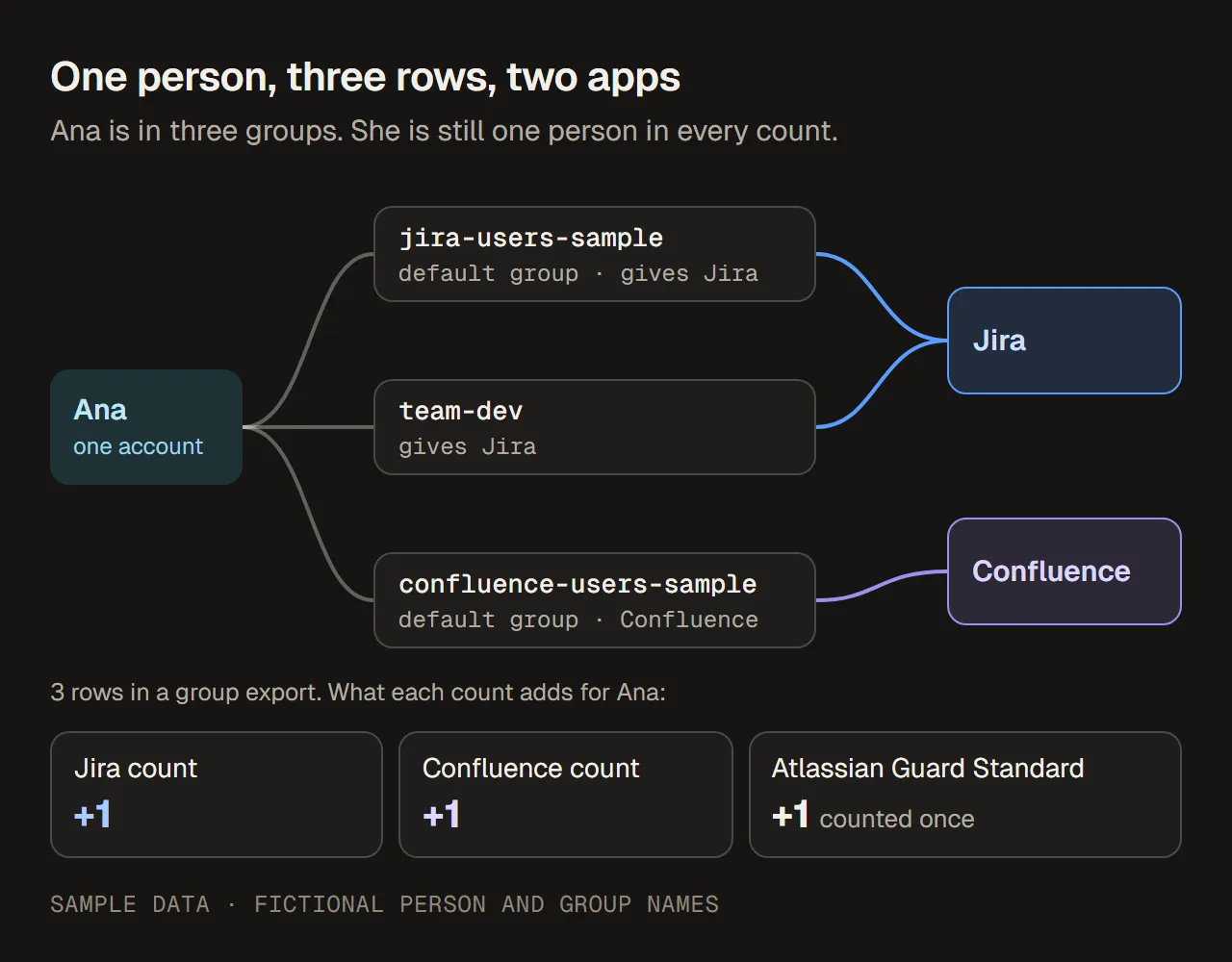
One account, three group rows, two apps. Ana adds one to each app’s count and one to the Guard Standard count. Sample data.
Now reconcile the numbers that different people will quote:
| Figure | Number | What it actually is |
|---|---|---|
| Rows in the group export | 12 | Group memberships. Not a count of anything you pay for. |
| Accounts in the export | 7 | Distinct people, billable or not |
| People with access to at least one app | 5 | Eli has no app access; Fay’s account is deactivated |
| Jira billable users | 4 | Ana, Ben, Chen, Gil |
| Confluence billable users | 4 | Ana, Ben, Dina, Gil |
| Seats across the two app subscriptions | 8 | 4 + 4. On Standard, each app is billed on its own count. |
| Unique billable users | 5 | Ana, Ben, Chen, Dina, Gil. What Guard Standard counts, and what a collection containing both apps would count. |
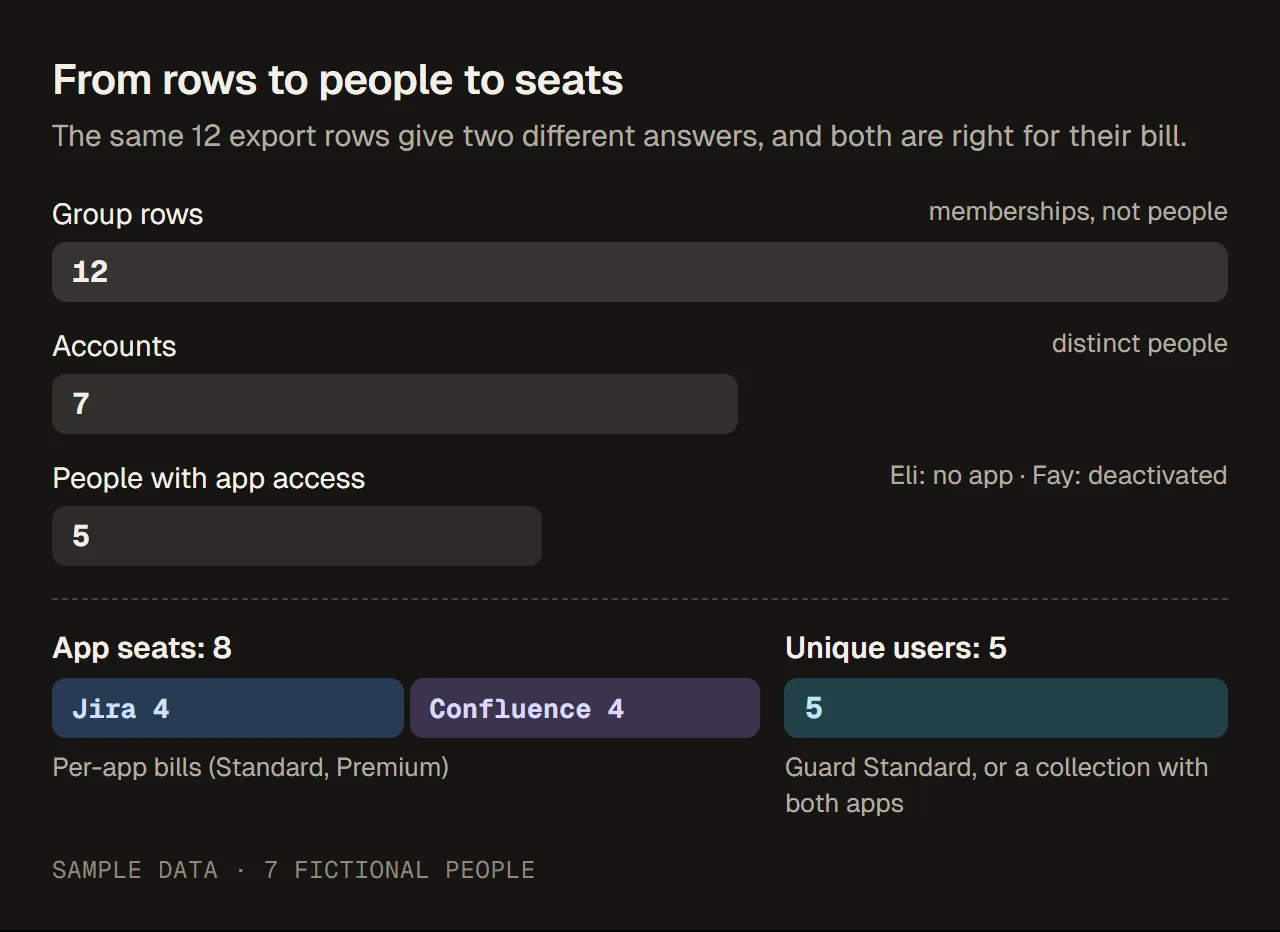
From rows to people to seats. The same 12 rows give 8 seats on per-app bills and 5 unique users on an organization-wide count. Sample data.
So three different answers to “how many people do we pay for?” are all correct for their bill: 4 for Jira, 4 for Confluence, 5 for Guard Standard. The 12 is not an answer to that question at all.
What a removal changes on each bill
Unique counting also changes what a cleanup saves. Using the same sample data, each row below starts again from the starting point:
| Change | Jira | Confluence | Guard Standard (unique) |
|---|---|---|---|
| Starting point | 4 | 4 | 5 |
Remove Ana from team-dev only | 4 (she still has Jira through jira-users-sample) | 4 | 5 |
| Remove Ana’s Confluence access | 4 | 3 | 5 (she still has Jira) |
| Remove all of Ana’s app access | 3 | 3 | 4 |
| Remove Chen’s Jira access | 3 | 4 | 4 (Jira was his only app) |
Removing one group path rarely changes anything, because people often have more than one. Removing one app lowers that app’s count, but the unique count only drops when a person loses their last app. When and how a lower count shows up on an invoice depends on the billing cycle: see Jira billable users explained for monthly and annual timing.
How to reconcile your own numbers
- Decide which bill you are explaining. A Jira subscription, a collection, an Enterprise plan or Guard Standard. Each one counts differently.
- Export your users. In Atlassian Administration, go to Directory › Users and select Export users. Include all users, and add both Group membership and App access. The file has one row per user, with a Role column for each app (None, Guest, User or Admin) and a Last seen column for each app.
- Count people, not rows. Use the user ID as the key. If you start from a group export instead, collapse it to one line per user first.
- Count per app. For each app, count the people whose role gives them access to it. Keep None out, and keep Guest separate: Jira guests are free within Atlassian’s limit.
- Count unique people if the bill is unique. Count each user ID once if they have access to at least one app in scope. For Guard Standard, compare with the Billable column in the managed accounts export.
- Compare with the billing page. In the improved billing experience, Billing › Subscriptions shows the number of billable users for each app. If your count and Atlassian’s differ, look first at deactivated or suspended accounts, guests, and people in groups that grant no app.
For tracing which groups give a person access, see How to check which groups give Jira access.
Sources: Atlassian: export users from a site, Atlassian: manage users and user tiers, Atlassian: manage guest access in Jira. Checked 13 October 2026.
Common mistakes
- Counting group rows as people. Twelve rows in the example were seven accounts and five billable people.
- Adding app counts and calling it a headcount. Four Jira users plus four Confluence users is eight seats, not eight people.
- Assuming “unique” means one access path. Ana is one unique user with two paths to Jira. Removing one path changed nothing.
- Expecting the Guard Standard count to match the Jira count. Guard counts each person once across all apps, leaves out people already covered by an Enterprise plan, and only counts managed accounts and external users.
- Reading the Billable column in the managed accounts export as a Jira count. It means billable for Guard Standard.
- Assuming two sites share one count on Standard or Premium. Check each subscription.
- Promising savings per row. Estimate per bill, after deduplication, and only for people who lose their last path to that app.